AI-Based candidate scoring in greytHR Recruit
Updated in October - 2026 | Subscribe to watch greytHR how-to video
Recruitment systems that rely only on keyword matching often make it difficult to identify the best-fit profiles. Resumes with matching keywords may still not suit the role, leading to similar scores across candidates and increased manual shortlisting effort.
greytHR Recruit’s AI-based candidate profile scoring feature takes the guesswork out of shortlisting by automatically evaluating each candidate against your job requirements and giving them a clear, data-driven match score.
With AI-based scoring, the system now:
Replaces vague High/Medium/Low labels with a precise percentage score
Shows a transparent breakdown of how each score is calculated
Lets you customize scoring weights globally or per job
Surfaces the top 10 best-fit candidates instantly
Lets you filter and sort candidates by profile score
Lets you refresh the top matches after new candidates are added to the candidate pool
Evaluates candidates fairly even when resume data is incomplete
Watch the video to learn more about AI based profile scoring.
Enable AI based profile scoring
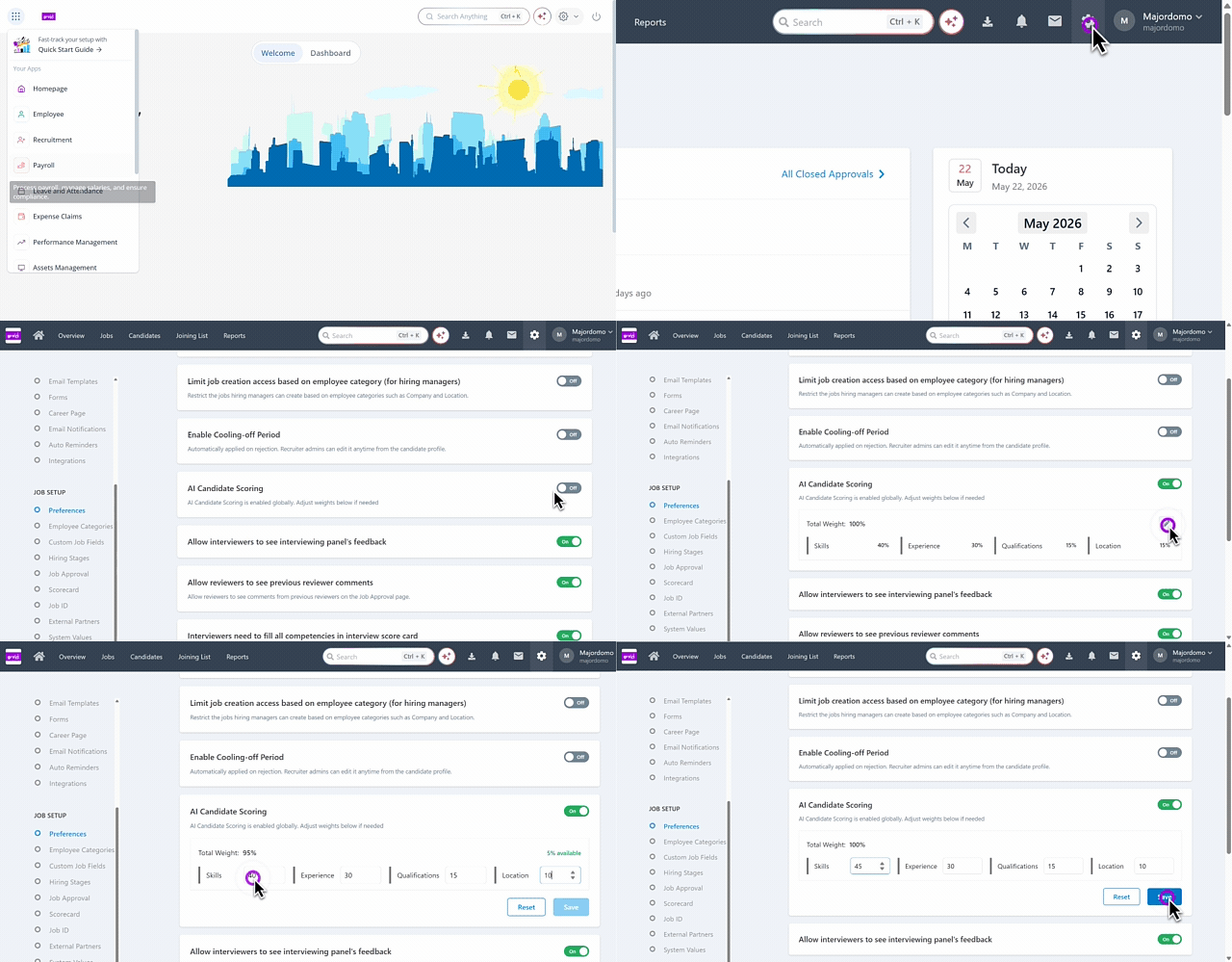
To enable AI-based candidate scoring in greytHR Recruit, from the greytHR Admin portal, hover over the 9 dots and select Recruitment > Settings > JOB SETUP.
Under the JOB SETUP section, select Preferences.
Enable the AI Candidate Scoring toggle option.
Define the total Weightage such as Skills, Experience, Qualifications and Location. The total weightage must equal 100% and cannot be less than or exceed this limit.
You can also adjust the percentage for each option as needed and click the Reset option.
Click Save to apply the scoring configuration across all jobs.
Edit AI based profile scoring weightage for a job
Once the admin has defined the weightage of all the criteria, it applied automatically to all the jobs. However, recruiters can modify the weightage while creating a job if needed.
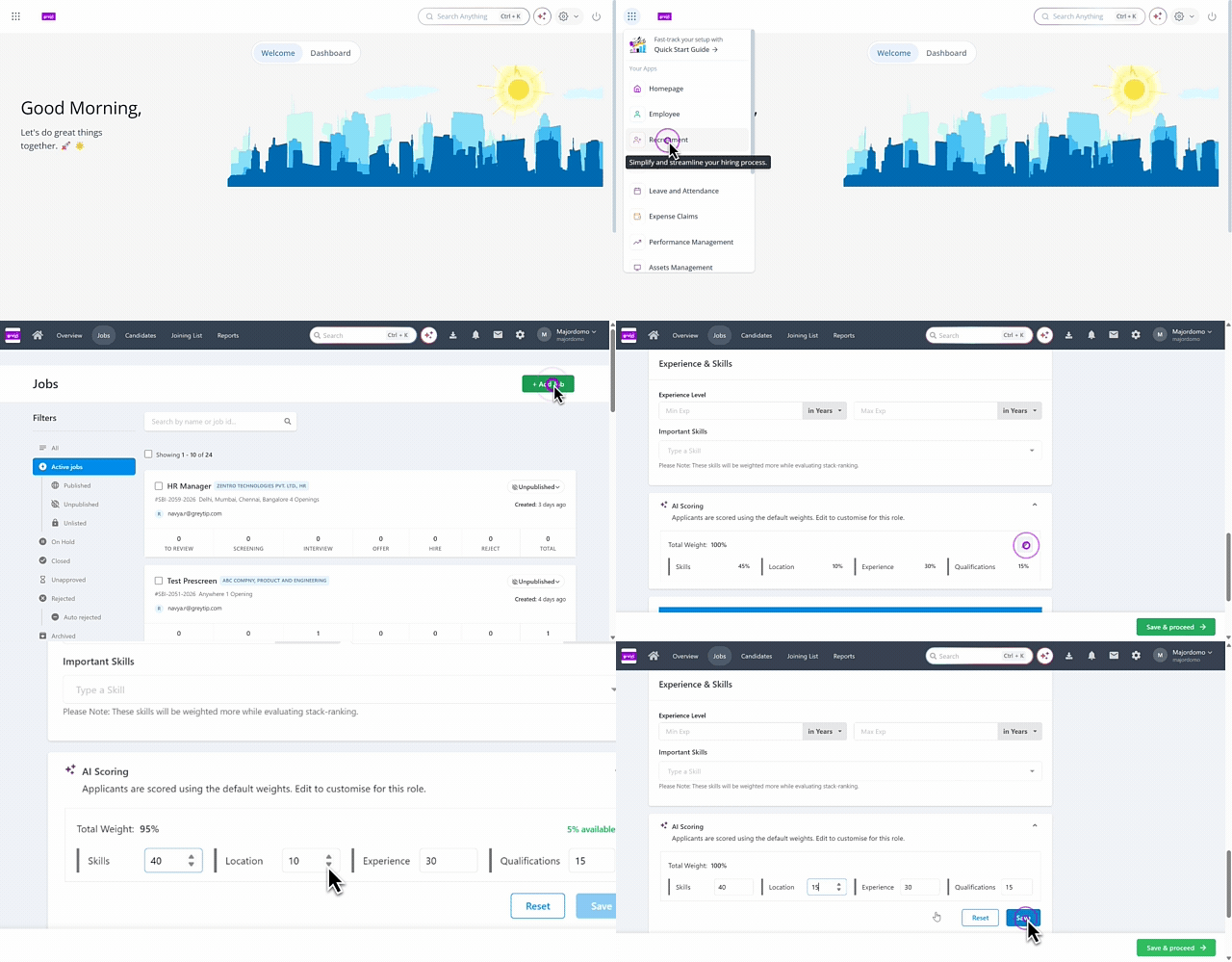
To edit the AI based profile scoring weightage, from the greytHR Admin portal, hover over the 9 dots and select Recruitment > Jobs > + Add Job.
Under the Basic Information tab, fill out all the required information and scroll down to the AI scoring card.
Expand the option and edit the weightage for the required criteria and click Save.
View candidates’ with AI based profile scoring
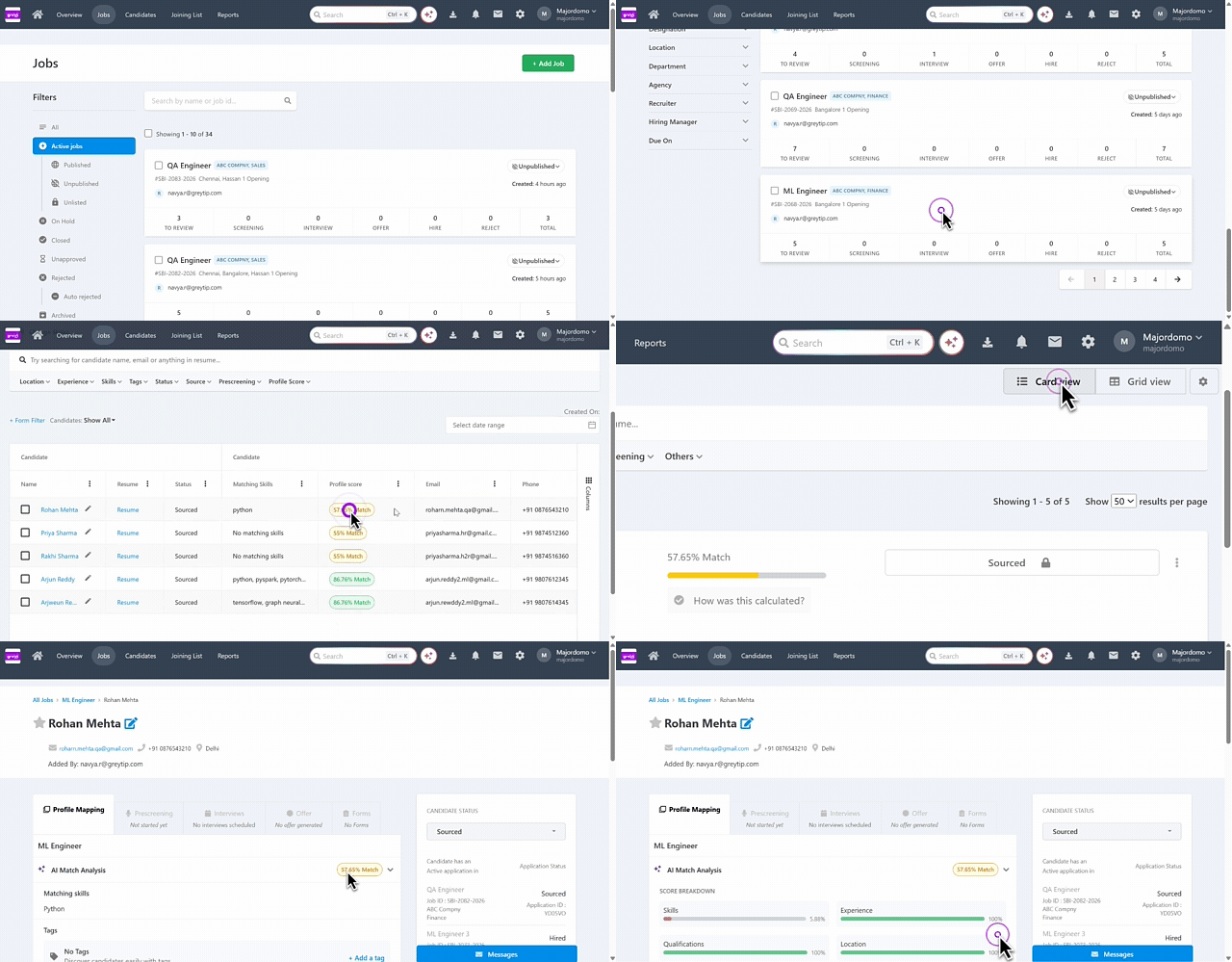
To view the candidates profiles with the AI based profile scoring for a job, from the greytHR Admin portal, hover over the 9 dots and select Recruitment > Jobs.
Select on the job card to view the candidates’ list.
Under the Candidates tab, you can view the AI based profile scoring in the Profile Score column.
To filter candidates by score, select one or more ranges under Profile Score Range in the filters section: Less than 35, 35 - 70, or Above 70.
To sort the list, click the Profile Score column header. The first click sorts from high to low, the second from low to high, and the third removes the sort.
Note: The Profile Score Range filter works along with the other filters and with sorting. Sorting does not clear the applied filters, and the sort resets when you refresh the page.
Hover over the score to view the detailed scoring breakdown based on each criterion, along with the AI-generated summary. This is applicable for both Grid and Card view.
Click Find Top AI Matches option, a side panel opens and you will be able to view the top 10 candidates’ profiles with a detailed analysis.
You can sort the candidates’ profiles based on the required criteria.
Expand the Score breakdown option to view the scoring in detail.
You can also view the AI summary and the resume by clicking on the respective icons.
Click the Refresh icon in the panel header to update the list with candidates added to the candidate pool since the list was last updated, without waiting for the automatic update. The list is sorted from the highest to the lowest score. Refresh re-scores all candidates in the pool against the job’s skills, experience, qualification, and job constraints.
If you want to add the candidate to a job, click Add to job.
Note: Within the candidate’s profile details, you can also view the AI-based profile score, including the breakdown for each criterion and the AI-generated summary.
Related article:
AI-Powered Recruitment with NAVOS