Workforce Management Menu in greytHR: Features, Navigation & FAQs
Updated in July - 2026 | Subscribe to watch greytHR how-to video
greytHR's Leave & Attendance module has a new name — Workforce Management. This update marks a significant step in greytHR's evolution, setting the foundation for a more comprehensive workforce experience.
All existing data, configurations, and workflows remain intact — only the name and navigation structure have been updated.
This change also introduces a restructured navigation with clearly grouped menus, making it easier for you to find the tools and settings you need — without having to hunt through unrelated sections.
What's new in the Workforce Management menu
The Workforce Management menu replaces the earlier Leave and Attendance label in the primary header.
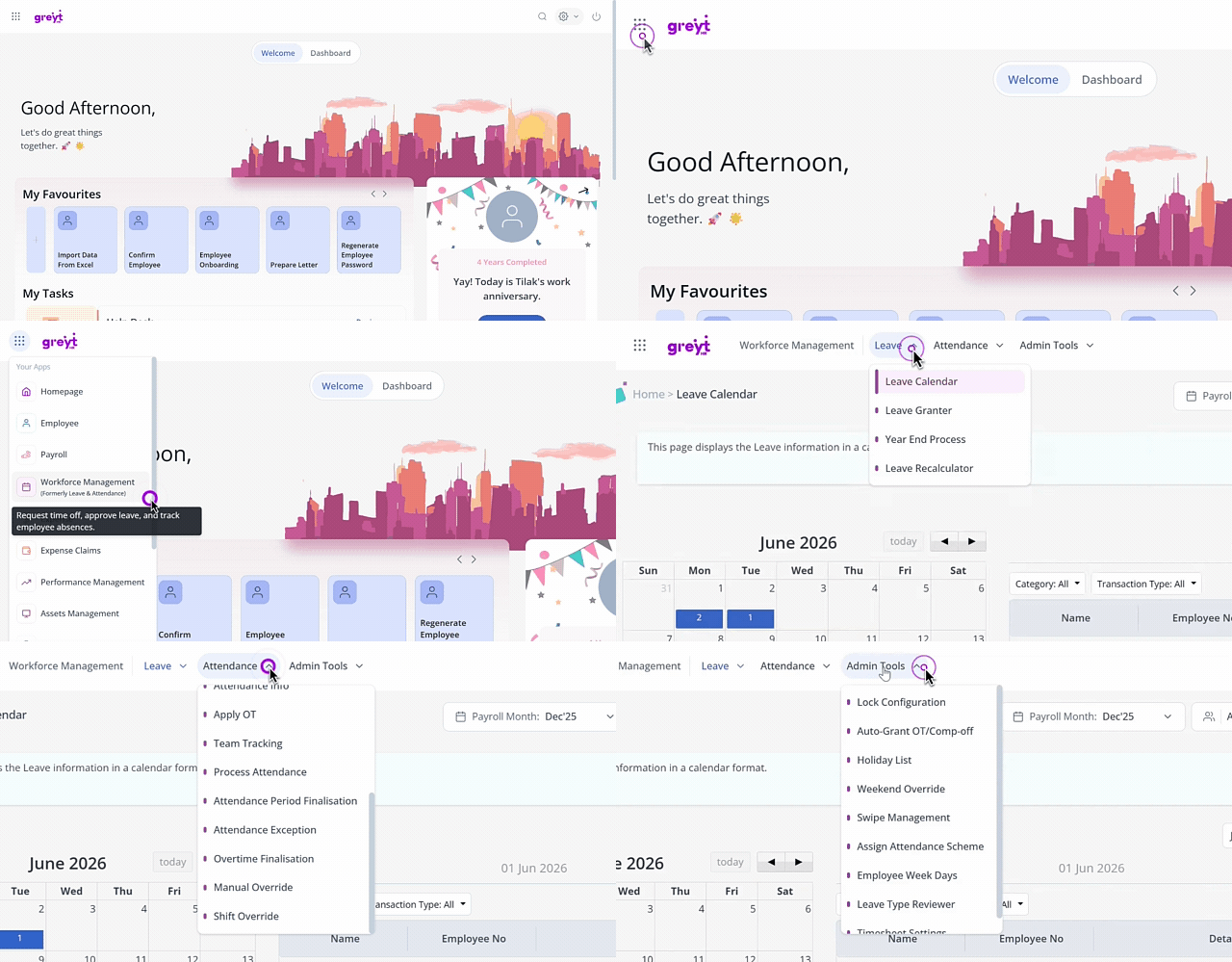
The navigation is now organized into the following groups:
| Menu group | What you'll find here |
|---|---|
| Leave | Leave overview, leave calendar, employee leave, and other leave management pages |
| Attendance | Attendance overview, employee attendance, and attendance management pages |
| Admin Tools | Administrative actions for leave, attendance like setting up holiday list, lock configuration etc |
What remains unchanged after the Workforce Management update
All your existing leave and attendance pages are accessible exactly as before — only the label and navigation grouping have changed.
All existing URLs and deep links to leave and attendance pages continue to work without any changes.
Clicking Workforce Management in the header takes you to the Leave Overview page by default.
You only see the menu items and tabs that you are authorized to access, based on your permissions.
Access Workforce Management in greytHR
To access any leave or attendance page, from the greytHR Admin portal, hover over the 9 dots and go to Workforce Management > Leave > Required page.
For example:
To view the Leave Calendar: go to Workforce Management > Leave > Leave Calendar.
To view Attendance Overview: go to Workforce Management > Attendance > Attendance Overview.
Note: If you have saved bookmarks or shared direct links to Leave and Attendance pages, those links remain functional and will continue to work.