Enable Future Leave Balance for Employees on greytHR
Updated in April- 2025 | Subscribe to watch greytHR how-to video
To allow employees to take leave using upcoming leave balance in greytHR, you will need to activate the Apply Future Leave Based on Upcoming Credit feature on greytHR. This feature allows employees with low or zero leave balances to apply for leave by utilizing their upcoming leave balance.
Imagine an employee has used all their available leave days, leaving them with zero balance. If they need to take another day off, the system allows them to use a future leave day (advance leave) they will earn when the applied leave starts. This results in a negative leave balance, like -1 day. As the employee continues working and earning leave, the system automatically adds those earned days, gradually bringing their balance back to zero or a positive number.
Enable future leave balance (advance leave) for employees on greytHR
From your greytHR Admin portal, go to Settings > System Settings.
Go to Leave to access the Leave Rules section and enable the future leave (advance leave) functionality.
As an admin, you have the flexibility to configure and specify which leave types allow the use of Future Leave Balance Provider based on your company’s policies.
Set the future leave (advance leave) balance eligibility in greytHR
From the Leave Rules page, select the leave type > Limits For Availing Leaves, and set Allow leave to be taken in excess of eligibility to Yes.
Employees can apply for as many leaves as they want in a single instance using Future Eligibility, but leave type limits still apply. Let’s say your organisation allows a maximum of 5 days for Annual Leave, then the employee can’t exceed 5 days even if they’ll earn more.
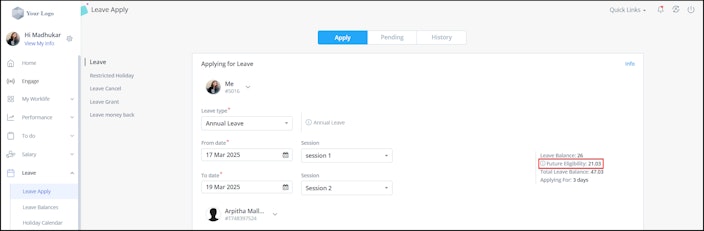
Where can the employee see their future leave (advance leave) balance eligibility?
When an employee logs in to their greytHR ESS portal to apply for leave, they need to go to the Leave section and apply for leave to see their future leave eligibility.


Calculate an employee's future leave (advance leave) eligibility
Once the employee submits the leave request, greytHR automatically:
Calculates the employee's future leave eligibility based on the leave policy.
Adds it to their current balance.
Subtracts any leave already taken.
Confirms eligibility based on the projected balance.
And that’s it! Leave planning just got a whole lot easier with greytHR! 🚀
Other related links: