Manage Employee Information Efficiently with greytHR
Updated in May - 2026 | Subscribe to watch greytHR how-to video
Maintaining the employee profile in an organization is important to keep accurate and up-to-date records of employee information, job history, performance, and personal details. It helps in making informed decisions about employee development, promotions, and benefits, and ensures compliance with employment laws and regulations. Accurate employee profiles can also help to build trust and positive relationships with employees and foster a positive work culture.
We’ve enhanced the Employee Profile page in the greytHR Admin portal. This enhancement allows you to add/edit the profile details of an employee. The page helps you to keep the employee information up to date.
Watch the video to learn more about the Employee Profile page in greytHR.
View/edit an employee's profile
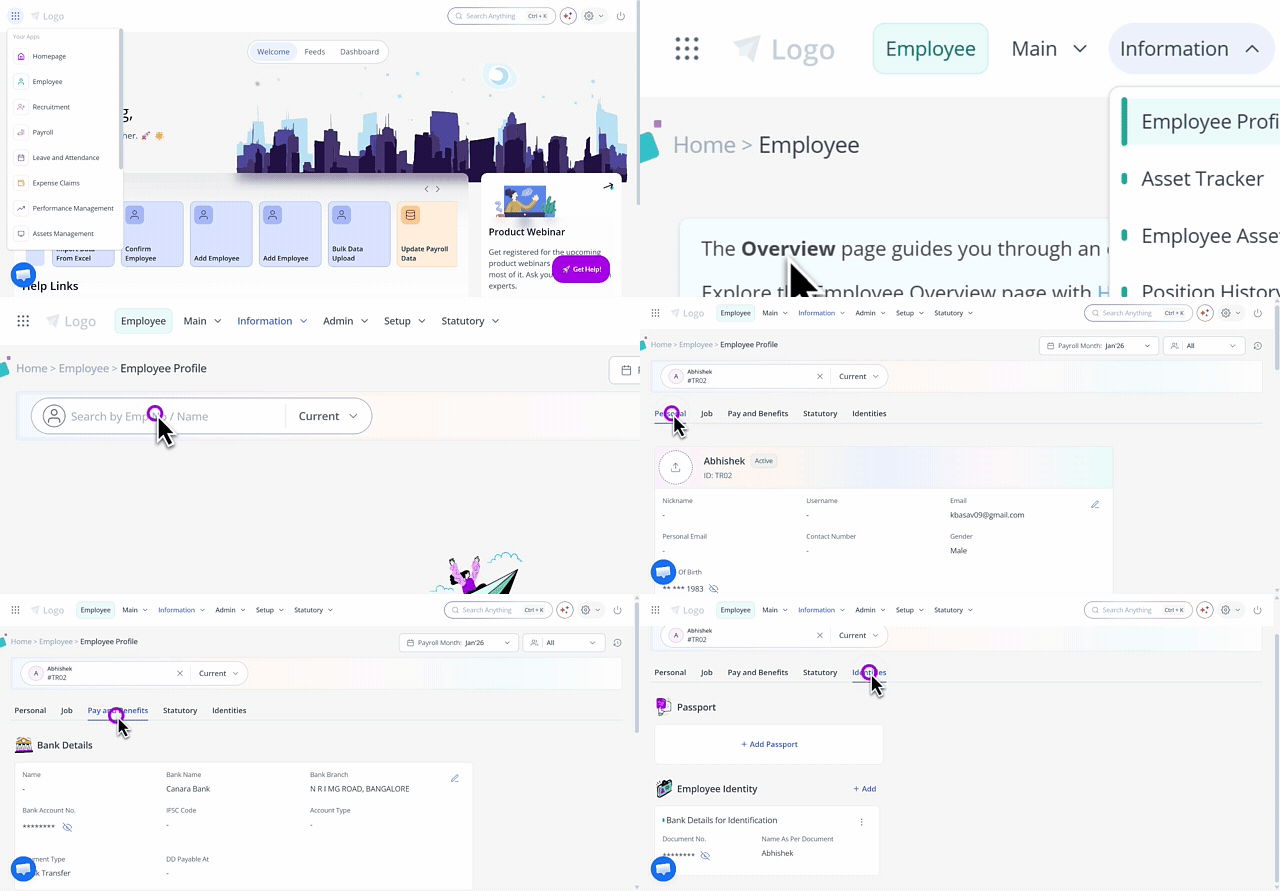
To view an employee’s profile detail on the Employee Profile page, hover over the 9 dots and select Employee > Information > Employee Profile.
In the Search Employee search box, search for the employee whose information you want to view. The employee's details appear.
Under the Personal tab, you can view, add, and edit the following information:
Basic Info
Personal Info
Biometric Details
Marital Info
Address
Education
Course Details
Emergency Contact
Family Details
Under the Job tab, you can view, add, and edit the following information:
Employment Details
Contract Details
Previous Employment
Background Check
Access Card Details
Under the Pay and Benefits tab, you can view, add, and edit the following information:
Bank Details
Insurance
Nomination
Bonus Register
Employee Benefits
Under the Statutory tab, you can view, add, and edit the following information:
ESI Account
PF Account
LWF
Bank Details
Visa Details
Under the Identities tab, you can view, add, and edit the following information:
Passport
Employee Identity
Ensuring compliance with the upcoming DPDP Act, 2023
To protect employees’ personal information, organizations should start preparing for compliance with the Government of India’s Digital Personal Data Protection (DPDP) Act, 2023.
As a result, on the Employee Profile page, certain personal information of an employee is hidden by default. This includes:
Government IDs: PAN, Aadhaar, Passport Number, Driving License, etc.
Banking & Financial Details: Bank Account Number, IFSC
Contact Details: Personal Email ID, Personal Phone Number, Address
Employee Information: Date of Birth, Blood Group, Height, Weight, Marital Status, Emergency Contact
You can view this information by clicking the eye icon. If you don’t manually hide it, the system will automatically conceal the information again after fifteen seconds.
Related article: