greytHR's August -September 2026 Updates



Here's what we've been working on lately
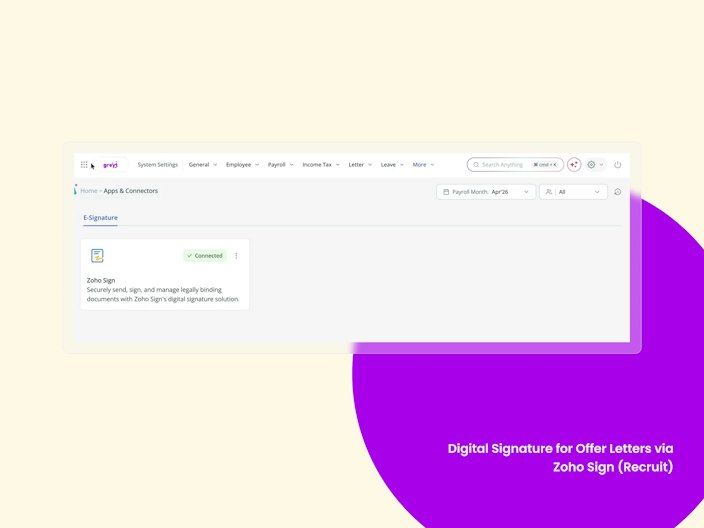
Digital Signature for Offer Letters via Zoho Sign (Recruit)
Recruiters and candidates now have a completely paperless, secure, and auditable way to sign and accept offers, powered by Zoho Sign — replacing the manual print-sign-scan-upload cycle for both internal approvers and candidates.
This enhancement:
Centralises e-signature setup under System Settings → Integrations → Connectors, where Admins enable or disable the Zoho Sign connector.
Adds a two-part signing flow in the Send Offer / Extend Offer step — internal signatories sign first, then the candidate receives a "Sign and Accept" step.
Delivers a secure, auditable digital signing record, replacing static signature images and manual uploads.
Falls back to the existing manual-upload process when Zoho Sign is disabled.


Removal of Unnamed Location Tag in GPS Live Tracking
GPS Live Tracking now displays meaningful location details by removing the generic "Unnamed Location" tag. Configured locations continue to show the location name along with address, while all other locations will display the captured address.


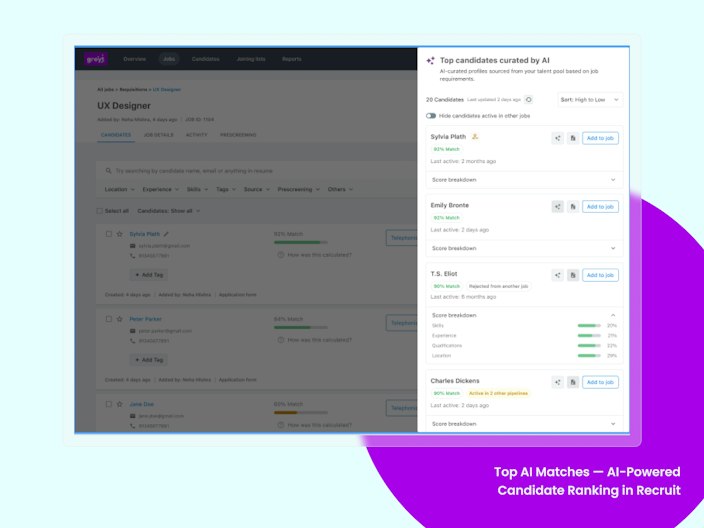
Top AI Matches — AI-Powered Candidate Ranking in Recruit
greytHR Recruit now ranks candidates for a job using AI from the entire. The new Top AI Matches side panel scores your entire candidate pool against a job and surfaces the top 20 best-fit candidates, ranked by overall AI match score — so recruiters can shortlist the strongest candidates instantly instead of reviewing profiles one by one.
This feature:
Scores the entire candidate pool against a job and ranks the top 20 by overall AI match score.
Lets recruiters switch ranking between Overall Match, Skills, Experience, Qualification, or Job Constraints Fit.
Shows a parameter-level score breakdown when any candidate card is expanded.
Surfaces pipeline status, prior-rejection context, and referral badges inline.
Enables one-click actions — View Resume, View AI Summary, and Add to Job — from both grid and card views.
Built on the AI-Based Candidate Scoring feature , putting those scores to work with a faster, more actionable way to shortlist.

HackerRank Assessments: Technical Screening Inside greytHR Recruit
greytHR Recruit now integrates with HackerRank, so recruiters can send technical assessments to candidates and track results without leaving Recruit. Admins enable HackerRank once in Settings, pick it as the assessment vendor for a job, and assign tests to candidates directly from the pipeline. This replaces manual coordination in an external portal.
This feature:
Adds a HackerRank toggle in Recruit Settings, so admins can enable the integration for their organisation.
Lets recruiters configure HackerRank as the assessment vendor at the job level.
Pulls the live list of HackerRank tests, so recruiters can pick the right test for each role.
Lets recruiters assign a HackerRank assessment to a candidate from within Recruit.
Moves the candidate to the Assessment stage automatically when the invite is sent.
Tracks assessment status in-app and shows the candidate's score once the test is completed.
Encrypts candidate data sent between greytHR and HackerRank.
This is built on Recruit's hiring pipeline, bringing technical screening into the same workflow recruiters already use to move candidates from application to offer.
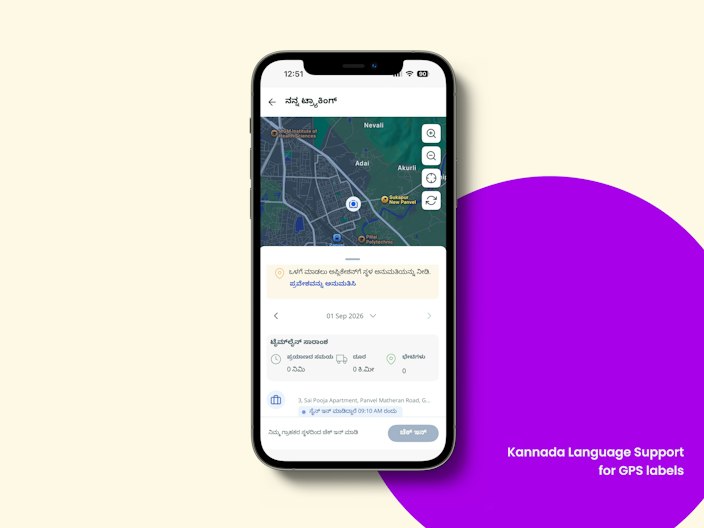
Kannada and Telugu Language Support for GPS labels in greytHR Mobile App
Users can now access GPS Live Tracking in Kannada and Telugu, with the interface, labels, and messages available in their preferred language for a more seamless and personalized experience.

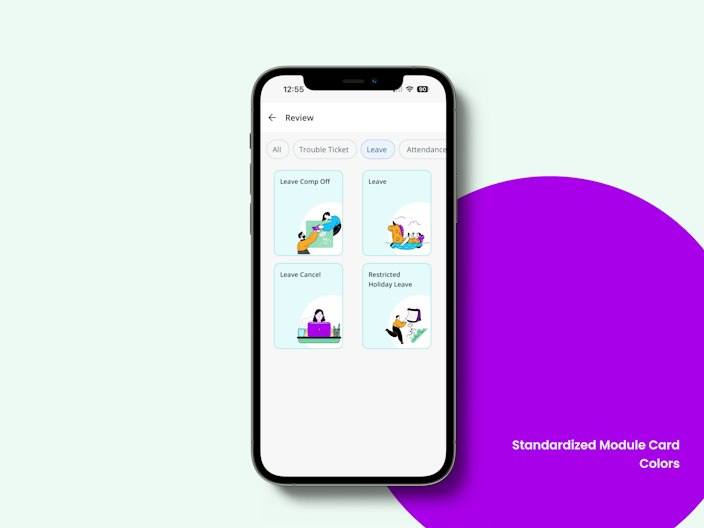
Standardized Module Card Colors in greytHR Mobile App
We're standardizing the colors and styling of module and review cards across the app to provide a more consistent, accessible, and seamless navigation experience.

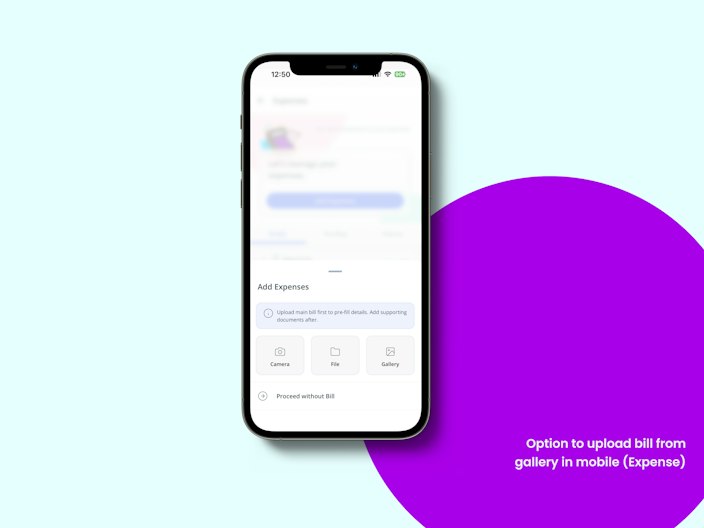
Option to upload bill from gallery in mobile (Expense)
Employees will also be able to upload bills directly from their device's photo gallery, alongside the existing Camera and File upload options, making expense submission more convenient.

Trip Based Expense
Employees can now group all trip expenses — flights, hotels, meals — under a single trip record, using the same submission flow as today. Managers can approve with full trip context and consolidated spend visible.
Delete Expense Policies and Requests
Admins can now delete unwanted expense policies and requests, including data created during implementation or testing and expenses submitted by mistake. This helps keep Expense data clean and accurate..
Auto Populate Mobile Number on Android Login
Android users logging in via mobile number will get their number suggested and auto filled using the Google Phone Number Hint API, cutting down manual entry while preserving existing validation and manual-entry fallback.
Resignation Warning & Mandatory Acknowledgement
Employees submitting a resignation will be shown a configurable warning message (e.g. non-compete, notice period terms) that they must explicitly acknowledge via a checkbox before the resignation is submitted.
Updated Error Messaging for GPS
GPS Live Tracking now displays clear and user-friendly error messages, helping users better understand issues and take the appropriate action.
Configurable Input Field Types in IT declaration in greytHR Mobile App
Chapter VI manual IT declaration items will soon support configurable input field types, helping organizations capture tax declaration details in the appropriate format.
Bank status Verification
Bank Account Verification (Penny Drop) lets Admins verify employee bank accounts directly within greytHR before running payroll. Under Payroll > Admin>Bank Verification Status, it validates each employee's Bank Account Number and IFSC against the bank in real time and returns a verification result - so account details are confirmed upfront instead of failing at transfer. Admins can verify all eligible employees at once or select specific ones, re-verify when details change or a check fails, and see a clear status (Verified / Not Verified / Failed) with a response column for each employee. Results can be filtered, and exported to Excel.
Benefits
Catch invalid or mismatched accounts before payroll, not after a failed transfer
Fewer payout reversals, delayed salaries, and manual employee follow-ups
Faster, cleaner payroll reconciliation with export-ready verification records
Full transparency on verification outcomes and associated charges
PF Wage Ceiling Limit Revision from 15000/- to 25000/-
Customers can now configure the EPF (Employees' Provident Fund) wage ceiling limit revision with a selectable effective month. This gives organizations control over when the revised ceiling applies to their payroll cycle. Customers can choose either September 2026 or October 2026 as their effective months for revising the PF wage Ceiling limit.
Loan Perquisite Exemption - Updated Eligibility
greytHR now determines loan perquisite taxability using the combined Original Loan Amount across all of an employee's open loans (per Rule 15), instead of each loan separately. Eligibility auto-updates whenever a loan is added or closed, or at the 1 April 2026 threshold change (₹20,000 → ₹2,00,000), and adjusts in both directions.
Benefit: Accurate, portfolio-level loan tax calculation that stays correct as loans change through the year - less manual review, fewer taxation errors.
Lookup Table Enhancements - Introduce versioning
We've enhanced the existing lookup table to support Effective Date–based versioning. Admins can now maintain multiple time-bound versions of a lookup — each set of values applying from a chosen Effective Month — so payroll automatically uses the right values for the period being processed, without overwriting history. This enhancement allows users to capture minimum wages across all the states and maintain the historical records.
Updated Tax Section Labels as per the New Income Tax Act 2025
The Government has renumbered sections of the Income Tax law as part of the new Income Tax Act, 2025, which comes into effect from April 2026. This means familiar terms like "Section 80C" or "Form 12BB" now have new section numbers (for example, Section 80C becomes Section 123).
This update changes only the names and labels shown to employees on the ESS Proof of Investment (POI) page — such as section headers, form names, and tags — so they match the new government terminology. It does not change how tax is calculated or what proofs employees need to submit. Old labels will continue to show for periods before April 2026. This change is across POI related pages in both admin, ESS and related reports.
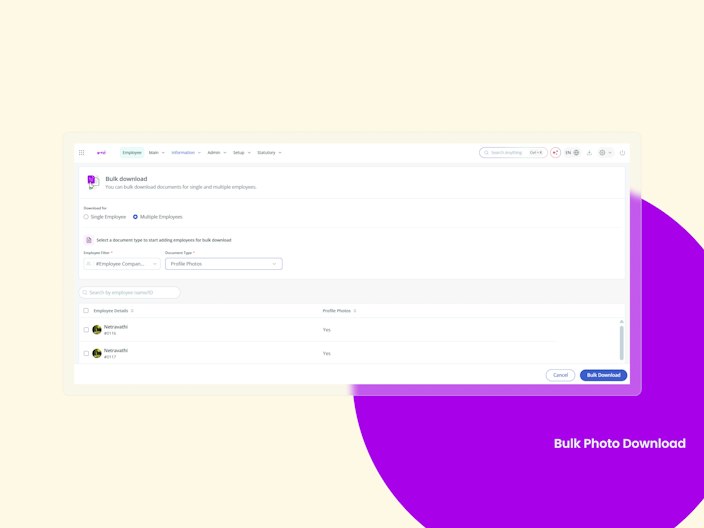
Bulk Photo Download
HR Admins can now download employee profile photos in bulk through the existing Bulk Document Download feature. Instead of downloading photos individually, admins can select employees, check photo availability, and download all available photos as a structured ZIP file—making it easier to use them for ID cards, access control, employee directories, and other operational needs.
What’s new:
Profile Photos added as a download category.
Supports single and bulk employee selection.
Bulk photos are packaged into a structured ZIP file.
Downloads are processed through the existing Download Center.

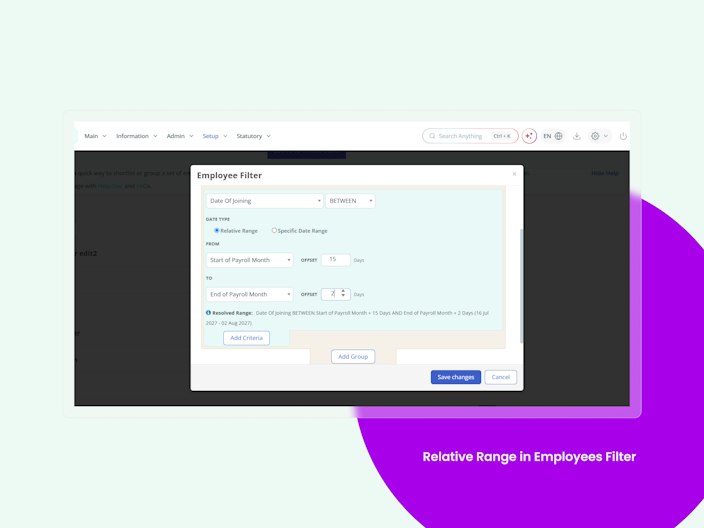
Relative Range in Employees Filter
Earlier, Employee Custom Filters supported only specific/fixed dates, which meant admins had to manually update saved filters as the date or payroll period changed. With this enhancement, admins can now create dynamic date-based filters that automatically resolve to the relevant period each time they are used.
What’s new:
Relative date ranges based on Today, Payroll Month, Financial Year, Calendar, etc.
Presets such as Current Payroll Month, Previous Payroll Month, and New Joiners.
±99-day offsets for greater flexibility.
Saved filters automatically update at runtime, eliminating recurring manual changes.
Support extended across Audit Logs, Reports, Segments

Configurable Resignation Warning & Acknowledgement
Previously, employees could submit resignation without acknowledging any organization-specific instructions or conditions.
With this enhancement, HR/Admins can configure a mandatory warning or instruction message in the Resignation Workflow, which is displayed to employees before resignation submission and requires acknowledgement.
The configured message is also included in the resignation confirmation email, while existing configurations, reporting, and logs remain unchanged.
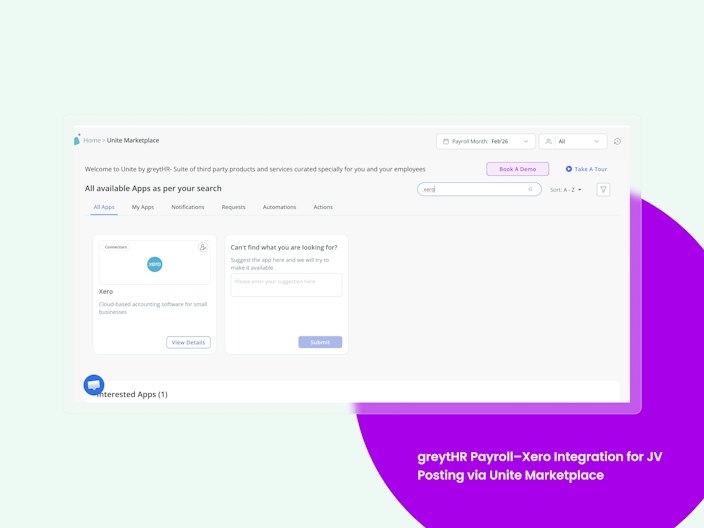
greytHR Payroll–Xero Integration for JV Posting via Unite Marketplace
greytHR Payroll is now integrated with Xero through the Unite Marketplace, live for customers across SEA, ME, and India. Xero is one of the most widely used cloud accounting platforms in SEA, and this adds to our Journal Voucher posting integrations alongside Zoho Books.
This enhancement:
Syncs payroll data from greytHR to Xero.
Minimises manual journal entries, reducing errors and saving time.
Makes Journal Voucher postings more accurate and efficient.
Improves compliance and transparency in payroll-related financials.

greytHR Payroll–Tally Integration for JV Posting via Unite Marketplace
greytHR Payroll is now integrated with Tally through the Unite Marketplace, live for customers . This adds to our Journal Voucher posting integrations alongside Zoho Books ,Xero, MSD , giving finance teams an automated path to post payroll entries into Tally.
This enhancement:
Syncs payroll data automatically from greytHR to Tally.
Minimises manual journal entries, reducing errors and saving time.
Makes Journal Voucher postings more accurate and efficient.
Improves compliance and transparency in payroll-related financials.
Enable Comp-Off Grant Based on Accumulated Excess Hours
A new "Accumulate Comp-Off grant" toggle under OT Policy → Eligibility lets HR configure slab-based multi-day Comp-Off grants (e.g., 1–10 hrs → 1 day), summing excess hours across a selected date range instead of capping at one day. Grant mode (Auto or Manual) must stay uniform across all Comp-Off day-types, with Auto running once per attendance/calendar cycle and Manual letting employees pick specific eligible days via a date-range picker with lapse warnings. Grant records carry a standardized "Cumulative grant for <dates>" reason across Admin, Employee, and Approver views, with full audit logging and traceability in existing Comp-Off reports.
Auto-Populate Maternity Leave End Date
When an employee applies for maternity leave, the system will automatically calculates the end date as 182 days from the selected start date, including handling leave year splits and partial/rejected leave scenarios, removing manual calculation.
Resubmission of Rejected Timesheets
Employees will be able to review, correct, and resubmit only the specific timesheet tasks a manager rejected, either in bulk across a period or day-by-day, instead of re-entering the whole timesheet.
Other Features
Organisations Can Now Choose Whether Goal Plans Lock After / During a Performance Review Submission
Goal plan locking is now an optional PMS setting, giving organisations greater control over when goal edits are restricted during the review process.
The setting can be enabled to lock goal updates once a linked review is submitted, or switched off after the review is completed for temporary control.
Preview PDF attachments directly in Engage
PDF attachments in Engage can now be previewed directly within the post, eliminating the need to download files just to view their contents. This is currently available on web only, with the existing download option remaining unchanged for other file types.
Resigned employees are now clearly flagged across Performance Management
A Resigned indicator is now shown next to employees marked as resigned, making it easier to identify them across Goal Plans and Reviews Control Panels, and Ratings & Recommendations. This helps managers and admins quickly account for resignation status when reviewing, following up, or reassigning work.
Manual calibration remarks now retain manual override context (Performance Management)
Calibration remarks now distinguish between manual override comments and system actions, ensuring important context is preserved while publish, pause, and cancel statuses are tracked separately.
Preview attachments directly across Performance Reviews and Goals Check-in
Documents attached across Reviews and Check-ins can now be previewed in-app, making it easier for employees, assessors, managers, and admins to verify files without downloading them. The preview is available for both new and saved attachments, while existing download, delete, permissions, and file-handling behaviour remain unchanged.
Newly eligible employees can now be added across Performance Management
Admins can now identify and add employees who become eligible for an existing employee filter after a cycle is created, without waiting for the next scheduled refresh. This is available across Goal Plans, Reviews, and 360° Feedback, enabling newly eligible employees to be included as soon as they’re detected.
Admins Can Now Bulk Approve Assessments in Performance Reviews
Admins can now approve multiple review assessments at once, instead of opening and approving them one by one.
Previously, every pending assessment had to be reviewed and approved individually, slow and painful during peak appraisal season when the volume is high.
Now, under the Pending tab in My Tasks of a Review, admins can select assessments (or select all), hit 'Approve Assessments', and confirm. Approved assessments move to the History tab once complete. The individual review-and-approve option stays exactly as it is.
Assessors Can Now Invite a Peer to Collaborate on a Performance Review Assessment
Admins can now let assessors bring in a peer to help fill an assessment, so evaluations capture input from people who've actually worked with the employee, not just the reporting manager.
Previously, whoever was configured as the assessor had to complete the assessment alone, even when a peer or cross-functional colleague had better context on the employee's work. That input got collected offline, if at all.
Now, when an admin turns on "Enable assessors to invite a peer to collaboratively fill their assessment" during review setup (Add Assessors step), assessors get an Invite Collaborator option in ESS. They pick any active employee, add a mandatory remark, and the peer fills the assessment. Once the peer submits, it comes back to the assessor to review, edit, and finalise. Only assessors (not self or final assessors) can invite, and only one peer per assessment.
Admins Can Add Additional Reviewers in Performance Goal Plans
Organizations can now add their own roles to a Goal Plan and set exactly what each role can do with goals, instead of being stuck with the fixed set of predefined roles.
Previously, goal management access was limited to predefined roles (Employee, Manager, Manager's Manager) with no way to add others or fine-tune what each could do. Any structure that didn't fit those roles had to be worked around.
Now, under Goal Plan User Controls, admins get an 'Add Role' option that pulls from the org's configured roles (just like 'Add Assessors' in Reviews configuration).
Each role, existing or newly added, gets fully editable Create, View, Edit, Delete, and Update Progress checkboxes. Members of a newly added role automatically get their ESS record for that goal plan. Once a Goal Plan is active, new roles can't be added and existing roles can't be removed, but their permissions stay editable at any time
With this enhancement, all permission checkboxes are freely editable for every role. Nothing is locked or read-only.
34-Character Bank Account Number Support
Earlier, bank account number fields had length limitations, which caused errors when adding, onboarding, importing, or viewing longer account numbers. This enhancement now allows admins to maintain up to 34-character alphanumeric bank account numbers consistently across the system.
What’s new:
Support for up to 34-character alphanumeric account numbers.
Extended support across Add Employee, Onboarding, Bank/PF/ESI, ESS, Excel Importer, and QB.
Account numbers are stored and displayed without truncation or data loss.
Values exceeding 34 characters are restricted with validation.
Existing shorter account numbers continue to work as before.
Trigger Alumni Portal Access Email on Bulk Resignation Upload
Previously, the Alumni Portal access email was not triggered when portal access was enabled through bulk resignation upload, especially when the employee’s LWD had already passed. With this enhancement, HR can choose to send the Alumni Portal access email directly through the bulk upload by providing the “Send Email” option along with “Alumni Portal” access.
What’s New
Added a “Send Email” column to the resignation upload template.
HR can trigger the Alumni Portal access email through bulk upload.
For future LWD, the existing LWD-based email trigger continues to work as before.
"Fit to be Rehired" Mandatory During Employee Separation
Previously, “Fit to be Rehired” was an optional checkbox during separation. With this enhancement, admins can make the field mandatory, requiring users to explicitly select Yes or No before completing the separation process.
What’s New
Added a configurable option to make Fit to be Rehired mandatory.
Replaced the checkbox with a Yes/No dropdown when capturing rehire eligibility.
Separation cannot be completed without providing the rehire status when enabled.
Captured status is retained in separation details and applicable reports.
Existing separation records remain unaffected with appropriate Yes/No mapping.
Changes are captured in Query Builder > Resignation Details logs.
Workflow Listing & Excel Export Column Parity
Previously, the workflow listing UI and Excel export had mismatched columns, labels, and ordering following the UI revamp. This enhancement ensures the Excel export maintains complete parity with the workflow listing, including columns, labels, order, and data.
What’s New
Excel export now matches the UI columns, labels, and order.
Added, removed, or renamed UI columns are automatically reflected in Excel.
Exported data remains consistent with the UI.
Export respects the applied filters/search criteria and includes the complete matching dataset.
Export is driven by the UI column configuration to maintain parity.
Door/Address Filter for Attendance & Swipes
Admins can now filter Attendance DailyView data by Door/Address, based on each employee's first swipe of the day, using a new toggle under Advanced Options that sources data from Astra, Biometric, Swipe API, and Geo Fencing. The filter is independent of Group Category selection, defaults to "All," and recomputes all summary columns for the filtered set. Door names are configured under System Settings → General → List of Values, and the active filter carries through to Excel exports.
Want to explore more about greytHR? Visit our website.