Configure Trip-Based Expenses in greytHR
Updated in September - 2026 | Subscribe to watch greytHR how-to video
When employees travel for work, their expenses are often submitted as individual requests, with no consolidated way for the employee, manager, or admin to view everything associated with a single trip.
Trip-based expenses address this by allowing employees to create a trip, add expenses to it as they are incurred, and track all related requests in one place. Managers and admins reviewing these expenses get the same consolidated, trip-level view — including the trip ID, trip name, and a link to the complete Trip Summary — directly alongside the request. This feature is disabled by default and must be enabled by the admin before it becomes available to users.
Enable trip-based expense submission
Trip-based expense submission is off by default. You must enable it from Expense > Settings > Advanced Settings. Until then, employees cannot find the option to create a trip
From the greytHR Admin portal, hover over the 9 dots and go to Expense > Settings > Advanced Settings.
Select the Trip-Based Expense Submission tab.
Click Enable available on the Trip-Based Expense Submission card. A pop up appears.
Click Enable Feature.
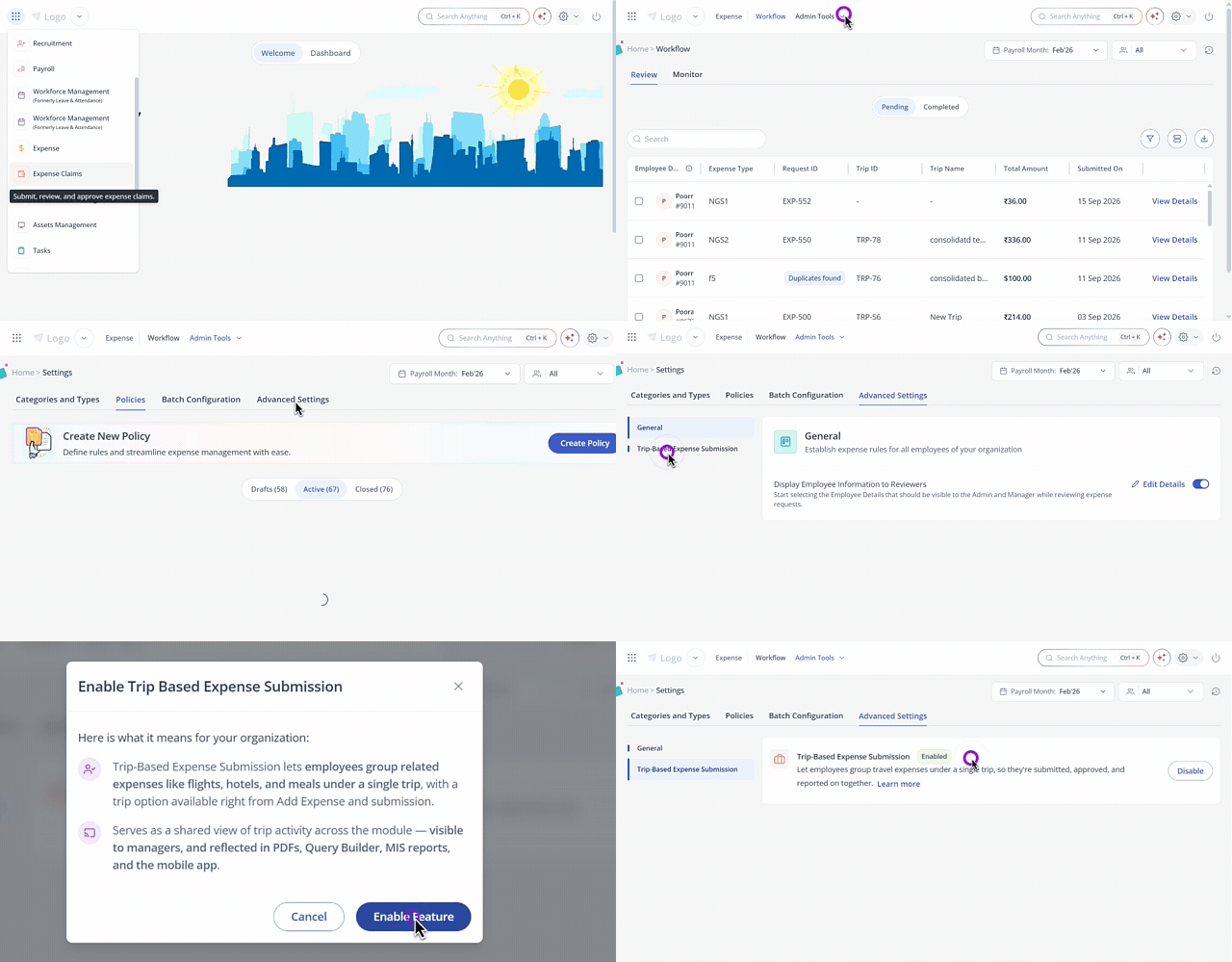
Note: This setting applies company-wide, across both the web ESS portal and the greytHR mobile app. Once enabled, employees will see the option to create trips and attach expenses to them.
Once this is enabled:
Employees can create a trip and group expenses under it, or submit an existing draft expense as a part of the trip.
Managers and admins reviewing an expense that's part of a trip will see the trip's name, duration, and description alongside the request, along with a link to the Trip Summary — a consolidated view of every expense submitted under that trip.
The existing approval workflow (Accept/Reject/Forward) is unaffected — trip-linked expenses move through the same review and approval stages as any other request.
A dedicated Trip-Based Expense Submission report becomes available under Reports, showing trip-level expense data.
Trip data is also available in Query Builder, so you can build custom reports using trip fields.
Existing batch processing is unaffected — this setting has no impact on how expense batches are configured or processed.
Related article:
Efficiently Review Expense Requests in greytHR