March 2026 Updates: greytHR's New HR Admin Features

Here's what we've been working on lately
GPS Live Tracking on Mobile App
greytHR introduces GPS Live Tracking on the mobile app to enable real-time visibility of employee work locations. This feature helps organizations accurately track attendance for field and remote employees while strengthening attendance accuracy for mobile employees. Managers gain better insights into employee movements during work hours. Overall, it improves transparency, accountability, and workforce monitoring.
Attendance Status Picker Agent and Attendance Leave Picker Agent Enhancements
The Attendance Leave Picker and Attendance Status Picker have been updated to support multi-select functionality. This change allows users to configure multiple values within a single component, replacing the previous single-select limitation.
Functional Updates
Attendance Leave Picker: Supports multi-select for Shift and Leave Type.
Attendance Status Picker: Supports multi-select for Shift Type.
Calculations: Systems now aggregate all combinations of selected Leave/Attendance Status, Day Type, and Shift for the configured Period Type.
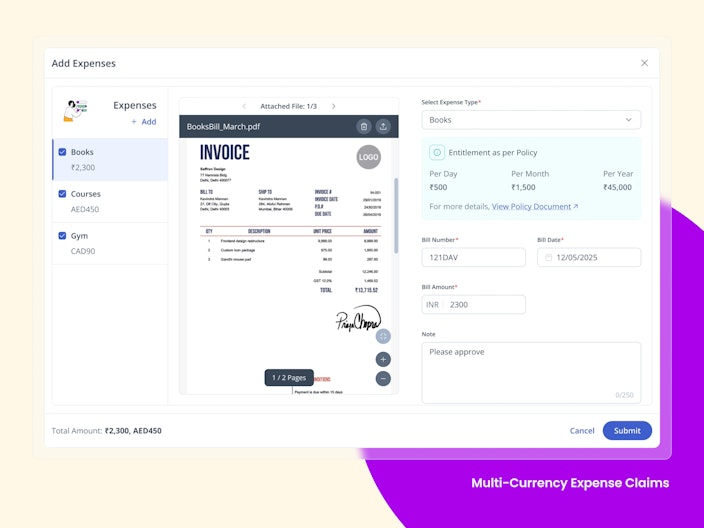
Multi-Currency Expense Claims
Employees can submit both amount-based and mileage-based expense claims in foreign currencies, while the system automatically converts them to the organization’s base currency for accurate reimbursement and reporting.

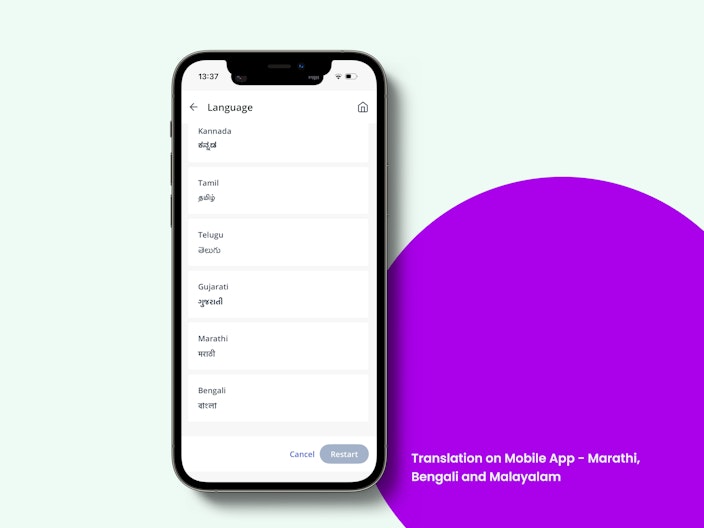
Translation on Mobile App - Marathi, Bengali and Malayalam
Building on our earlier launch of Tamil, Telugu and Kannada translation, the greytHR mobile app will support Marathi, Bengali and Malayalam. Users can seamlessly switch their app language from English to Marathi, Bengali and Malayalam, allowing the content to be displayed in their preferred language.

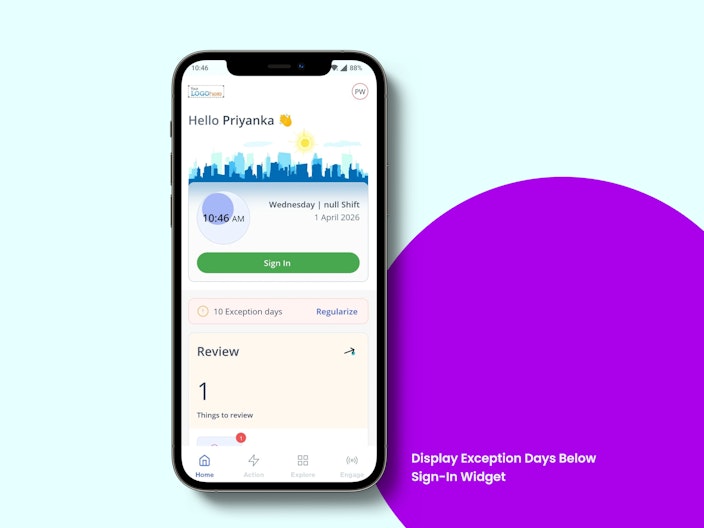
Display Exception Days Below Sign-in Widget in Mobile App
Employees can now view exception days directly below the sign-in widget on the home screen for quick visibility of unresolved attendance issues. Tapping the banner navigates them to the Regularization / Regularization & Permission screen, where both Gap Days and Exception Days are shown for action.

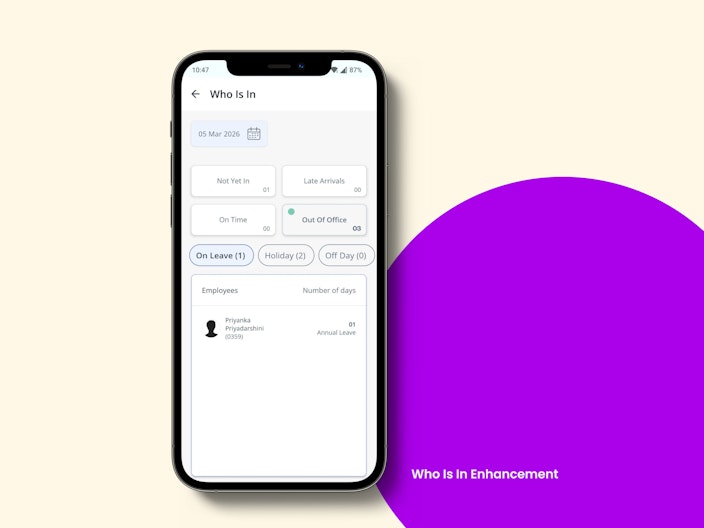
Who Is In Enhancement in Mobile App
The ‘On Leave’ section is renamed to ‘Out of Office’ and now includes On Leave, Holiday, Rest Day, and Off Day categories. This provides managers and HR a clearer, consolidated view of employees who are unavailable and the reason for it.

Other Features
GPS Live Tracking in ESS
GPS Live Tracking is now available on the web, enabling stakeholders to conveniently view tracking details beyond mobile. Admins can access tracking data for all employees, managers can view details for their team, and employees can view their own tracking information.
Extended Bank Account Number Field Support (Up to 34 Characters)
Bank Account Number Field Support supports up to 34 alphanumeric characters end-to-end, ensuring accurate validation, storage, and display without data loss, thereby resolving client issues, preventing salary processing failures, and ensuring compliance with banks issuing longer account numbers.
Event & Request Hub – Secure Attachment Visibility Enhancement
Now, attachments are accessible without global access and are restricted to only authorized tasks, ensuring proper role-based access and data privacy.
Automated Notice Period Update on Profile Changes
The system auto-updates the notice period based on latest employee attributes using configured rules, with audit tracking and fallback logic, ensuring accuracy without manual intervention. This applies across workflows, manual updates, and bulk changes, ensuring consistency at scale.
Revoke Resignation with Attachment Support
Users can now optionally upload attachments (PDF, DOC, images) during revocation across Offboarding and Resignation workflows. The details are available for preview, download, and audit tracking ensuring complete and compliant record management.
Confirmation Workflow Category in Query Builder (QB)
A new "Confirmation Workflow" category is added in QB, enabling retrieval of records for both manual and automated workflows with detailed fields like status, dates, extensions, and approvals. This will help HR teams gain complete visibility over employee’s confirmation processes.
Restrict OT and Comp Off on the Same Attendance Date
A new global rule allows admins to ensure employees can choose either OT or Comp Off on the same attendance date. The minimum hour eligibility for both continues to work independently, but when this rule is enabled, employees can submit only one of the two for the same date. If both are attempted, the system shows: “You can apply either OT or Comp Off grant for the same day, not both.” When the rule is disabled, the existing behavior continues. This change has no impact on existing customers unless it is explicitly enabled.
IN/OUT Visibility in Visage
Visage will now display the actual IN/OUT result instantly after a successful swipe, with the swipe record immediately visible on the Swipes Page and under Admin → Leave & Attendance → Information → Employee Swipes. This update eliminates the need for attendance processing and removes the dependency on using two devices to capture IN/OUT.
Convert Weekly Off to Absent
A new rule, Convert Weekly Off to Absent, allows HR/Admins to automatically mark scheduled Rest Days / Off Days as Absent when an employee is absent for a configured number of consecutive days.
Admin Added as Default Initiator in Request Hub
Admin is now added as a default initiator in the Request Hub platform within greytHR. While configuring workflows, Admin can now be selected as an initiator — providing greater flexibility in setting up and managing workflow requests.
New 'Performance' Widget
Introducing a new Performance Widget on the ESS homepage: a single, unified space to track and take action on all your performance-related tasks. Whether you’re an employee, manager, or skip-level manager, everything pending: from feedback to assessments and goal reviews is now clearly visible and easily accessible in one place. Each item links directly to where action is required, making it faster and simpler to stay on top of performance activities.
Enhanced Rating Scale Policy in Performance Reviews Configuration
More flexibility in performance reviews. Assessors will be able to rate goals with scores, admins can set custom score ranges with their own rating descriptions, and choose from new 4-point and 7-point rating scales to better align reviews with your evaluation approach.
Bulk document Download - Single and Multiple Employees
Earlier, HR, admins had to download documents individually for each employee, making it time-consuming and inefficient. Now the system enables bulk download of documents for single and multiple employees in a single action, allowing users to select employees, choose required documents, and download them as consolidated ZIP files with background processing and progress tracking, thereby reducing manual effort and improving operational efficiency.
Coming Soon
Enhanced Expense Batch Visibility & Scheduling Control
We’ve enhanced Expense Batch Management to give admins better visibility into all batches in one place, including past, current, and future batches. Batch creation is now more streamlined with the option to configure both one-time and recurring schedules based on need. We’ve also introduced a clearer segregation of Active and Closed batches, making it easier to track and manage batch operations.
Duplicate Attendance Processing Prevention with Ongoing Request Notification
The system will now detect if attendance processing is already running for the same date range, attendance cycle, or employee scope, and prevent duplicate requests. Users will see a clear message with the ongoing process details and can retry only after the current process is completed or 1 hour has passed since it was initiated. This helps prevent duplicate attendance records and payroll inconsistencies.
Admin Bulk Reviewer Actions for Attendance Features
Admins can now review and take bulk action on pending Attendance Regularization, Permission, and Overtime (OT) requests from a single workflow review page. Selected requests can be approved, rejected, or forwarded in bulk, while still applying individual validations, workflow rules, and audit logging for each request. The feature also supports filters, multi-select, partial success handling, and real-time status updates to help manage high-volume approvals efficiently.
Auto Reminder System in Recruitment
Recruiters can now automate follow-ups across the hiring process using Auto Reminders in greytHR Recruit. This feature allows admins to configure reminders for key recruitment actions such as interview feedback submission, offer approvals, candidate responses, and form completion. Reminders are triggered automatically based on predefined events, with customizable frequency, recipients, and stop conditions, ensuring timely task completion without manual intervention.
Navos AI Assist in the Recruit module.
Recruiters can now simplify and accelerate hiring workflows using NAVOS, greytHR’s AI-powered assistant. NAVOS enables admins and recruiters to instantly generate job descriptions, email templates, prescreening questions, and scorecard categories directly within greytHR Recruit. By leveraging minimal inputs such as job title, department, or location, NAVOS auto-generates structured and consistent content, reducing manual effort while improving the quality and personalization of candidate communication.
Background Verification Integration with BGV Vendors
Recruiters can now seamlessly initiate and manage candidate background verification (BGV) directly from greytHR Recruit. Once a candidate accepts the offer, admins can trigger BGV using integrated vendor apps like SpringVerify and InstaVeritas via the Unite Marketplace. The system auto-fills candidate details, allows document sharing, and enables real-time tracking of verification status—streamlining the entire background verification process without leaving the platform.
AI-Based Candidate Profile Scoring
Recruiters can now identify the best-fit candidates more effectively using AI-based profile scoring in greytHR Recruit. Instead of relying only on keyword matching, the system evaluates candidate resumes across multiple criteria such as skills, experience, qualifications, and location. Admins can configure weightage for each criterion, and the AI generates a transparent score along with a detailed breakdown and summary—helping recruiters prioritize applications and make faster, data-driven hiring decisions.
Advanced Analytics Hub v1.1 (AAH v1.1)
What’s new in AAH v1.1? AAH v1.1 introduces faster report building with seamless step navigation (no resets or data loss), improved field ordering for consistent outputs, and enhanced access control for secure report sharing. It also brings advanced filtering with full operator support (on par with Query Builder), better usability through field category tooltips, and a ready-to-use payroll dataset with a default report for instant insights. Additionally, grouping on non-integer fields (including Pivot) is now supported for richer analysis.
What’s coming next: Conversational Reporting with Navos (Advanced Analytics Hub Agent) will soon allow users to create reports and discover insights using plain English. For example, users can request an attrition report for a specific department and timeframe, and Navos will automatically structure the report, select relevant fields, and guide them through naming and permissions. It will also enable anomaly detection by scanning templates and highlighting issues such as missing PAN or bank details. This marks a major step toward making analytics faster, smarter, and accessible to everyone—without requiring technical expertise.
Timesheets on Mobile App
Timesheets feature allows employees to log daily work hours with task-level details and submit them for approval. Managers can review, approve, or reject entries, ensuring transparency and accurate time tracking. It helps improve productivity monitoring, reduce errors, and maintain better operational efficiency.
Translation on Mobile App - Oriya
Building on our earlier launch of Marathi, Bengali and Malayalam translations, the greytHR mobile app will support Oriya. Users can seamlessly switch their app language from English to Oriya, allowing the content to be displayed in their preferred language.
GPS Enhancement on Mobile app
The mobile app will support GPS enhancements including a refresh button for improved real time tracking and a capture image feature for better on field validation. It will also include Tamil translations to enhance accessibility for regional users. Additionally, direction indicators will provide clearer movement insights, improving overall tracking visibility and user experience.
Auto Populate End date for maternity leave
Maternity leave applications will now auto calculate the end date from the selected start date, reducing manual effort and errors. The system will also handle year split scenarios, partial applications, and policy validations to ensure accurate and compliant leave management.
Design Spotlight
Multi-Currency Support in Expense Claims
Multi-Currency Support lets employees submit expenses in the currency they spend in, while admins can set policies across currencies. With built-in forex rates and a seamless approval flow, it reduces manual work and improves accuracy.

AI Candidate Profile Scoring in Recruit
Recruiters can now identify the best-fit candidates more effectively using AI-based profile scoring in greytHR Recruit. Instead of relying only on keyword matching, the system evaluates candidate resumes across multiple criteria such as skills, experience, qualifications, and location. Admins can configure weightage for each criterion, and the AI generates a transparent score along with a detailed breakdown and summary—helping recruiters prioritize applications and make faster, data-driven hiring decisions.

Engineering Team Updates
What's New:
Kafka Migration to Managed Service
We have migrated our on-prem Kafka service to a managed Kafka solution. This shift will reduce operational overhead, improve scalability, and ensure higher availability.
GKE and EKS Version Upgrade
We have upgraded our EKS (Trogon) cluster from version 1.32 to 1.34.
This upgrade ensures we stay aligned with the latest Kubernetes features, performance improvements, and security patches provided by AWS, helping maintain cluster stability, supportability, and long-term reliability.
Apigee to KONG migration
We originally moved to Apigee around 3 years ago to leverage its managed API capabilities, including features like API monetization. However, given our current requirements, we were not actively using those features. Moving back to Kong helps us better align with our needs while also optimizing costs.
Upcoming Features:
GKE Upgrade
We will be upgrading our GKE (Scoprion) cluster from version 1.32 to 1.34. This upgrade ensures we stay aligned with the latest Kubernetes features, performance improvements, and security patches provided by GCP, helping maintain cluster stability, supportability, and long-term reliability.
Product Content Updates
Collaterals published in the month of March:
New Knowledge Base Articles
GPS Live Tracking
Admins: Set up GPS Live Tracking
Managers: View Team Tracking
Employees: View Your Tracking
IT Rules 2026-Key Changes from Tax Year 2026-27
Date-wise LOP
New Videos
Employee Onboarding for Middle East
Revamped walkthroughs for:
Mastering employee attendance,
Declare FBP on greytHR's ESS Portal,
Mark and Track Employee Attendance,
Generate Employee Payslip after Processing Payroll.
Product Usage Stats
Monthly POI Declaration Released and Submitted

PAN Aadhar Link

Monthly Payroll Employee Count

Monthly Payroll Customer Count

Payroll Agent usage Customer wise