Integrate Google Meet, Microsoft Teams and Zoom in greytHR Recruit
Updated in November - 2025 | Subscribe to watch greytHR how-to video
Integrating video conferencing platforms into recruitment software offers significant advantages, enhances efficiency, and streamlines workflows. It simplifies scheduling interviews, improves communication, and ensures a seamless interview process for both recruiters and candidates.
The integration of Google Meet, Microsoft Teams, and Zoom into greytHR Recruit effectively resolves interview scheduling challenges, ensuring a smoother and more efficient hiring process. It benefits you as a recruiter/admin to:
Schedule interviews effortlessly with a one-click setup.
Automate calendar synchronization for seamless coordination.
Ensure accuracy in scheduling.
Eliminate scheduling conflicts effectively.
The integration involves the following steps:
Enable Google Meet/Microsoft Teams/Zoom Integration.
Enable Calendar settings.
Step 1: Enable Google Meet/Microsoft Teams/Zoom integration
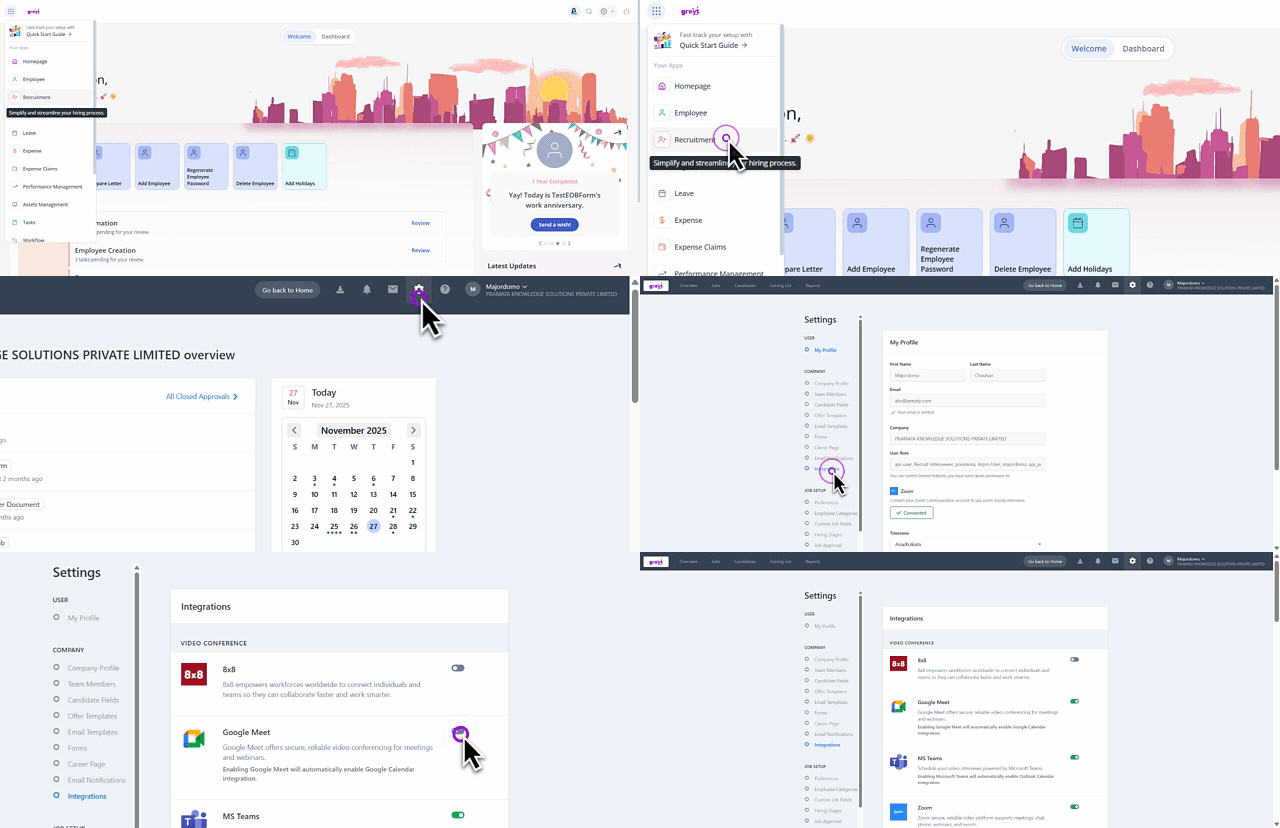
From the greytHR Admin portal, hover over the 9 dots and select Recruitment > Settings > Company > Integrations.
Under the VIDEO CONFERENCE section, toggle to enable Google Meet/Microsoft Teams/Zoom.
Step 2: Enable calendar settings
Once you enable any of the video conference integrations, the calendar associated with it gets enabled automatically.
Note: If you enable Zoom, you have the flexibility to select any one of the three calendar options: Google Calendar/Outlook Calendar/Calendar.
Info:
If you enable Google Meet, Google Calendar is enabled by default.
If you enable Microsoft Teams, Outlook Calendar is enabled by default.
If you enable multiple platforms, the calendar linked to the most recently enabled platform is enabled.
Note: You can enable only one calendar integration at a time.
After enabling the calendar settings, you can schedule the interview with the respective video conference platform.
Other related links:
How to schedule an interview with Google Meet in greytHR Recruit
How to schedule an interview with Microsoft Teams in greytHR Recruit