Post Jobs on LinkedIn Easily with greytHR Recruit
Updated in March - 2026 | Subscribe to watch greytHR how-to video
Hiring teams often struggle with the manual, repetitive task of posting job openings across multiple platforms. This not only consumes time but also increases the chances of errors and inconsistent job visibility.
To address this challenge, greytHR Recruit introduces an integration with LinkedIn’s Limited Listings feature. This offers recruiters a seamless way to publish Basic Jobs on LinkedIn.
Unlike Job Slots (paid jobs), Basic Jobs are free job posts aggregated on LinkedIn to create a wider job-seeking experience for members. By publishing these jobs directly on your company’s LinkedIn Page, you can reach candidates interested in your organization and make the application process simpler with everything in one place.
LinkedIn Limited Listings
LinkedIn Limited Listings are free job posts that LinkedIn automatically gathers from job boards and applicant tracking systems (ATS) to help users easily discover relevant roles.
With this integration, job posts created in greytHR Recruit will automatically appear on the organization's LinkedIn page and in LinkedIn job searches, increasing visibility to a broader audience of active and passive job seekers.
Posting jobs to LinkedIn involves the following steps:
Enable the LinkedIn Limited Listings Integration
Post jobs on LinkedIn
Enable the LinkedIn Limited Listings Integration
To enable the LinkedIn Limited Listings integration, from your greytHR Admin portal, hover over the 9 dots and select Recruitment > Settings > Integrations.
Under the JOB BOARD section, toggle on the LinkedIn Limited Listing option.
Enter the Company ID and click Update. If you are unaware of the Company ID, click on the Find your Company ID link.
Note: If the Company ID is invalid, the job doesn’t get posted on LinkedIn.
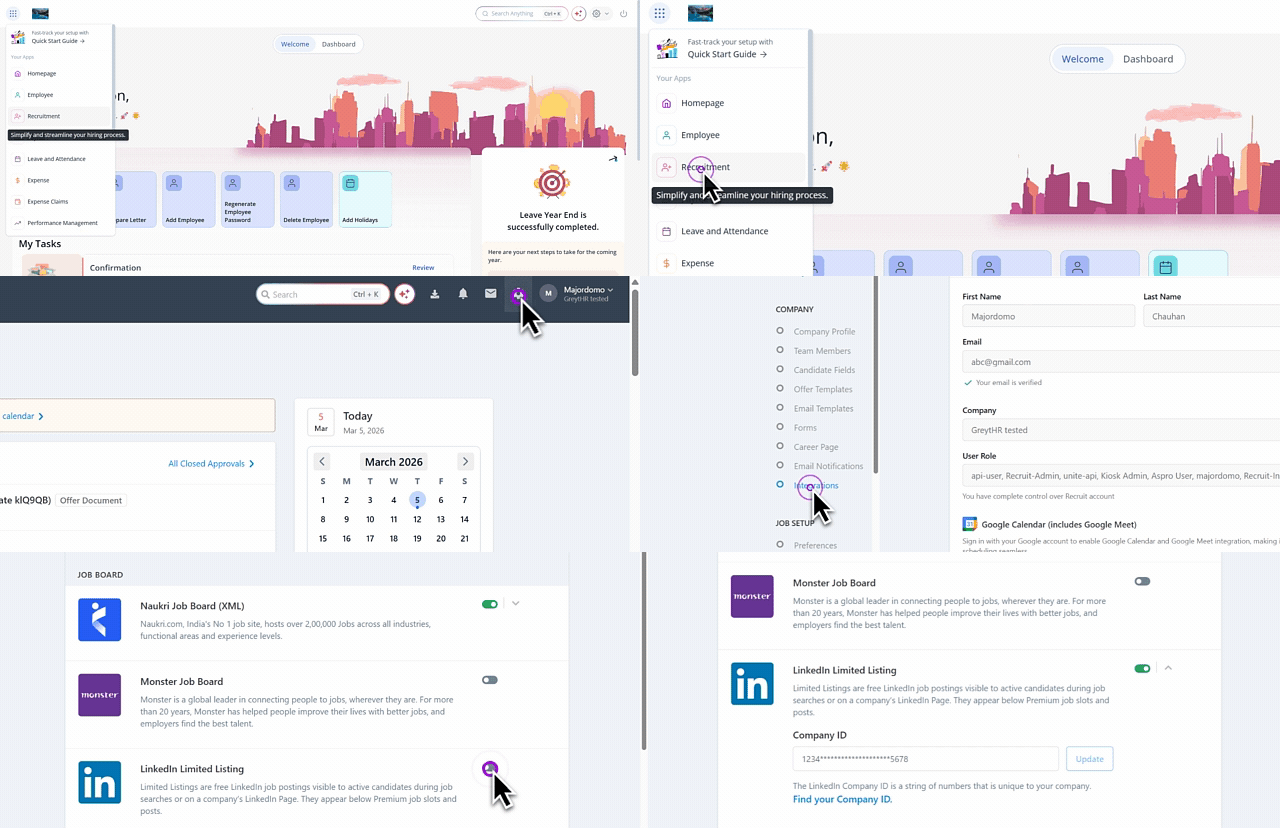
After you have enabled the LinkedIn Limited Listing integration, you can post jobs on LinkedIn.
Post jobs on LinkedIn
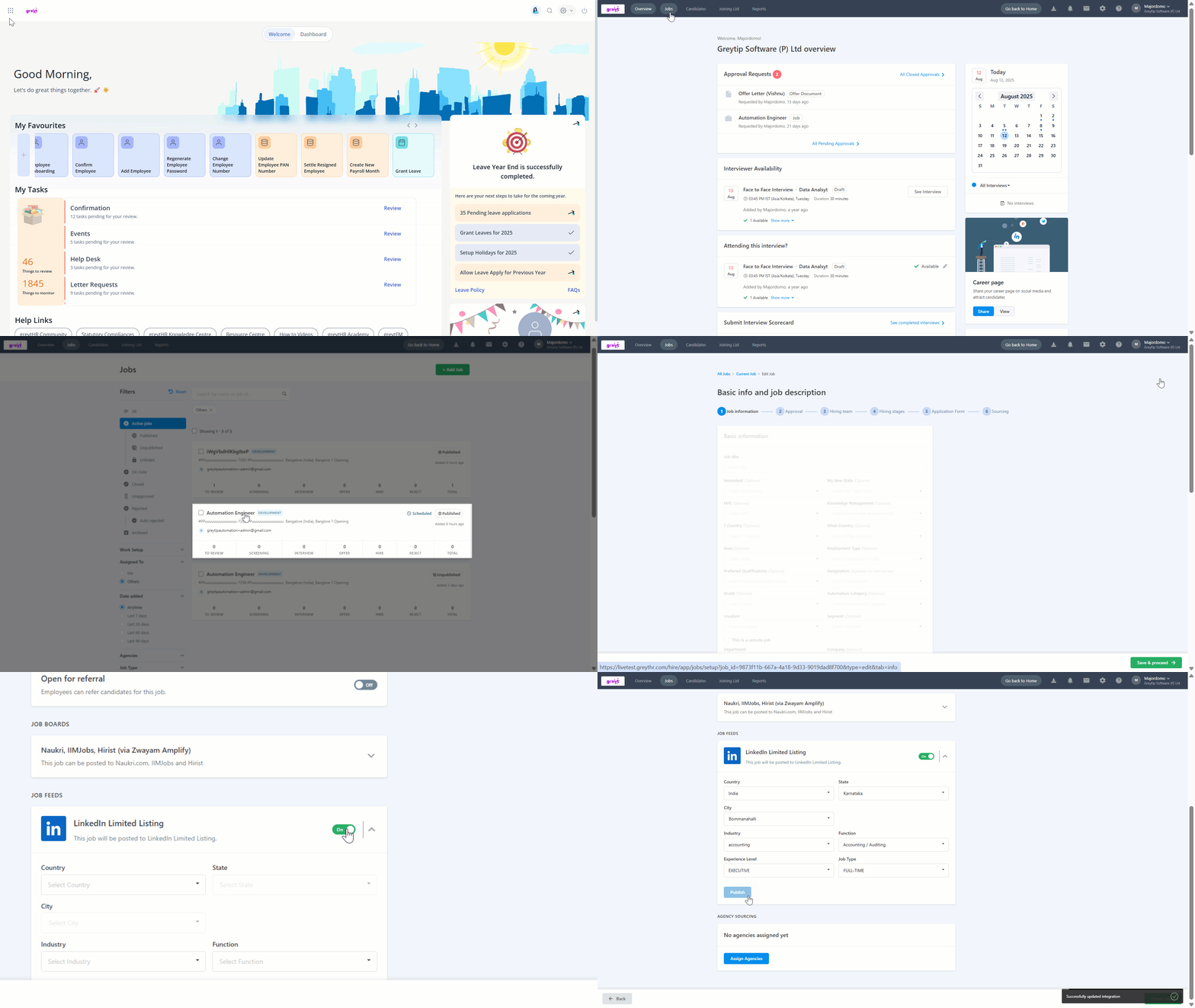
You can post jobs on LinkedIn while creating a new job or by editing an existing job. To post a job on LinkedIn, hover over the 9 dots and select Recruitment > Jobs.
To publish an existing job on LinkedIn, select an existing job card > click Edit > Sourcing > Job Boards. Toggle the LinkedIn Limited Listing option, fill out the details such as Country, State, City, and other details, and click Publish.
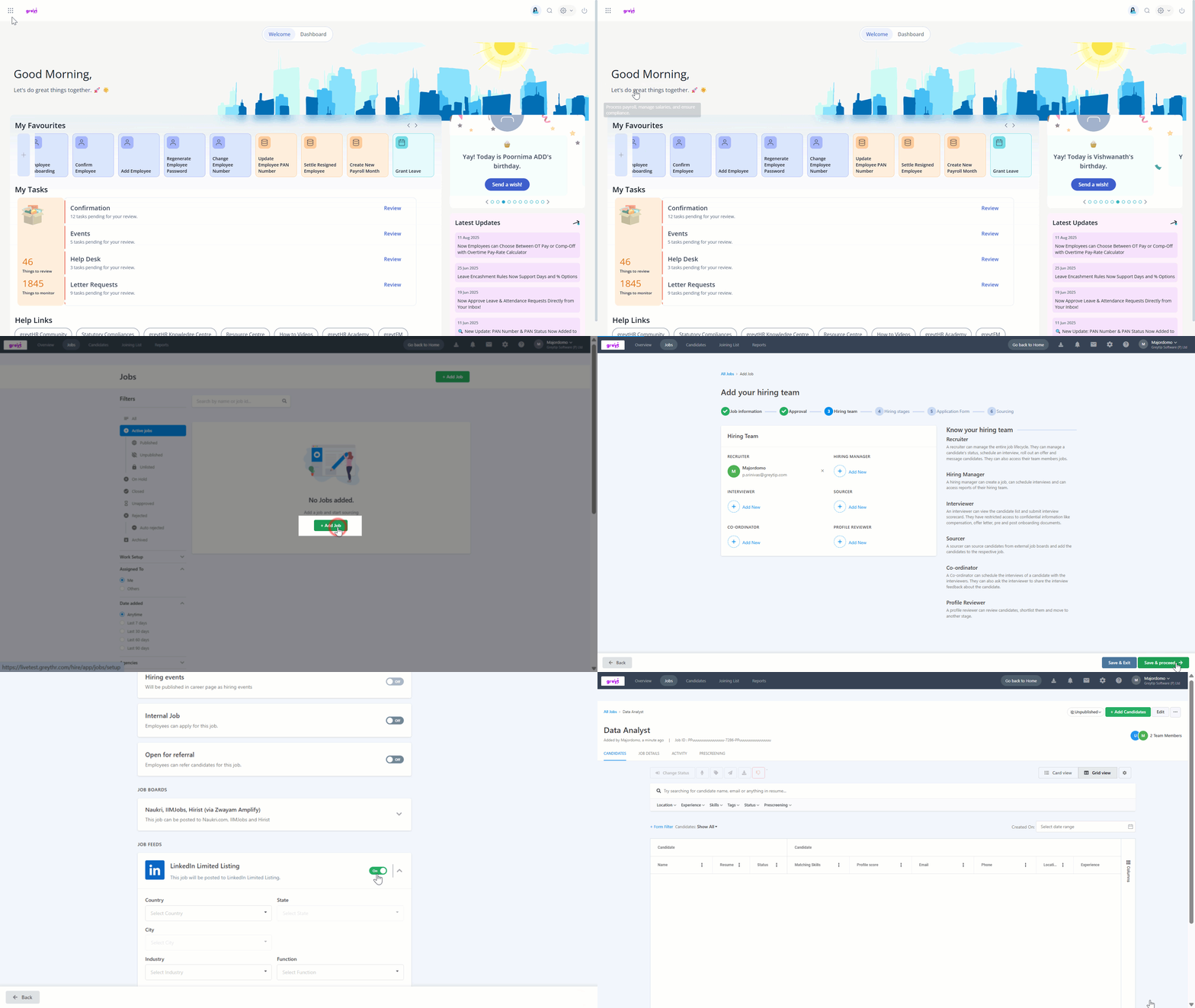
To publish a new job on LinkedIn, on the Jobs page, click + Add Job, follow the steps similar to adding a job > under Sourcing > Job Boards > toggle the LinkedIn Limited Listing option, fill out the details such as Country, State, City, and other details, and click Publish.
Note:
Once published, it may take up to 24 hours for the job to appear on LinkedIn.
The LinkedIn Limited Listing toggle option is available once you have completed the integration.
Important: After you click on Publish to post jobs to LinkedIn, the system should check if all mandatory fields are available and validations are satisfied.
The mandatory fields are:
Job ID - (will be generated during job creation)
Company Name - (Company Name from Req if there are multiple companies, or a system-level company name if there is only one)
Job Title - (will be generated during job creation)
Job Description - (will be generated during job creation)
LinkedIn Company ID - (available in the settings page)
The validations needed are:
Ensure Job ID has a maximum length of 40 characters to be considered as valid
Ensure Job Descriptions have a minimum of 100 characters to be considered as valid
If mandatory fields are missing or validations fail, the system will not allow the job to be posted on LinkedIn.
Additional information
Limited listings don't guarantee a job being posted on LinkedIn. This is due to certain reasons:
De-duplication: Jobs that you have already posted directly on LinkedIn or from greytHR Recruit.
Employer opt-out: If you have opted out of the LL program.
Invalid fields: Missing mandatory fields like Company ID, Industry, or Location.
Spam Jobs: Jobs posted on LinkedIn may go through a review process to ensure they meet LinkedIn’s professionalism and integrity guidelines.
In some cases, LinkedIn may require certain jobs to be promoted, such as those from companies with generic names (e.g., “Confidential Company”) or staffing firms. This helps prevent misuse, improve quality, and ensure transparency. LinkedIn also reserves the right to mandate job promotion.
For more information, you can refer to this link.
Note: For LinkedIn-related issues, you can use the following template to raise tickets with LinkedIn support team using the link: https://www.linkedin.com/help/recruiter:
Contact Reason: General Question/Service Request
Issue Type: Jobs
Your Question: Please opt-in the following employer for limited listings ingestion from the below XML feed that is already integrated with LinkedIn. Please use the following information:
XML Name (JAM Source): greythr
Employer Name: Exact company name as on the feed
Company Page URL: LinkedIn Company Page URL starting with https://www.linkedin.com/company/
We have also attached the consent from the customer for your reference
Filter jobs posted on LinkedIn
If you want to filter the jobs that are posted on LinkedIn, hover over the 9 dots and select Recruitment > Jobs. On the Jobs page, under the Filters section, expand the Job Board and select LinkedIn. The jobs posted on LinkedIn would appear.
Candidates can apply to jobs posted on LinkedIn. When they click the posting, they will be redirected to the specific job application page on your greytHR-hosted Career Portal, where they can complete and submit their application.
Filter candidates’ LinkedIn applications
To review the candidates’ applications received through LinkedIn, hover over the 9 dots and select Recruitment > Candidates.
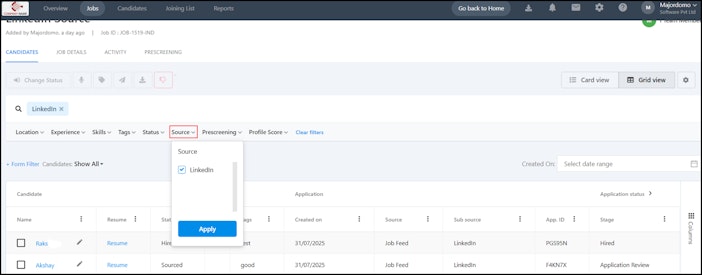
Under the filters, expand the Sub source field, select LinkedIn, and the list of candidates’ applications from LinkedIn would appear.


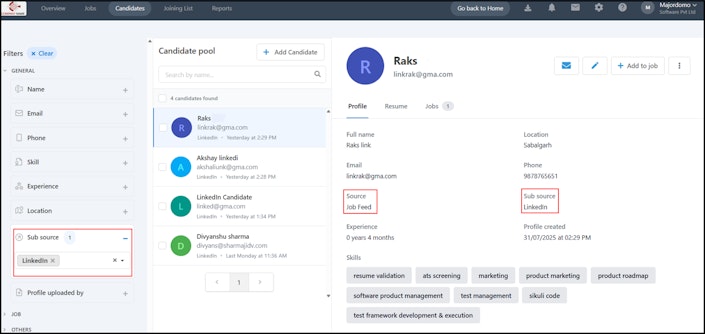
Alternatively, you can open a job and apply filter in the Source tab.


Monitor jobs posted on LinkedIn
You can monitor the jobs posted on LinkedIn through the Reports tab. Hover over the 9 dots and select Recruitment > Reports. On the Reports page, you can view the following reports:
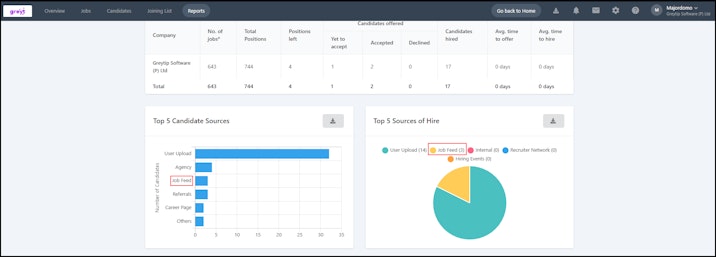
Recruitment Summary Report helps you to view the top 5 Candidate Sources and Sources of Hire.


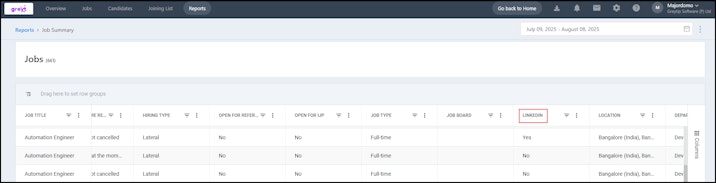
Job Summary Report includes a filter as LinkedIn helps you to identify if the job is posted to LinkedIn.


You can also check if a job has been posted to LinkedIn from the following reports:
Candidate
Source and Origin
LinkedIn Help Centre articles:
Related articles: