Effortlessly Post Jobs on Naukri, Hirist, and IIM with greytHR
Updated in September - 2025 | Subscribe to watch greytHR how-to video
Integrating job portals or career platforms with recruitment systems simplifies hiring processes for organizations and helps them automate HR tasks. As recruitment needs grow, companies require a solution to post jobs, manage applications, and track candidates effortlessly from a single platform.
The Naukri, Hirist, and IIM Jobs integration with greytHR Recruit addresses the key recruitment challenges. The integration (using Zwayam Amplify) enables recruiters to post job openings directly to these platforms from within greytHR Recruit. This ensures a seamless flow of applications into the system.
Note: To enable the Naukri, Hirist, and IIM Jobs integrations in greytHR Recruit, get the paid Zwayam Amplify service from Naukri. Contact your Naukri Account Manager to access the service and obtain the Zwayam Amplify key.
The Naukri integration involves the following steps:
Enable Naukri (using Zwayam Amplify)
Publish jobs to Naukri
Enable Naukri (using Zwayam Amplify)
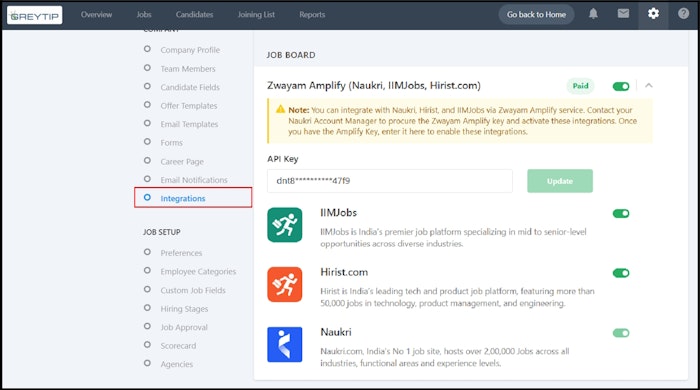
From the greytHR Admin portal, hover over the 9 dots and select Recruitment > Settings > Company > Integrations.
Under the JOB BOARDS section, toggle to enable the Zwayam Amplify option.
Add the Zwayam API Key and click Update.
Enable the Naukri, Hirist.com, and IIM Jobs as per your requirements.


Publish jobs to Naukri (using Zwayam Amplify)
After enabling the Naukri option, there are two scenarios to publish the jobs to Naukri:
To publish an existing job on Naukri, log in to the greytHR Admin portal and go to Recruit > Jobs > Select an existing job card > click Edit > Sourcing > Job Boards > Select the Location, Industry, Salary options > Publish > Save & Exit.
To publish a new job on Naukri, go to Recruit > Jobs > Click + Add Job, follow the steps similar to adding a job > under Sourcing > Select the Location, Industry, Salary options > Click Publish to post jobs on Naukri, IIM Jobs, and Hirist.com.
Update jobs on Job Boards
If you want to update or edit the jobs published on the job boards:
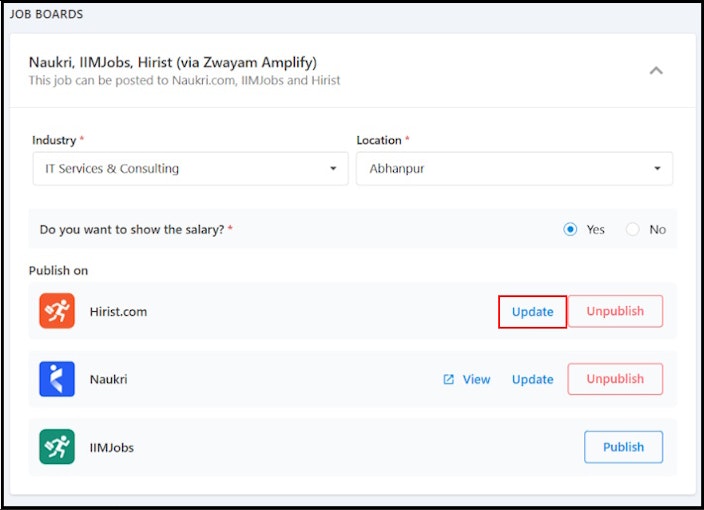
Log in to the greytHR Admin portal, hover over the 9 dots, and select Recruitment > Jobs > select the required job card, and click Edit to make the required changes.
Go to Sourcing > Job Boards > Click Update for the changes to reflect.


Unpublish jobs from Job Boards
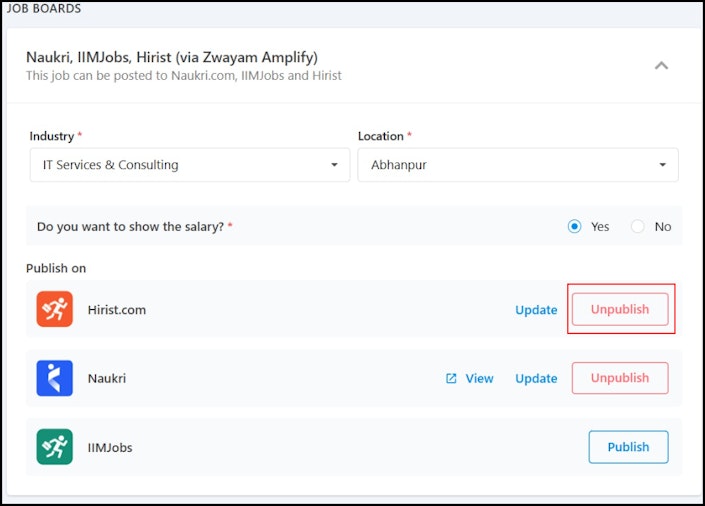
To unpublish a job on Naukri, from the greytHR Admin portal, hover over the 9 dots and select Recruitment > Jobs > Select the required job card > click Edit > Sourcing > Job Boards > Click Unpublish.


Other related links: