Use Employee Categories in greytHR Recruit for Job Fields
Updated in May - 2026 | Subscribe to watch greytHR how-to video
Employee categorization is a critical aspect of job postings, enabling organizations to attract the right talent and clearly define job roles. In the greytHR Admin Portal, Employee Categories under the Employee Position page allows organizations to classify employees based on attributes such as designation, department, location, and more.
These Employee Categories can be configured as Job Information fields in greytHR Recruit. This ensures smooth data management when moving candidates to HRMS and assigning them to the right positions.
Enable/Disable employee categories in Recruit
From the greytHR Admin portal, hover over the 9 dots and go to Recruitment > Settings > JOB SETUP > Employee Categories.


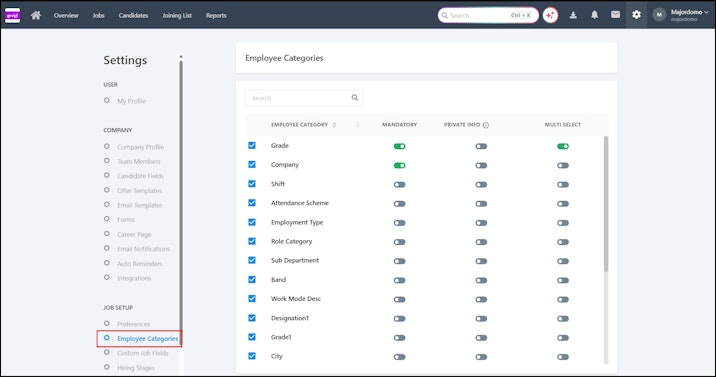
Enable/disable the EMPLOYEE CATEGORY field by clicking the checkbox available against each field.
Configure EMPLOYEE CATEGORY fields by toggling the required option:
MANDATORY: Designates the employee category field as needed.
PRIVATE: Restricts field visibility to internal members only.
MULTI-SELECT: Enables the selection of multiple values for the field.
Points to remember:
Enabling/disabling employee categories in Settings immediately reflects on the Jobs page.
Department and Location are the default employee categories on greytHR Recruit.
If Employee Categories such as Job Category, Designation, and Job Type are linked to active jobs, you cannot modify or delete them.
The dropdown values for the employee category fields are based on the configurations set in the Employee Category in greytHR.
Create new employee categories based on your organizational requirements from the Employee Position page.
You can also automate the Job Approval workflow by applying predefined conditions. The Job Approval feature in greytHR Recruit helps streamline the recruitment process by automating job approval workflows.