View Income Tax Slabs Easily in greytHR Admin Portal
Updated in January - 2026 | Subscribe to watch greytHR how-to video
Income Tax is calculated on income earned by all individuals, Hindu Undivided Family (HUF), partnership firms, and corporates as per the Income Tax Act of India. A tax slab means to pay different tax rates based on different income ranges.
The Tax Slab page in the greytHR Admin portal displays the tax slabs for calculating income tax in India. You can also view the tax slabs for the current and past financial years. You do not need to make any effort to incorporate the budget changes. The budget changes will automatically reflect in greytHR.
You can view the old tax slabs and new tax slabs under the Old Regime and New Regime tabs respectively. To view the Tax Slab page, go to the Settings icon > System Settings > Income Tax > Tax Slab.
View Income Tax slabs
To view the Income Tax slabs, from the greytHR Admin portal, go to the Settings icon > System Settings > Income Tax > Tax Slab.
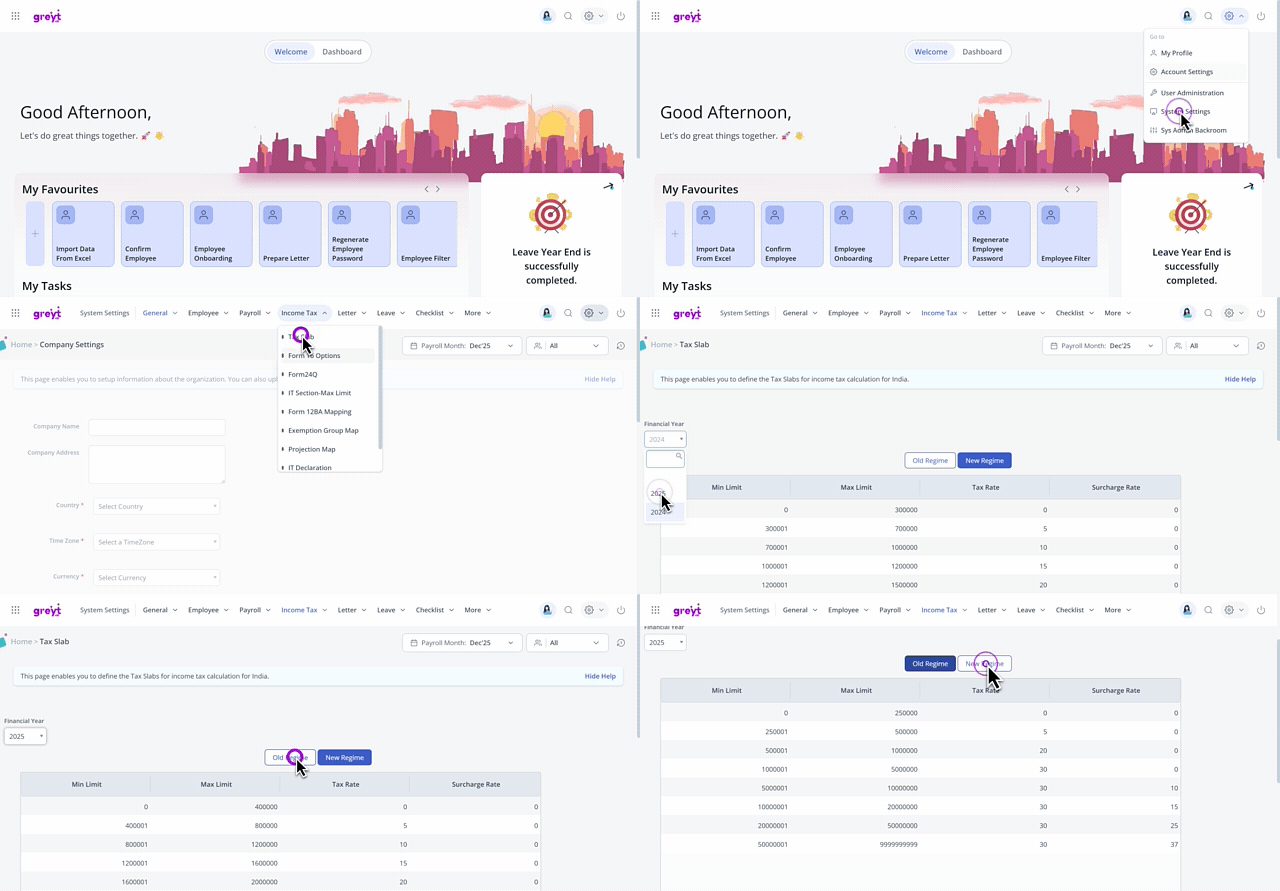
On the Tax Slab page, from the Financial Year dropdown list, select the required financial year. The page displays the Min Limit, Max Limit, Tax Rate, and Surcharge Rate for different income groups in a tabular format.
You can toggle through the Old Regime and New Regime tabs to view the tax slabs as per your requirements.
Other related links: