View and Download Employee PF YTD Statement on greytHR
Updated in February - 2026 | Subscribe to watch greytHR how-to video
An employee's Provident Fund (PF) Year-to-Date (YTD) statement is important for providing a summary of their PF contributions and withdrawals during a specific period. It helps you to verify the PF contributions deducted from the employee's salary and to identify any discrepancies or errors. The statement can also be used for tax filing purposes and as proof of PF contributions made by the employee.
The PF YTD Statement page on the greytHR Admin portal helps you to view the employee's and employer's contribution towards the employee’s provident fund (PF). The page allows you to download the statement in pdf format for the selected year. The page also displays the Month, Earnings, PF, and VPF details of the selected employee.
To view the PF YTD Statement page,from the greytHR Admin portal, hover over the 9 dots and go to Payroll > Published Info > PF YTD Statement.
View and download the PF YTD statement
To view and download the PF YTD statement, from the greytHR Admin portal, navigate to Payroll > Published Info > PF YTD Statement.


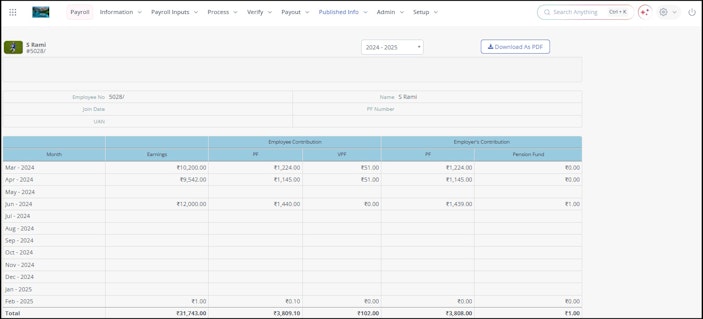
On the PF YTD Statement page, from the search an employee search box, search for the employee whose statement you want to view.
From the dropdown list available next to the Download As PDF button, select the required year. The page displays the PF YTD statement for the selected year.
Click the Download As PDF button to download the PF YTD statement of the selected employee.
Related articles: