Easily View and Download Employee Payslips in greytHR
Updated in February - 2026 | Subscribe to watch greytHR how-to video
Viewing and sharing employees' payslips is vital for transparency and accuracy in payroll. Payslips provide detailed earnings and deductions, helping employees understand taxes and make informed financial choices. They also help identify and resolve pay discrepancies. Establishing clear policies and protecting privacy is crucial in managing payslip access.
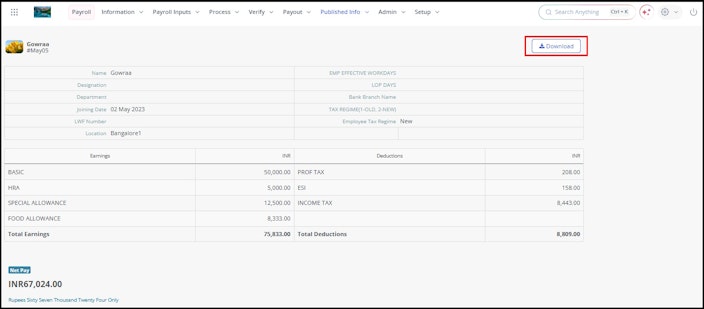
The Payslip page in the greytHR Admin portal allows you to view and download your employees' payslips. You can release the payslip to the employee’s portal from this page. The payslip displays the Total Earnings, Total Deductions, and Net Pay of the employee’s salary.
To view the Payslip page, from the greytHR Admin portal, hover over the 9 dots and select Payroll > Published Info > Payslip.
You can perform the following actions on the Payslip page:
View and download an employee’s payslip.
Publish the payslip to an employee’s portal.
View and download an employee's payslip
To view an employee's payslip, from the greytHR Admin portal, hover over the 9 dots and select Payroll > Published Info > Payslip.
On the Payslip page, from the select an employee search box, search for the employee whose payslip you want to view. The page displays the payslip of the selected employee.
Click the Download button to download the payslip of the selected employee.


Publish the payslip to the employee’s portal
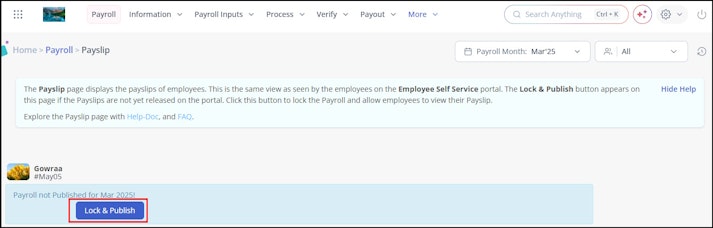
The Lock & Publish button is visible only when the payslip is not published to the employee’s portal. This button allows you to lock the payroll and publish the payslip.
To publish the payslip to an employee’s portal, from the greytHR Admin portal, hover over the 9 dots and select Payroll > Published Info > Payslip.
On the Payslip page, from the select an employee search box, search for the employee whose payslip you want to publish.
Click the Lock & Publish button to publish the payslip to the employee’s portal.


Related articles: