Discover and Customize Payslip Templates in greytHR
Updated in January - 2026 | Subscribe to watch greytHR how-to video
A payslip template gallery is a collection of pre-designed templates that employers can use to create payslips for their employees. These templates typically include fields for the employee's name, salary, tax deductions, and other relevant information.
The purpose of a payslip template gallery is to provide employers with a range of options for creating payslips that are clear, concise, and easy to understand. By selecting a template from the gallery, employers can quickly create professional-looking payslips without needing to design them from scratch.
The Payslip Gallery page in the greytHR Admin portal allows you to select and customize the payslips as per your requirements. The page offers you a variety of templates for your selection. You can view the chosen template in effect after generating the employees' salary payslips.
To view the Payslip Gallery page, from the greytHR Admin portal, hover over the 9 dots and go to Payroll > Setup > Payslip Gallery.
View and select a payslip template
To view and select a payslip template, from the greytHR Admin portal, hover over the 9 dots and go to Payroll > Setup > Payslip Gallery.
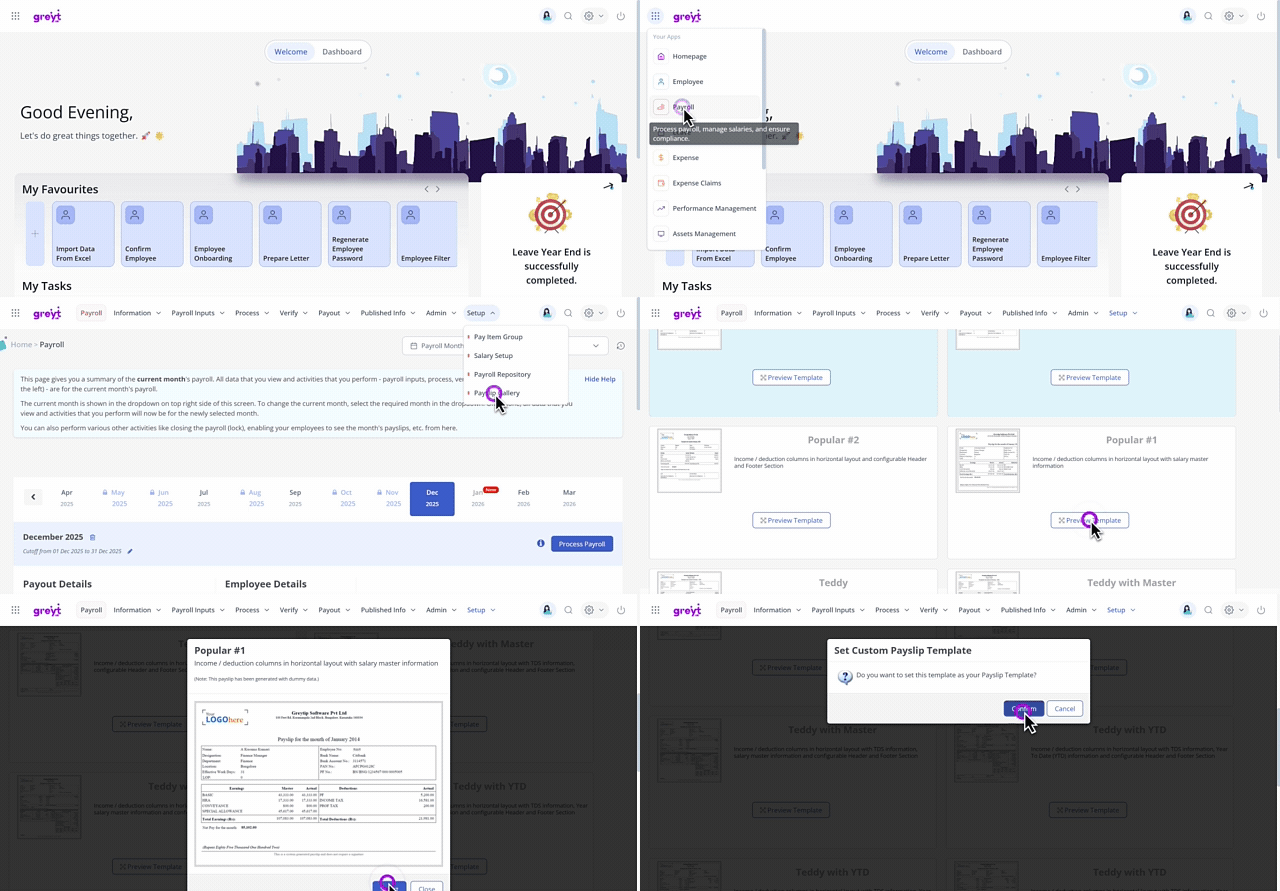
On the Payslip Gallery page, you can view various templates for customizing your payslip.
Select the required template and click the Preview Template button. A pop-up appears and displays a preview of the selected template.
On the pop-up, click Select. The Set Custom Payslip Template pop-up appears.
Click Confirm to customize your payslip.
Other related links: