Access Employee Loan Statements Easily with greytHR
Updated in February - 2026 | Subscribe to watch greytHR how-to video
Viewing an employee's loan statement is necessary to keep track of the loan repayment schedule and the amount of outstanding debt. It allows you to monitor loan payments and identify any discrepancies or issues in the repayment process.
With the help of the statement, you can ensure that loan repayments are deducted accurately from the employee's salary and that there are no delays or missed payments. This helps to maintain transparency and accountability in the loan process and promotes a positive work environment.
The Loan Statement page in your greytHR Admin portal allows you to view information on the loans availed by an employee. The page displays the Active, Closed, and All loan cards. Each card displays the Balance Principal and Balance Installments for the loan.
View an employee’s loan statement
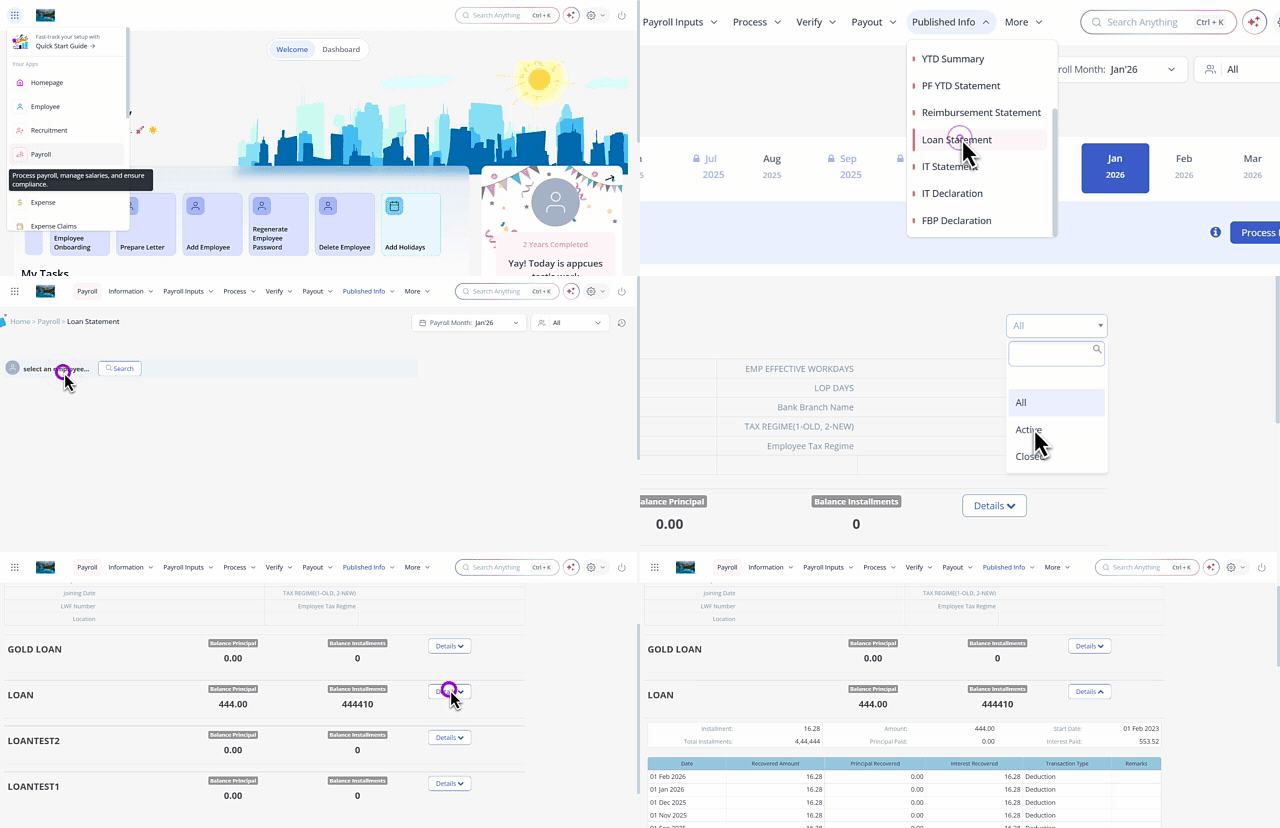
To view an employee’s loan statement, from the greytHR Admin portal, hover over the 9 dots and select Payroll > Published Info > Loan Statement.
On the Loan Statement page, from the select an employee search box, search for the employee whose loan statement you want to view. All the loan cards appear.
From the dropdown list available in the top right corner, select the loan status as All/Active/Closed as per your requirements.
Select the required loan card and click the Details button. The card expands and displays the loan statement for the selected employee. The loan statement displays the details such as Date, Recovered Amount, Principal Recovered, Interest Recovered, Transaction Type, and Remarks.
Other related links: