View and Download Employee IT Statements on greytHR
Updated in February - 2026 | Subscribe to watch greytHR how-to video
Viewing an employee's IT statement helps to ensure that proper tax withholding and payment are made, and can also help in avoiding legal disputes with tax authorities. The statement helps you view and share accurate reports of employees' income and taxes paid to the government and can assist in reducing the risk of penalties or fines for non-compliance.
The IT Statement page in your greytHR Admin portal allows you to view the Income Tax (IT) calculations of the employees’ income for the current financial year. The page displays the Taxable Income, Net Tax, various incomes and deductions, and all other Income Tax components. The page also allows you to download the IT statement in pdf format.
To view the IT Statement page, from the greytHR Admin portal, hover over the 9 dots and go to Payroll > Published Info > IT Statement.
You can view the following information on the IT Statement page:
Tax calculated as per tax TAX REGIME.
Net tax.
Tax deducted per month.
Remaining months.
Total tax due.
View and download an employee’s IT statement
To view and download an employee’s IT statement, from the greytHR Admin portal, hover over the 9 dots and go to Payroll > Published Info > IT Statement.


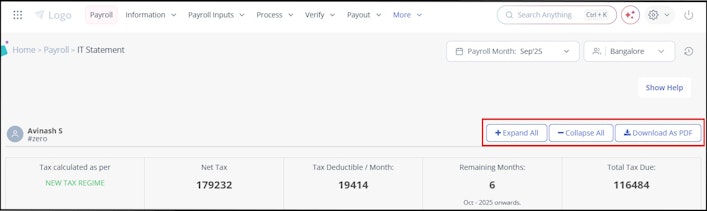
On the IT Statement page, from the search an employee search box, search for the employee whose IT statement you want to view. The Income Tax Computation for the Financial Year as on page appears.
Click + Expand All. The section expands and displays the details of the Income Tax calculated. You can click - Collapse All to reset the section.
Click the Download As PDF button to download the IT statement in pdf format.
Related articles: