Use greytHR to Post Employee Bulletins and Announcements
Updated in February - 2026 | Subscribe to watch greytHR how-to video
Bulletin board is a feature that allows employers to share information with their employees. The bulletin board typically functions as a central hub for important announcements, updates, and other information that employees need to know.
Using the Bulletin Board page in the greytHR Admin portal, you can:
Post official announcements such as company news, newsletters, and office memos for employees.
Attach files to bulletin messages for easy reference.
Schedule bulletins to be published on future dates.
The posted messages disappear after the selected expiry date. The page displays information such as Category, Title, Posted Date, and Rank.
Post a bulletin
To post a bulletin, from the greytHR Admin portal, hover over the 9 dots and select Employee > Admin > Bulletin Board.
On the Bulletin Board page, click Add Bulletin button. The form appears.
From the Category dropdown list, select the category of the bulletin.
In the Rank text box, enter the display order of the bulletin.
From the Start Date & Expiry Date dropdown calendar, select the start and expiry date of the bulletin.
In the Title text box, enter the title of the bulletin.
In the Content description box, enter the content of the bulletin.
In the Attachments section, click Upload File. The dialog box appears.
Browse to the folder, select the file, and click Open.
From the Employee Filter dropdown list, select the required option.
Note: You can also create a new filter by clicking the + icon available next to Employee Filter.Click Save to post a bulletin.
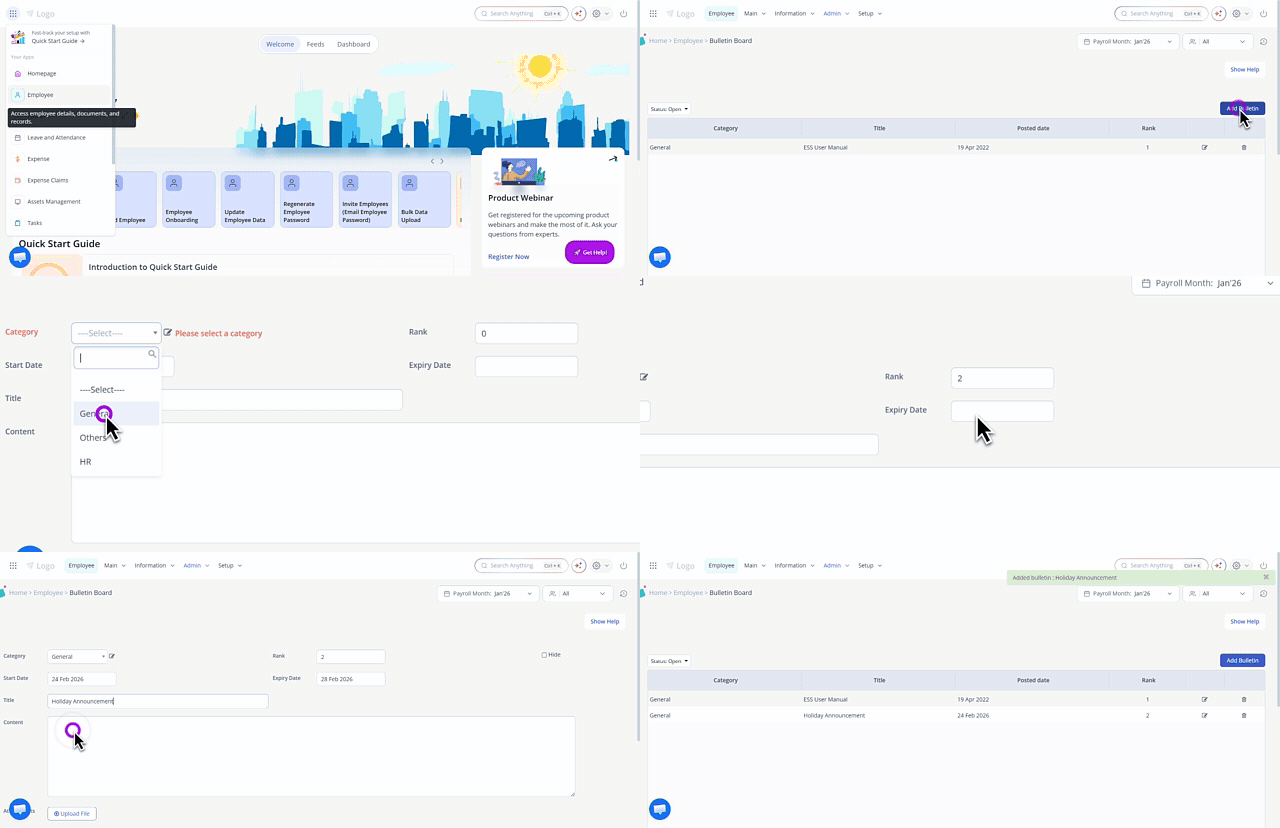
Note: You can edit or delete the existing bulletin by clicking the Edit or Delete icons on the Bulletin Board page.
Other related links: