Easily Regenerate Employee ESS Passwords in greytHR
Updated in January- 2026 | Subscribe to watch greytHR how-to video
When employees forget their passwords for the ESS portal, they cannot reset them directly due to security reasons. As an admin, you must regenerate the ESS password and share it with the employee. After entering the regenerated ESS password, the employee will be prompted to create a new password of their choice.
The Regenerate Employee Password page allows you to regenerate an employee's ESS password. You can either send the new password through email or view the password and communicate it to the employee.
Regenerate employee password
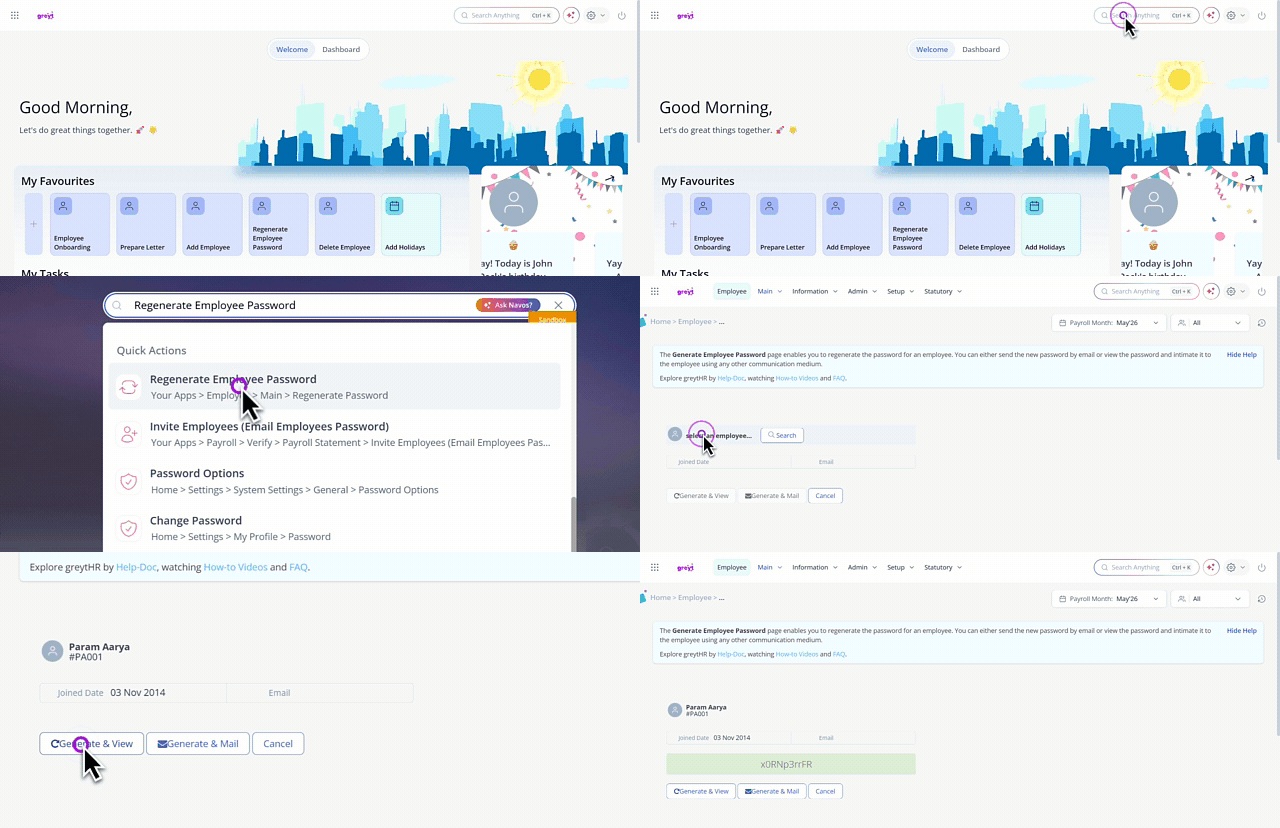
To regenerate an employee's ESS password, from the greytHR Admin portal, go to the NAVOS search bar, and enter Regenerate Employee Password.
On the Regenerate Employee Password page, from the Select an employee search box, select the employee for whom you want to regenerate the ESS password. The page displays the Joined Date and Email.
Click the Generate & View button. The page displays the new ESS password, and you can choose to manually inform the employee of the new password.
Click the Generate & Mail button to generate the ESS password and send it via email.
Other related links: