Invite Employees to greytHR ESS Mobile App
Updated in February - 2026 | Subscribe to watch greytHR how-to video
The greytHR mobile application is Employee Self Service (ESS) at employees' fingertips. The mobile app enables employees to manage their attendance, leave, IT declaration, and reimbursement claims on the go.
You can invite employees to use the Employee Self Service (ESS) mobile app through the Employee Overview page.
Invite employees to use ESS mobile app
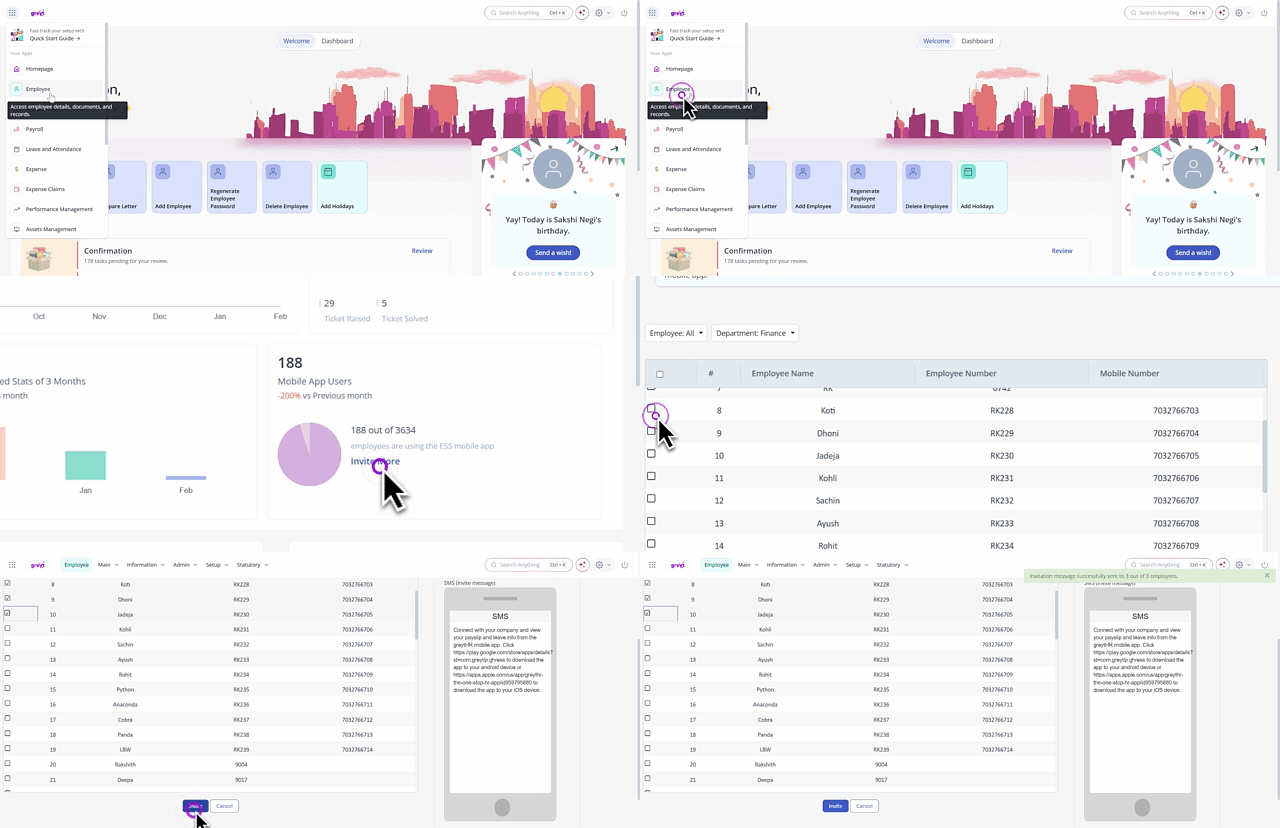
To invite employees to use the greytHR mobile application, from the greytHR Admin login, hover over the 9 dots and select Employee > Main > Overview. The Overview page opens.
Under the Mobile App Users card, click Invite More. A list of the employees appears.
Select the employees using the checkbox available next to the employees' names.
Click Invite to invite the employees.
Note: To complete this process successfully, the employee's mobile number must be updated in the greytHR database.
Other related links: