Remove Employee Separation Details for Easy Rehiring
Updated in February - 2026 | Subscribe to watch greytHR how-to video
When an employee leaves a company, various details related to their departure, such as the date of separation, the reason for leaving, final paycheck information, benefits termination, and any other relevant information, are usually recorded in the company's systems or employee files.
Removing an employee's separation details is the erasing or elimination of the information or records associated with an employee's separation from a company or organization.
In greytHR, you might feel the need to remove these details when you are hiring a former employee. The Separation page in the greytHR Admin portal allows you, as an admin, to remove the separation details of an employee.
Remove employee’s separation details
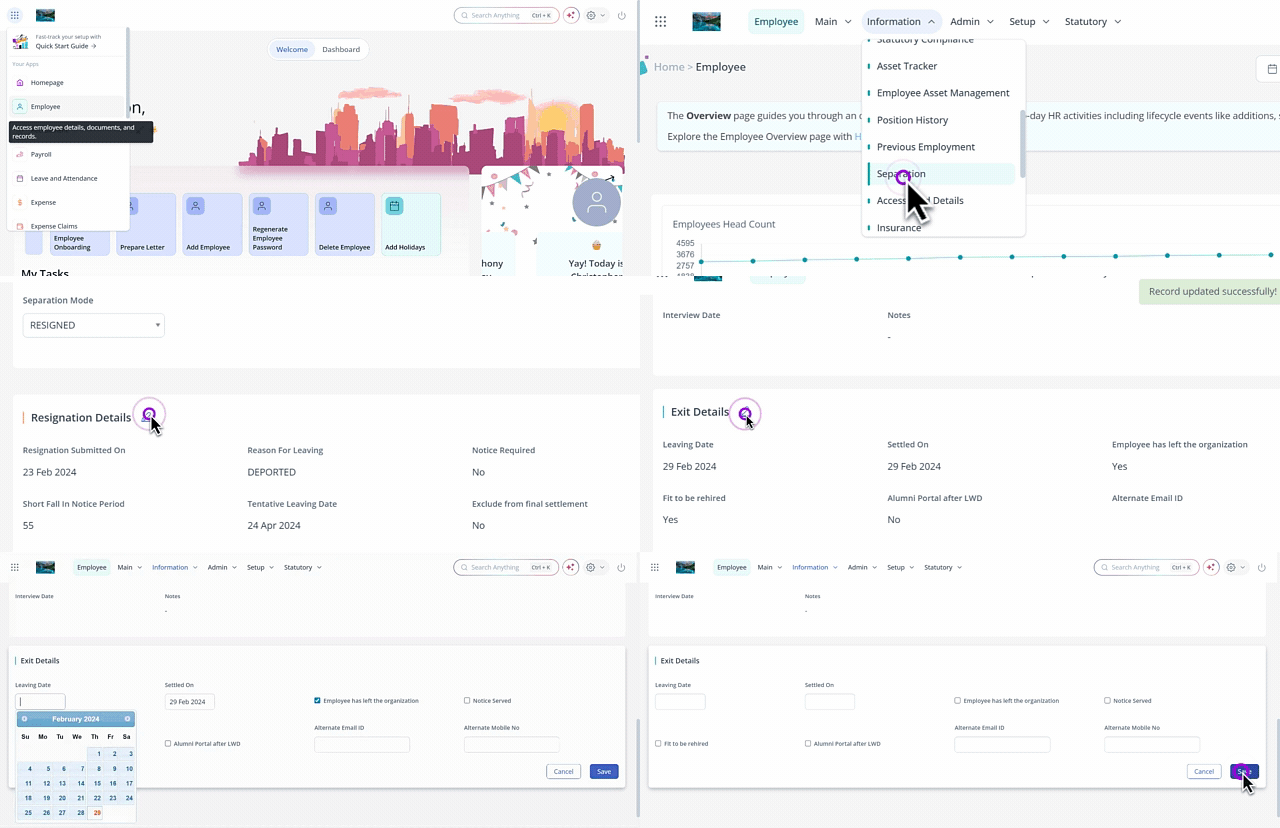
To remove the separation details of an employee, from the greytHR Admin portal, hover over the 9 dots and select Employee > Information > Separation.
On the Separation page, from the Employee Type dropdown list, select Resigned Employees.
In the Search Employee text box, search for the employee whose separation details you want to remove.
Under the Resignation Status section, from the Separation Mode dropdown list, select Resigned.
Clear all the details from the Resignation Details, Exit Interview, and Exit Details sections. Once all the separation details are removed, the employee profile is reactivated.
Other related links: