Easily Upload Employee Photos in Bulk via greytHR
Updated in February - 2026 | Subscribe to watch greytHR how-to video
Uploading bulk photos of employees refers to the process of adding or updating the employee photos for a large number of employees at once. The feature can be useful for organizations with a large number of employees, as it allows employers to quickly and easily update the employee photos for all employees at once.
The Bulk Photo Upload page in the greytHR Admin portal enables you to upload your employees' photos in bulk with a few simple steps. The feature saves your time and reduces errors that may happen due to the repetitive nature of the task.
The page displays a list of all the uploads you have done in the past. You can view the upload details such as File name, Status, Log, and Date of upload.
Upload employees' photos in bulk
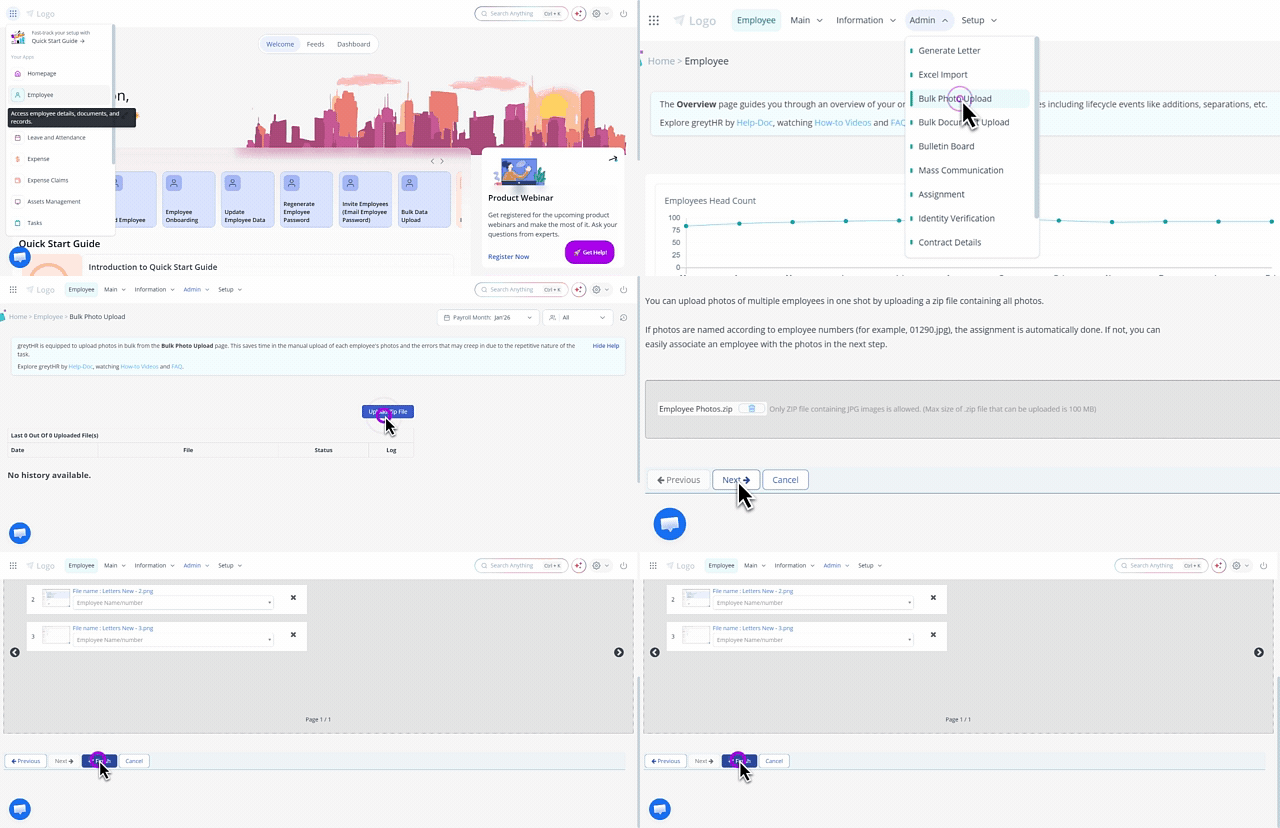
To upload photos in bulk, from the greytHR Admin portal, hover over the 9 dots and select Employee > Admin > Bulk Photo Upload.
On the Bulk Photo Upload page, click Upload Zip File. A form appears.
Under Step 1: Upload section, click Upload File. The dialog box appears.
Browse to the folder, select the appropriate zip file from your directory, and click Open. The uploaded file appears in place of the Upload File button.
Note: If you want to cancel the selection and choose another file, click the Delete icon appearing adjacent to the uploaded file.Click Next. Step 2: Associate section appears.
Under Step 2: Associate, click the photo. The dropdown list of employee numbers appears.
Select the required employee number.
Note: The process is automatically done if the names of the photos are according to their employee number.Click Finish to upload the photos in bulk. The success message appears.
Other related links: