Add and Manage Claim Items in greytHR for HR Admins
Updated in July - 2025 | Subscribe to watch greytHR how-to video
Sometimes, to provide employees with benefits, organizations provide reimbursement options. The employees can apply for the claim reimbursement and get their money back.
The Claim Items page in the greytHR Admin portal helps you to add the items for which the employees can claim reimbursement. The page also allows you to edit the existing claim item as per your requirements. You can view the list of existing claim items on the page.
To view the Claim Items page, go the Settings > System Settings > Claims > Claim Items.
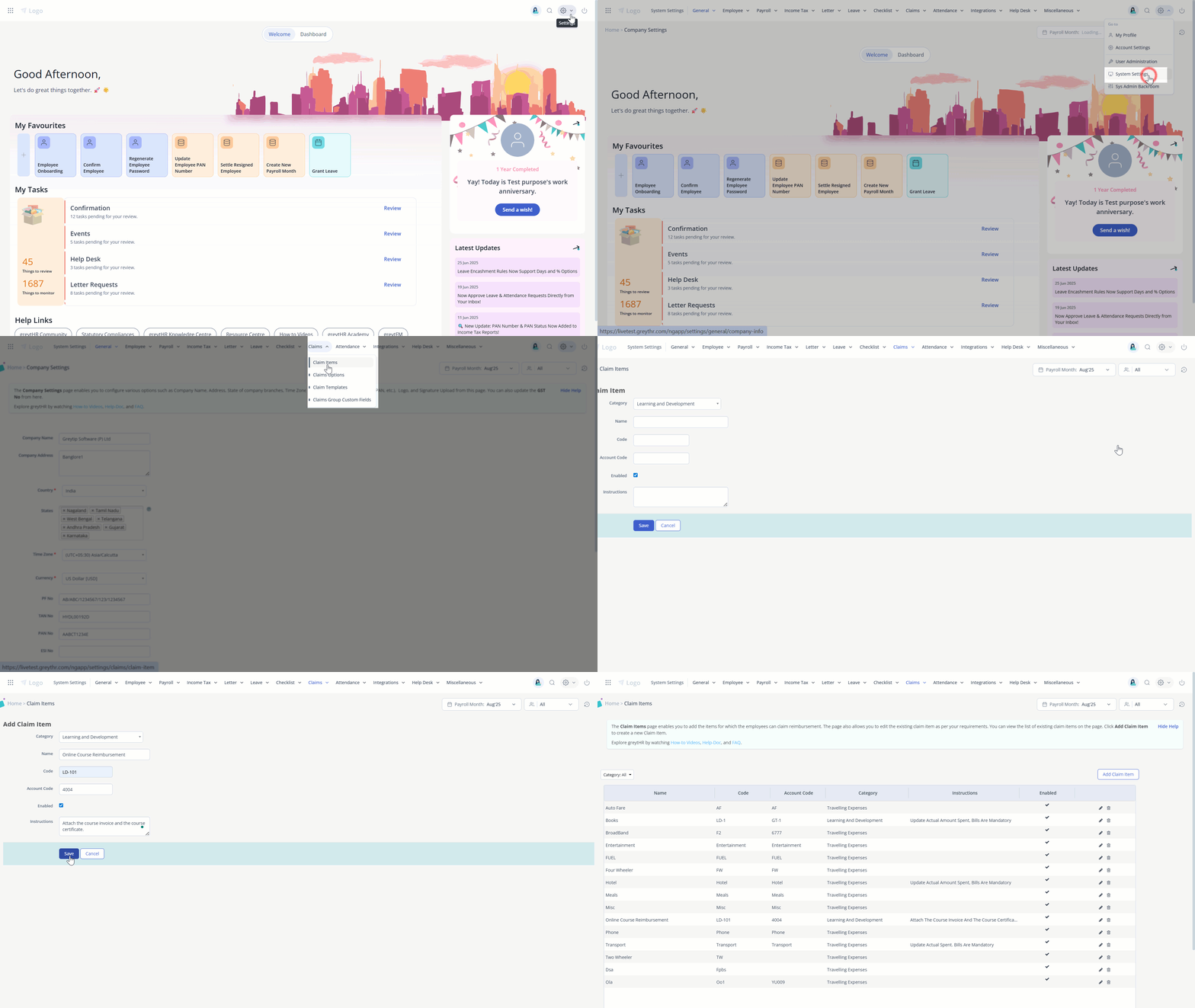
Add a claim item for the organization
To add the claim item for the organization, perform the following actions:
From the greytHR Admin portal, go to Settings > System Settings > Claims > Claim Items.
On the Claim Items page, click the Add Claim Item button. A form appears.
From the Category dropdown list, select the required category.
In the Name text box, enter the name of the claim item.
In the Code text box, enter the claim code.
In the Account Code text box, enter the account code.
Select the Enabled option if required.
In the Instruction description box, enter the necessary instructions for claims.
Click Save to add the claim item for the organization.
Note: You can edit or delete the existing claim item by clicking the Edit or Delete icon available next to the Enabled column in the table.
Other related links: