greytHR’s October 2026 Updates


Here's what we've been working on lately
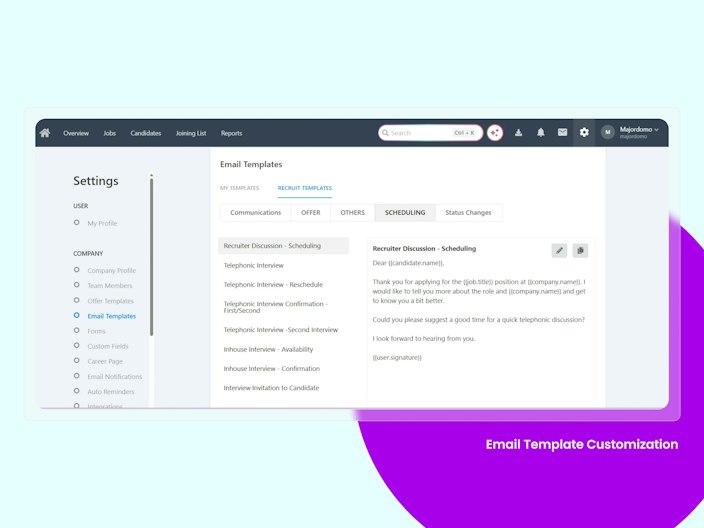
Email Template Customization in Recruit
Until now, all recruitment emails — interview invites, scorecard alerts, hiring notifications — were sent automatically with fixed content. Recruiters had no visibility into what was going out and no way to edit it.
Now, every system email is surfaced as an editable template under Settings → Email Templates → Recruit Templates. Admins can customise subject lines, body content, and placeholders. And at two critical moments — when scheduling an interview and when marking a candidate as Hired — recruiters see the exact email before it’s sent and can edit it on the spot.


Manpower Planning — Auto-Escalation on Missed Deadlines
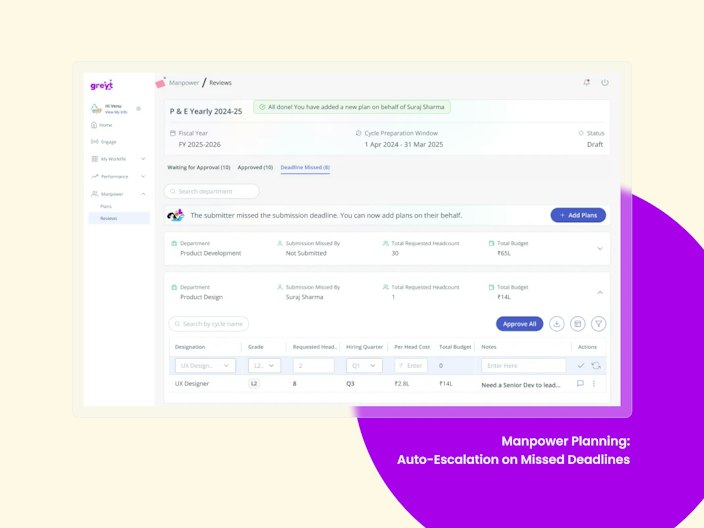
When a department head missed the submission deadline for their manpower plan, nothing happened — the plan stayed in “Not Submitted” indefinitely, silently blocking the entire planning cycle.
Now, the system automatically escalates to the next assessor in the approval chain who has Create permission. The assessor receives an email with a direct link to create and submit the plan on behalf of the submitter. The original submitter is also notified that their plan was submitted on their behalf.

Reviews Data Migration in greytHR PMS
greytHR PMS now enables organizations to migrate historical performance review data from legacy and third-party systems, ensuring no review history is lost when switching platforms.
Admins can bulk-import review ratings through Excel and upload historical review PDFs, mapped to employees and review cycles.
Imported records are accessible across ESS and Admin, tagged as External to distinguish them from native reviews.
Access is controlled through an Advance Option and role-based permissions.
This enables seamless S2T transitions, removes a key adoption barrier, and brings complete performance history into greytHR PMS.
AAH Reports for Letters Module
Letter data was spread across modules, so reporting and audits on letters had to be done manually.
Advanced Analytics Hub now has a “Letters Generated” category that works with Query Builder. HR and compliance teams can track each letter from preparation through signatory approval, release to ESS and the employee’s acceptance or rejection, all in one report.
The category supports all standard AAH features, including column selection, filtering, sorting and grouping.
It has multiple fields, including template, signatories and their status, published status, employee acceptance and remarks.
Only users with Letters module permission can access it.
Data updates automatically from the Letters module, and Excel exports match what the report shows.
MIS Report for Employee Filters and Conditions
Checking filter conditions meant opening each employee filter one at a time, which was slow for customers with many access-control and filters.
Admins can now export a single Excel report covering all filters and their configurations. Filters with multiple conditions show each one clearly in the report, so admins can audit store or region segregation and geo-fencing setups in one place.
The report includes filter name, conditions, type, created by and created date.
It does not include the list of employees mapped to each filter.
Only authorized admins with report access can use it.
It covers all active and available filters in the system.
Other Features
Recruit - Offer Letter Custom Fields + Joining Date Auto-Population
Recruiters were manually typing values into offer letters that already existed in the system like Candidate Report EnhancementsNotice Period, Offer Range and other custom fields had to be re-entered for every candidate.
Now, all custom field placeholders are accessible inside the offer editor and auto-populate with the value already captured. Joining Date also auto-fills from the system. For organisations with 5–15 custom fields per offer, this eliminates significant duplicate effort on every hire.
Recruit - Candidate Report Enhancements
HR teams needed individual candidate-level hiring metrics but had to calculate them offline using spreadsheets.
Three new columns are now available in the Candidate Report: Joining Date, Cost of Hire, and Job Approved Date. All three are filterable, sortable, and exportable. Teams can now calculate hiring lead time and cost-per-hire directly from the report.
Aggregate Goal Score Now Shown at the Performance Review Level
Reviews now show a consolidated goal score across all assessors at the overall review level, not just per assessor.
Previously, goal scores were aggregated at the assessor level only. On the summary table and in reports, you could see category ratings but had no single rolled-up goal score for the full review. In multi-assessor setups, where each assessor's score carries a different weightage, that overall context was missing.
Now, when goal score is enabled for a review, an aggregate goal score shows at the review level alongside the assessor-level one. On every summary table where the goals category aggregate rating appears, the goal score sits next to it in brackets, e.g. 2.3 (69/100). The same rollup flows into reports: the Unified Comprehensive Reviews Report, the Goals Evaluation Report, and the Reviews Report.
Delete Assets in Asset Management
Removing obsolete or duplicate assets needed help from the backend or support team. Admins can now do it themselves with a Delete action next to Edit on the Asset Register.
Available assets can be deleted after a confirmation step. The deletion is permanent.
Allocated assets are blocked from deletion with a message to unassign them first.
Every deletion is logged in Audit Logs and Query Builder.
Filter Onboarding List by Submission Status
The onboarding approval page listed every initiated employee, submitted or not, so admins doing bulk onboarding had to find completed records by hand. A submission-status filter now separates them. Choosing “Submitted” shows only the employees who have completed their details, so admins can go straight to approvals. The filter is built to work with large employee lists.
Filter options are Submitted, Pending and All.
The selected filter stays applied across pages, and an empty state shows when nothing matches.
The existing approval workflow is unchanged.
Approvals move faster during high-volume hiring because admins no longer have to sort records by hand.
Recalculate Shortfall Days When LWD Changes in the Workflow
Shortfall Days were calculated once, at submission, and stayed the same even if a manager, reviewer or HR later changed the LWD. The system now recalculates them every time the LWD is edited, at any approval stage.
Each later approver sees the latest value. It shows 0 if the new LWD meets or exceeds the policy LWD.
The updated value flows to ESS, Separation, Offboarding, Query Builder, AAH and F&F calculations.
Audit logs record each LWD change and the recalculation that followed.
Validate Required LWD Against Current System Date
Employees were able to submit resignations with a Required LWD that had already passed, which created invalid separation records.
A new policy setting now restricts the LWD to today or a future date.
New checkbox in the LWD settings: “Allow only Current and Future LWD”. It is off by default for existing workflows.
The check uses the current system date, not the submission date.
Backdating the submission date still works as before.
Resignation Report: Reason of Leaving for Involuntary Resignations
HR could enter a Reason of Leaving for involuntary exits in the Admin Portal, but Query Builder reports showed it only for voluntary resignations. The reports now show the reason stored on the exit record for both types.
Involuntary exit reasons now appear in both the report and the export.
The value matches the employee’s Off-boarding record.
The fix covers existing custom reports as well as new ones.
Timesheets Daily Summary Report
The Timesheets Daily Summary is a new report introduced to help Admins and Managers view employee timesheet hours on a day-by-day basis across different projects within a selected date range.Previously, reviewing employee utilisation, tracking daily project effort, and reconciling timesheet hours required manually collecting and consolidating data from multiple sources.This report provides a consolidated view of daily timesheet entries in a single report, making timesheet monitoring and project effort analysis easier and faster.
Door/Address Filter for Attendance & Swipes
The Door/Address Filter is a new enhancement introduced to Attendance DailyView and Employee Swipes pages to help Admins and Managers filter attendance and swipe records based on the physical entry point, such as building, gate, floor, site, or door.Previously, administrators had to manually review attendance and swipe records to identify employees entering through specific locations. This made site-wise headcount reconciliation and door/reader audits time-consuming.With this enhancement, users can filter attendance and swipe data using a Door/Address filter, improving visibility into employee entry patterns and simplifying attendance monitoring.
Want to explore more about greytHR? Visit our website.