Create API Users in greytHR for Efficient Data Sharing
Updated in August - 2026 | Subscribe to watch greytHR how-to video
The Application Programming Interface (API) Users page in the greytHR Admin portal lets you make new users who can access APIs whenever needed. APIs are like messengers that help applications talk to each other, so organizations can share data efficiently. Through this page, you can also give each API user different roles and credentials to access employee-related data like attendance, leave, and payroll. This allows you to create and personalize functions based on what you need.
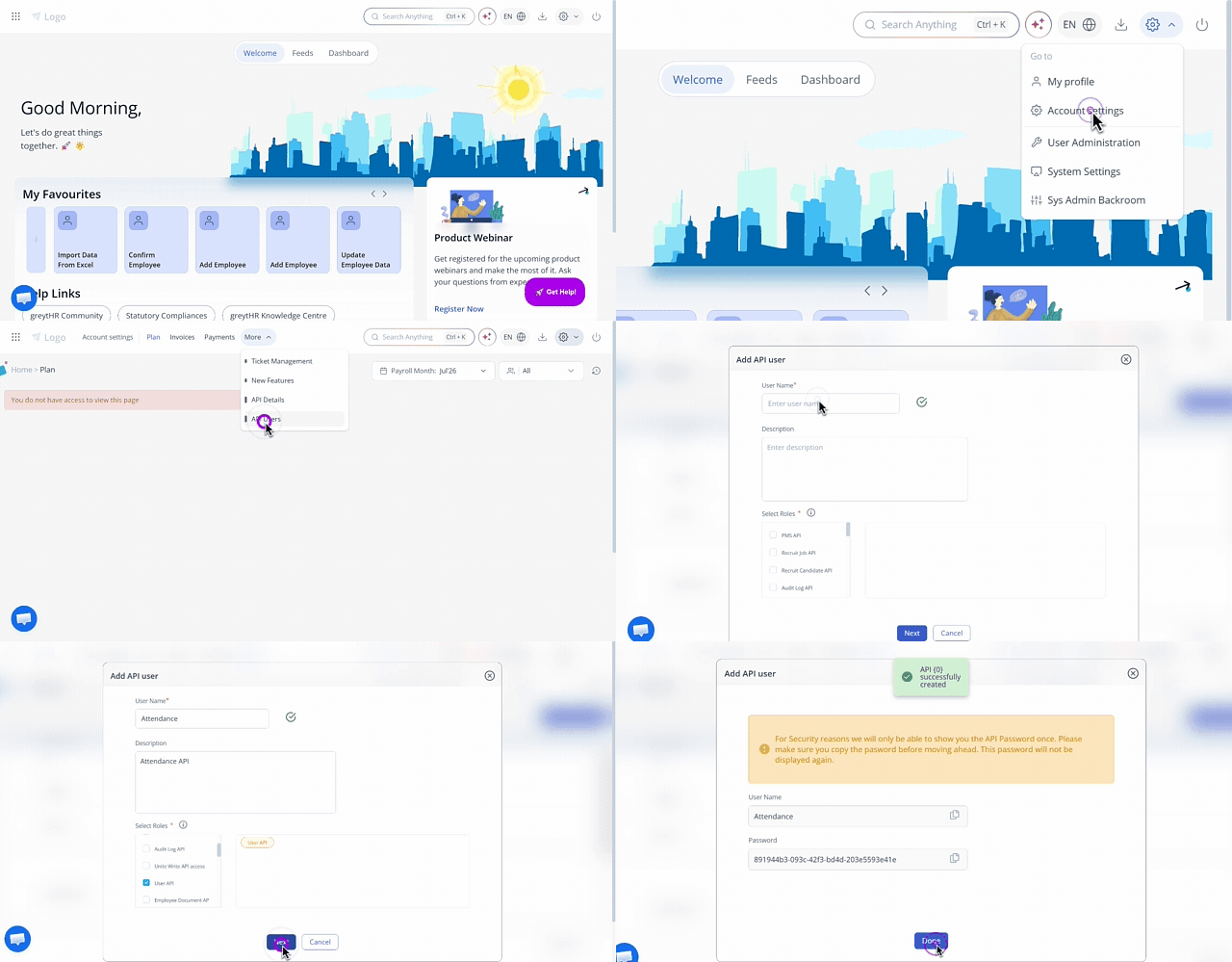
To view the API Users page, go to Settings icon > Account Settings > API users.
Create API user
To create a new API user, perform the following actions:
From the greytHR Admin portal, navigate to Settings > Account Settings > API users.
On the API Users page, click Create API User. The Add API user pop-up appears.
In the User Name text box, enter the user name.
In the Description text box, enter the description.
Under the Select Roles section, select the required checkboxes to define the role of the API user. The selected roles appear in the given adjacent box.
Click Next. A pop-up appears with detailed information about the created API user.
API user creation is successful. A confirmation message API User successfully created appears.
Note: You can view a system-generated password for accessing the APIs. For security reasons, the password is only shown once, so ensure to copy the password.Click Done. A confirmation message appears.
Note: You can also edit the details of an existing API user using the Edit User option. You cannot edit a user name.