Boost Employee Skills with VioletLMS on greytHR Unite
Updated in September - 2025 | Subscribe to watch greytHR how-to video
Organizations today face challenges to upskill employees, ensure compliance, and maintain engagement, while manual or scattered tools hinder consistent and measurable learning.
The VioletLMS app in greytHR’s Unite Marketplace helps organizations modernize their Learning & Development (L&D) programs by offering a scalable, feature-rich Learning Management System. It enables HR teams, managers, and admins to design personalized learning journeys, deliver training across formats, and track learner progress in real time.
Key Features of VioletLMS
Tailored Learning Pathways: Design personalized journeys with structured, step-by-step progression to keep learners engaged.
Omni Access: Deliver consistent learning across mobile, tablet, and desktop—ensuring inclusivity and flexibility.
Competency Mapping: Identify skill gaps, align with industry standards, and build targeted development plans.
Progress Metrics: Monitor real-time progress with intuitive dashboards and actionable analytics.
Open to Integrate: Connect ERP, HRMS, content libraries, and CRM for a unified learning ecosystem.
Custom Branding: White-label the platform with your company’s identity for a familiar, branded experience.
Multi-lingual Compatibility: Deliver training in local and global languages to reach diverse workforces.
Multimodal Training: Blend online, classroom, and hybrid learning for maximum flexibility.
Instant Alerts & Reminders: Keep learners, managers, and trainers aligned with automated notifications.
Reflect & Respond: Enable continuous feedback loops for improving learner satisfaction and training quality.
Gamified Learning: Motivate learners through leaderboards, badges, points, and shareable certificates.
You can view the following tabs on the app:
About: Overview of VioletLMS features and benefits.
Support: Contact details for the VioletLMS support team.
Pricing: Subscription and plan details.
FAQ: Common questions and answers.
Reviews: Customer feedback and ratings.


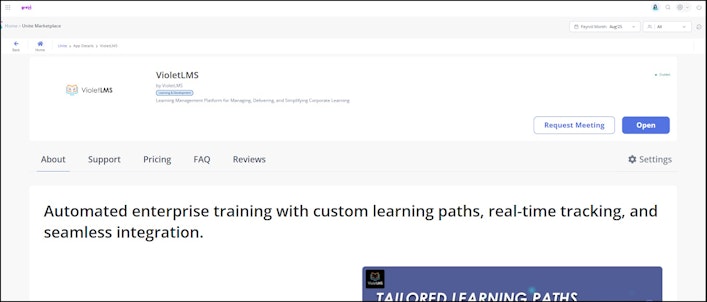
Get started with VioletLMS
From the greytHR Admin portal, hover over the 9 dots and select Unite Marketplace.
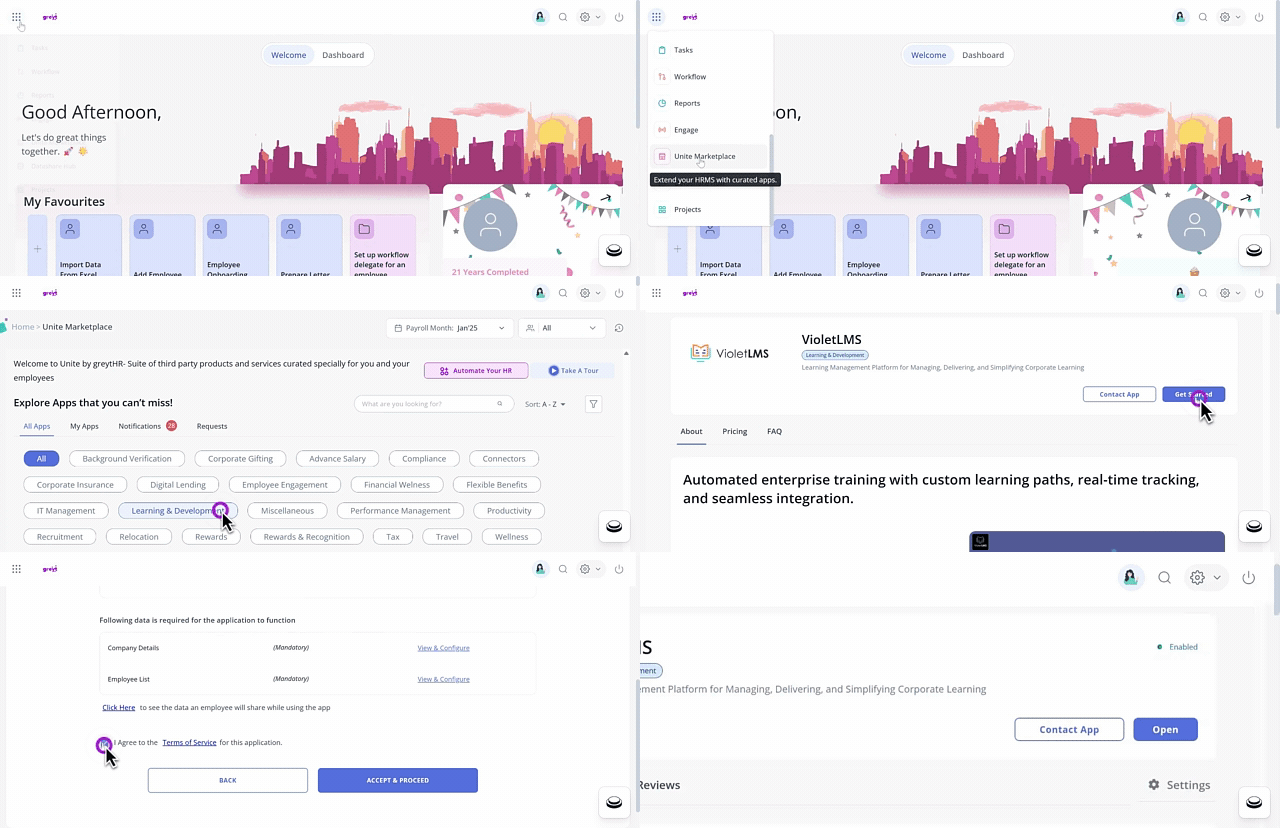
On the Unite Marketplace page, under All Apps, select the Learning and Developement category.
Select the VioletLMS card and click View Details.
Click Get Started..
Enter the details such as Name of Contact, Email of Contact, Phone Number, and GSTIN to share with VioletLMS.
Under the Following data is required for the application to function section, view, and configure the Company Details and Employee Details.
Click I Agree to the Terms of Service for this application checkbox after reading all the terms and conditions.
Click ACCEPT & PROCEED to get started with the application. Congrats! Application will be enabled soon message appears.
Click OK.
Note: Once the app is enabled, the app status will change to Enabled, and the Open button becomes visible.Click Open.
Under the Verify Your Email card, click Send OTP and enter the received OTP.
Under Verify Your Phone Number card, click Send OTP and enter the received OTP.
Click VERIFY ACCOUNT, the VioletLMS Home page opens.


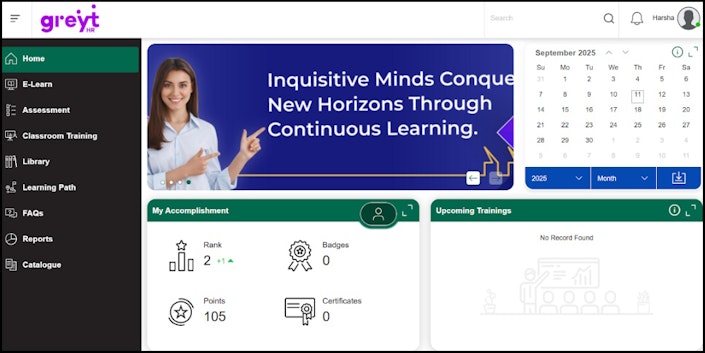
Note: The email and mobile number verification is required only during the initial login. From subsequent logins, clicking the open button will automatically redirect to the VioletLMS website without requesting credentials.
Contact VioletLMS app representative
We recommend you fully understand the app by browsing through the About, Support, Pricing, FAQ, and Reviews tabs. For more information, you can contact the VioletLMS app representative.


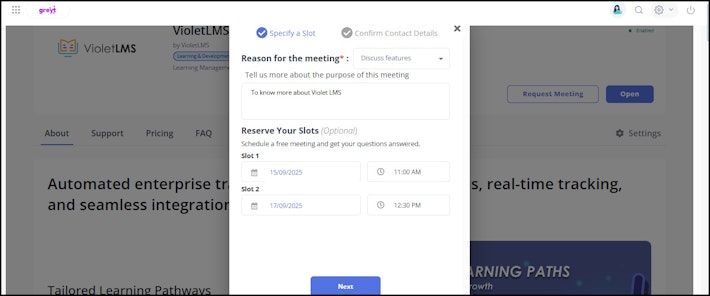
On the Unite by greytHR page, under All Apps, select the Learning and Developement category. The VioletLMS app displays.
On the VioletLMS card, click View Details. The card opens.
Click Contact App. A pop-up appears.
From the Reason for the meeting dropdown list, select the required reason.
In the Tell us more about the purpose of this meeting textbox, enter the purpose.
Under Reserve your slots, from the Slot 1 dropdown calendar, select a date.
From the Time dropdown list, select the required time slot. Similarly, select the Date and Time for Slot 2. Note: The steps 6 and 7 are optional.
Under the Provide Contact Details section, enter details such as Name, Email, Phone Number, and Company Name.
Click Submit. The Meeting has been requested successfully and a confirmation email has been sent message appears.
Once you book the meeting, the selected app representative will give you a slot on the selected date and time. Kindly note that greytHR is not part of the booking and demo process.
Disable VioletLMS
On the Unite by greytHR page, under All Apps, select the Learning and Developement category.
On the VioletLMS card, click View Details.
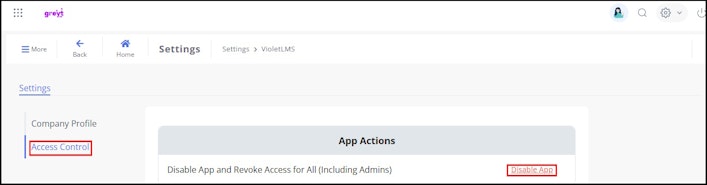
Click the Settings icon available on the right side of the page. The page displays the Company Profile and Access Control tabs.
Under the Access Control tab, in the Disable App section, click the Disable App and Revoke Access for All (Including Admins) option. A pop-up appears.
Click Yes to disable the application.


Update company profile
On the Unite by greytHR page, under All Apps, select the Learning and Developement category. The VioletLMS app displays.
On the VioletLMS card, click View Details. The card opens.
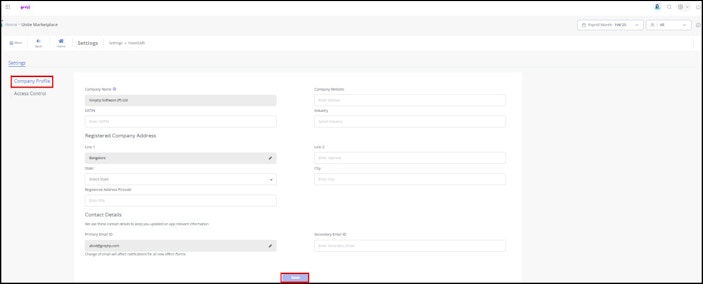
Click the Settings icon available on the right side of the page. The page displays the Company Profile and Access Control tabs.
Under the Company Profile tab, enter the details such as Company Website, GSTIN, Industry, State, City, and Contact Details.
Click Save & Proceed to update the company profile information. A success message appears.


Related article:
Unlock learning opportunities with VioletLMS on greytHR Unite Marketplace