Monitor Flexible Benefit Plans with greytHR PRO Dashboard
Updated in April - 2025 | Subscribe to watch greytHR how-to video
A Flexible Benefit Plan (FBP) allows employees to customize their salary structure by choosing tax-saving components like HRA, meal vouchers, or fuel allowance. Payroll processors must verify employee declarations and ensure accurate tax exemptions during payroll processing.
greytHR PRO introduces the FBP Overview dashboard, a unified interface for tracking all FBP activities across multiple client accounts. It reduces effort by eliminating the need to access each account individually and collect data manually.
What is the FBP overview dashboard in greytHR PRO?
The FBP Overview Dashboard in greytHR PRO is a centralized view that helps payroll processors to:
View FBP declaration details across all clients.
Access data across multiple clients by eliminating repeated logins.
Track the end-to-end status of FBP declarations for multiple clients from a single dashboard.


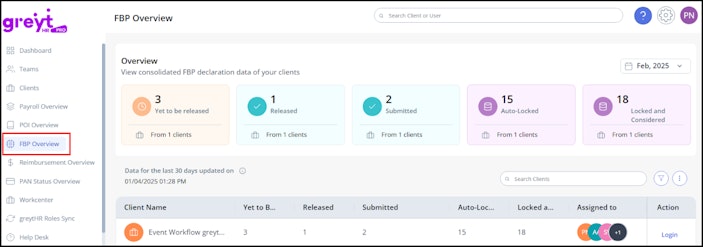
FBP month selection: You can select the required month to view the client's FBP details.


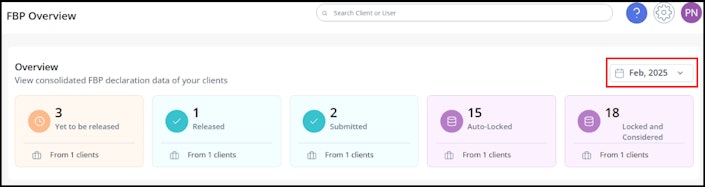
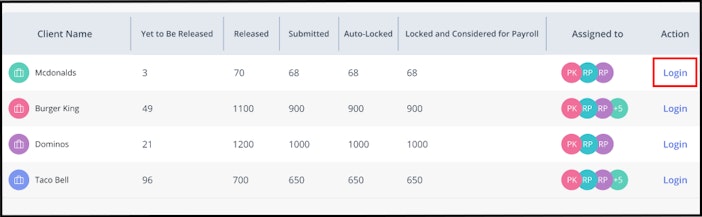
Consolidated FBP dashboard: View FBP details across all client accounts using the summary cards or the detailed table. Click on the client name to view the FBP components.


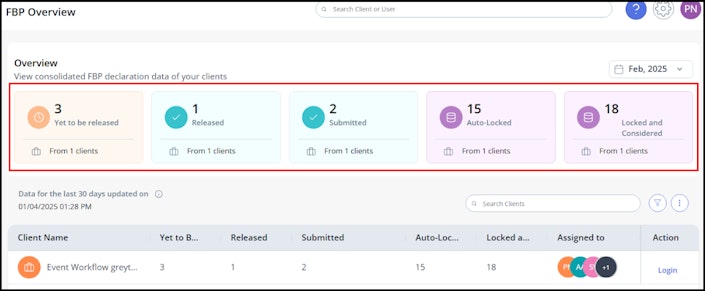
Client FBP status: The FBP status of multiple clients is classified into the following categories:
Yet to be Released
Released
Submitted
Auto-locked
Locked and Considered
Filter by Assigned User: Use the Filter by option to filter client accounts based on assigned users.
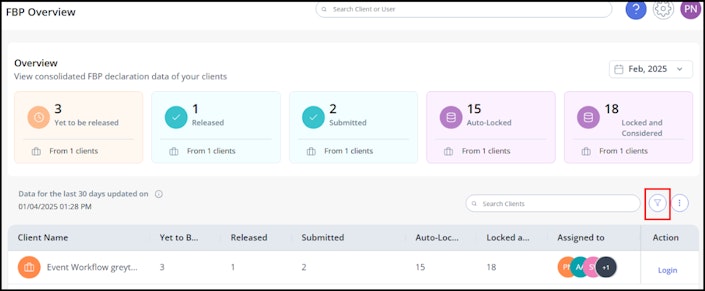
Export FBP Details: Click the Kebab icon (three dots) to export FBP details for the selected clients. The data is exported in .csv format.
Sync FBP Details: Click the same icon to manually sync FBP details and ensure you are viewing the most updated information.
Note: Data is synced automatically, but you can trigger a manual sync anytime. The last sync timestamp is displayed above the table.Direct client account login: Log in directly to specific client accounts by clicking the Login option.


Other related links: