Activate Employee Self-Service Portal on greytHR
Updated in June - 2026 | Subscribe to watch greytHR how-to video
The Employee Self-Service (ESS) platform is a one-stop hub where you can easily access and handle all employee HR and payroll information. It is a convenient web and mobile app to find important things like individual employee payslips, income tax statements, leave and attendance records, and other useful resources. Instead of searching through different places, everything your employees need is at their fingertips. This self-service portal is for one and all.
Enable Employee Self Service (ESS) for employees
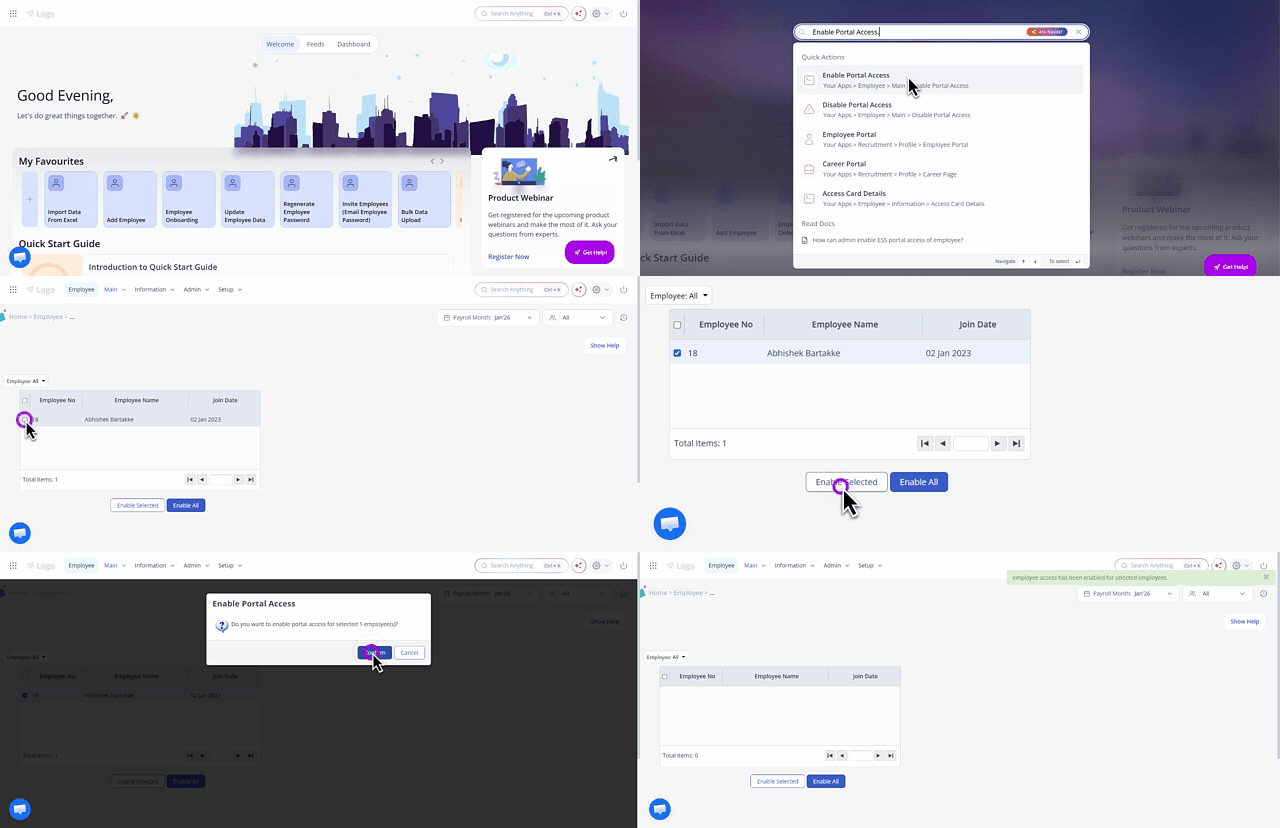
To enable the ESS portal access for an employee, from the greytHR Admin portal, in the NAVOS search bar, enter the keyword Enable Portal Access. The Enable Portal Access page opens.
From the Employee dropdown list, enter the name/number of the employee for whom you want to enable the ESS portal access. The Employee No, Employee Name, and Join Date appear.
Note: From the Employee dropdown list, select the All option to enable access for all employees.Select the checkbox of the employee.
Click the Enable Selected button to enable the ESS portal access. A success message appears.
Note: If an employee forgets their greytHR ESS portal's password, as an admin, you need to regenerate it and share it with them. Once they log in using the new password, they will be asked to set a new one of their choice.
Other related links: