Use greytHR to Track Employee LOP Days Accurately
Updated in May - 2026 | Subscribe to watch greytHR how-to video
Loss of Pay (LOP) days represent unpaid absences that reduce an employee’s payable salary. Traditionally, LOP is recorded as the total number of days for the entire payroll month.
With Date-wise LOP in greytHR, as an admin, you can record LOP for specific dates instead of entering a consolidated monthly value. This helps you achieve better payroll accuracy in situations such as mid-month salary revisions, arrears calculations, and LOP reversals.
As an existing customer, you can continue using the consolidated format or switch to the date-wise model as needed.
Benefits of Date-wise LOP
Using date-specific LOP tracking helps improve payroll accuracy in several scenarios such as:
Salary revisions: If an employee receives a mid-month salary revision, the system calculates the LOP deduction based on the salary applicable on the specific absence date.
Accurate arrears calculation: The arrears engine can calculate adjustments more precisely when LOP or LOP reversal occurs between the effective month and payout month.
Mid-month proration: Salary components that depend on working days are calculated more accurately.
Better reversal tracking: Admins can reverse specific LOP dates instead of adjusting a consolidated number of days.
Switch to Date-wise LOP
If you are using the consolidated LOP feature, you can switch to the date-wise model from the Add LOP Days page.



To switch to date-wise LOP, from the greytHR Admin portal, hover over the 9 dots and go to Payroll > Payroll Inputs > Employee LOP Days.
Click Add LOP Days.
Click Switch to Date-wise LOPs. A pop-up appears mentioning the benefits of using the date wise LOP.
The Effective Month always reflects the most recently created payroll month.
Type CONFIRM in capital letters only to authorize the change. If LOP entries already exist for that payroll month, delete them before switching.
Click Confirm. Once the switch is completed, the page refreshes and the date-wise LOP entry format becomes active.

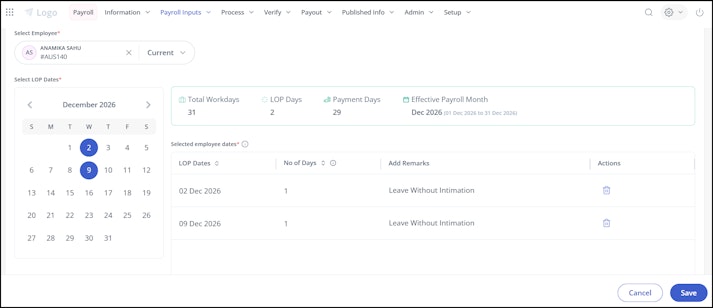
Once you enable Date-wise LOP, search for the required employee.
Select the LOP dates.
Under the Add Remarks column, enter remarks if required.
Click Save > Confirm.


Info:
All the existing Consolidated LOP data remains safe and accessible for all previous months, ensuring no loss of records during the transition.
If you switch in April 2026 but need to add a retrospective LOP for February 2026 (which was consolidated), the UI will automatically display the consolidated entry format for that specific retrospective action.
Impact of date-wise LOP on other modules
Arrears
The arrears module will calculate arrears using date-wise LOPs only when all LOP entries within the Effective From and Payout period are recorded as date-wise LOPs.
If the period contains a mix of consolidated LOP and date-wise LOP, the system will automatically default to consolidated LOP for the calculation.
Attendance LOPs
If LOP entries are generated from the Attendance module during attendance period finalization, you can switch the LOP format from the Employee LOP Days > LOP tab.
Once the admin switches, the system will start using date-wise LOP values for arrears and other payroll calculations.
Note: On the Employee LOP Days page, once you expand the employee card, you will be able to view the list of LOP dates.
Understanding Consolidated LOP vs Date-wise LOP
Suppose an employee’s salary is revised in the middle of March, and he has two LOP days during the month.
Scenario
Cutoff : Regular cutoff / Calendar month
Payout Month: March
Total Days in Month: 31
Salary Revision: Effective 15 March
Salary Structure
1–14 March: Basic Salary = ₹30,000
15–31 March: Basic Salary = ₹50,000
LOP Days: 12 March (before revision) and 24 March (after revision)
Consolidated LOP Calculation
In this method, the system blends the salary for the entire month and calculates a single average daily rate.
Step 1: Calculate earned salary for the month
1–14 March → (30,000 / 31) × 14 = ₹13,548.39
15–31 March → (50,000 / 31) × 17 = ₹27,419.35
Total earned salary: ₹13,548.39 + ₹27,419.35 = ₹40,967.74
Step 2: Calculate blended daily rate
40,967.74 ÷ 31 = ₹1,321.54
Step 3: Apply LOP deduction
2 days × 1,321.54 = ₹2,643.08
Total LOP Deduction (Consolidated): ₹2,643.08
Date-wise LOP Calculation
In this method, the system checks the salary applicable on the exact date of absence.
LOP on 12 March
Active Salary: ₹30,000
Daily Rate: 30,000 ÷ 31 = ₹967.74
LOP on 24 March
Active Salary: ₹50,000
Daily Rate: 50,000 ÷ 31 = ₹1,612.90
Total LOP Deduction: ₹967.74 + ₹1,612.90 = ₹2,580.64
Total LOP Deduction (Date-wise): ₹2,580.64
Key Difference
Consolidated LOP: Uses a single averaged daily rate for the entire month.
Date-wise LOP: Uses the actual salary applicable on the day of absence.
This helps ensure more accurate deductions when salary revisions happen within a month.
Related articles: