Streamline HR Management with greytHR Admin Tools
Updated in May- 2025 | Subscribe to watch greytHR how-to video
The greytHR's Home page, is the first screen you see when you open the app. It acts like the main dashboard that gives you an overview of what is going on in the organization.
On the greytHR Admin Home Page, you can do important HR tasks and access useful features. These might include managing employee info, handling leaves, checking attendance, dealing with payroll, and getting reports.


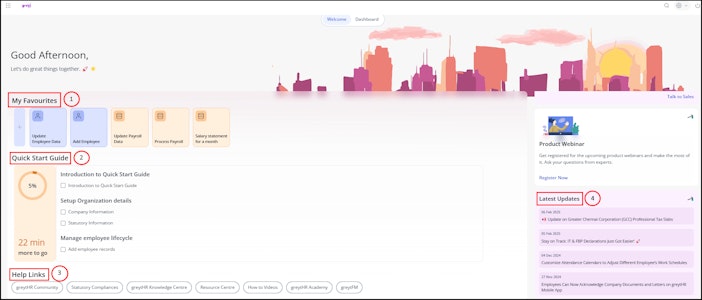
You can perform the following actions on the admin Home page:
Add a shortcut to any feature.
Track/review employees’ workflow requests quickly.
View the latest updates in the application.
Access different greytHR resources with quick help links.
Add a shortcut to any feature
The My Favourites section on the Home page allows you to add a shortcut to any feature in the application.
To add a shortcut to a feature, perform the following actions:
From the greytHR Admin portal, on the Home page, under the My Favorites section, navigate to the + icon. The Search pop-up appears.
In the Search here text box, enter the name of the action that you frequently perform as a shortcut. The required action card appears.
Note: You can also perform desired actions by navigating to the required page from the menu available below the Home icon. click a specific module tab to list the features under that module. For example - Employee.Click the Star icon on the card to add a shortcut to the action.
Track/review employees’ workflow requests quickly
The My Tasks section on the Home page allows you to view the list of tasks that are pending for your review. The section also displays the total number of tasks pending for review and a total number of tasks that are pending with the other reviewers.
To review employee’s workflow requests, perform the following actions:
From the greytHR Admin portal, on the Home page, under the My Tasks section, navigate to the Review/Monitor option on the required task. The Review/Monitor page appears.
From the Employee, List, and Applied Date dropdown filters, select the required options to customize the list of applications.
Click the required application card. The card expands and displays information according to that particular page, such as employee details, application details, reason, and the name of the reviewer with whom the applications are pending.
Note: You can also download the application by clicking the Export Excel button. The report downloads in Excel format.
View the latest updates in the application
The Latest Updates card allows you to view a brief description of the latest updates done in the application. It can be new or enhancements to existing features. Click the → arrow on the Latest Updates card. You will be directed to the product updates page.
Access different greytHR resources with quick help links
The Help Links section enables you to access the shortcut of other greytHR resources quickly. You can access the following resources from the Home page:
greytHR Community 🌐 The Greytribe community as a team bring together subject experts who generously share their wisdom through engaging sessions like Greytribe Live and Parichay.
Statutory Compliances 📝 Statutory Compliance in HR refers to the legal framework that an organization should adhere to in dealing with its employees.
greytHR Knowledge Centre 🔎 The greytHR knowledge centre extensively provides complete user manuals, Frequently Asked Questions (FAQs), various product updates, and videos for visual understanding of the application’s features.
Resource Centre 📚 The Resource centre acts like a library of numerous templates and guides used across the organization for performing HR-related tasks.
How to Videos 🎥 Short, step-by-step visual guides to help you easily navigate and use key features of the greytHR platform.
greytHR Academy 👨🎓👩🎓 Join us to learn various HR and Payroll courses on Udemy in greytHR Academy.
greytFM 📻 Unable to update yourselves professionally? Listen to our greytFM’s podcasts on wide topics that are relevant today.
Other related links: