HOP, WOP & ROP Attendance labels in greytHR
Updated in April - 2026 | Subscribe to watch greytHR how-to video
When employees work on scheduled non-working days Rest Days, Off Days, or Holidays, greytHR now lets organisations track and visually identify these instances across attendance screens and reports.
Using the Custom Attendance Labels feature, dedicated status tags such as WOP (Weekly Off, but Present), HOP (Holiday, but Present), or ROP (Rest Day, but Present) are displayed wherever an employee has worked on a non-working day.
For example, if an employee works on a public holiday, the label HOP appears against their attendance record, making such instances instantly identifiable for HR and payroll teams without the need for manual cross-referencing.


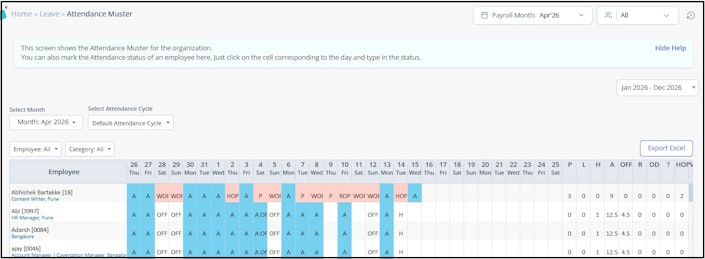
Where custom labels appear?
Screens
| Screen | Custom Label displayed |
|---|---|
| Attendance Info(calendar and table view) | Yes |
| Attendance Override | Display only cannot override custom status |
APIs
| APIs | Custom Label displayed |
|---|---|
| Employee Muster APIs | Display only — cannot override custom status |
| Attendance Processing APIs | Yes — for updating day status |
Core attendance reports
| Reports | Custom Label displayed |
|---|---|
| Attendance Overview Report | Yes |
| Attendance Muster Info Report | Yes |
| Attendance Summary Report | Yes |
| Attendance Consolidated Report | Yes |
| Consolidated Work Hours Report | Yes |
| Shift Summary Report | Yes |
Statutory / Compliance Reports
| Statutory / Compliance Reports | Custom Label displayed |
|---|---|
| Form 25 – Muster Roll (Tamil Nadu Factory Rules) | Yes |
| Form 25 – Muster Roll and Register of Compensatory Holiday (Tamil Nadu) | Yes |
| CLRA Form XVI – Muster Roll | Yes |
| CLRA Form XII – Muster Roll (Haryana) | Yes |
| CLRA Form XVIII – Register of Wages Cum Muster Roll | Yes |
| Form VI – Register of National Festival Holidays (TN) | Yes |
| Form N – Notice of Periods of Work (JK) | Yes |
| Form V – Muster Roll – Minimum Wage Rule (Telangana) | Yes |
| Form VII – Muster Roll – Minimum Wages Rules (Karnataka) | Yes |
| Form 22 – Muster Roll cum Wage Register – Factories Act (Karnataka) | Yes |
| Form 10 – Muster Roll cum Register of Wages (Odisha) | Yes |
Note: In any screen or report where On Duty (OD) appears as a distinct column or label, custom labels (such as WOP or HOP) are displayed the same way.
Use Cases
Worked on Holiday — label as HOP An organisation wants to visually distinguish days where an employee worked on a public holiday. Once the label HOP (Holiday, but Present) is configured from the backend, it appears as a separate column in the Attendance Muster and Summary reports.
Worked on Off Day — label as WOP An organisation uses WOP (Weekly Off, but Present) to flag employees who worked on their weekly off. Once configured, WOP appears in Attendance Info and relevant reports wherever OD is displayed as a distinct column.
Worked on Rest Day — label as ROP A client requires Rest Day working to be tracked separately. The label ROP (Rest Day, but Present) reflects across all configured impact areas, giving reviewers a clear visual indicator during attendance review.
Additional Information
Custom labels are configured from the backend by the greytHR internal team. No admin UI action is required.
Labels directly reflect in attendance logic, payroll processing, and leave calculations for accurate downstream impact.
Labels take effect only when explicitly configured — existing customers will see zero disruption until a label is set up.
If a custom label is not configured for a particular scenario, the system automatically uses the default attendance description.
Custom labels apply uniformly across all impact areas listed above. There is no per-report or per-department label configuration.
Note: To get custom labels configured for your organisation, raise a support ticket with the greytHR team.
Related articles:
View an individual employee’s attendance information
View employees' attendance details in bulk