Easily View and Download Your Payslips on greytHR
Updated in July -2025 | Subscribe to watch greytHR how-to video
Payslips or salary slips are documents that contain detailed information on an employee’s salary components like the basic salary, HRA, special allowance, and basic deductions.
The Payslips page in the greytHR ESS portal displays different types of payslips released for an employee and conveniently allows you to export or email multiple payslips over a selected time period
You can perform the following actions on the Payslips page:
View payslips (Regular, CTC, Reimbursement, and Overtime)
Download or export payslips
View payslips
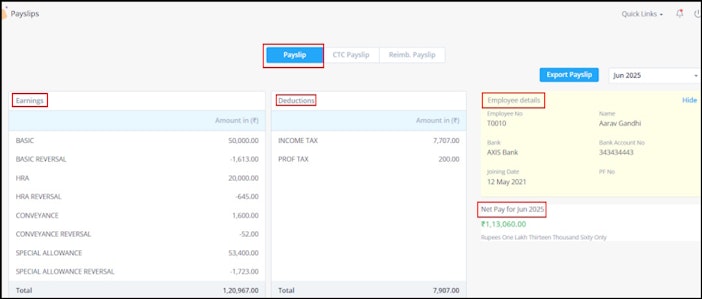
To view your payslip, from the greytHR ESS portal, go to Salary > Payslips.
Click the relevant tab:
Payslip for regular salary
CTC Payslip for cost-to-company structure
Reimb. Payslip for reimbursements
Overtime Payslip for extra hours worked
From the month dropdown, select the desired month and you can see the Earnings, Deductions, Employee details, and Net Pay for the selected month.


Download or export payslips
Once your admin enables the export payslip feature, you can export or download single or multiple payslips at once over a defined period.


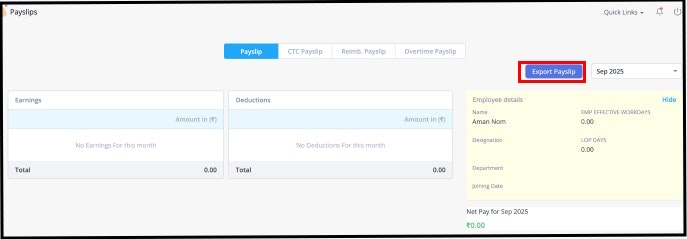
Additionally, you can also send the payslips via email to your official or personal email address.
On the payslips page, click Export Payslip.
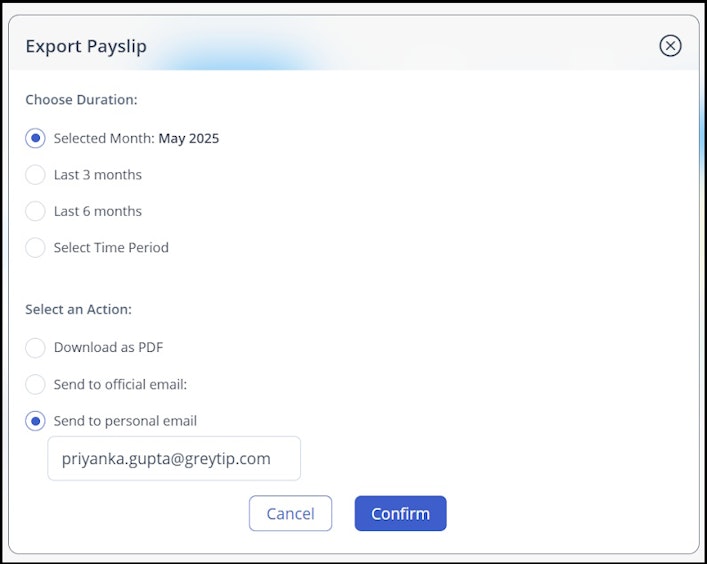
In the Export Payslip pop-up, Choose Duration as Current Month/Last 3 Months/Last 6 Months/Select Time Period according to your requirement.
Select the Month Range to specify the period for which you want to export the payslips.
Note: There is no limitation to the month range when exporting payslips. You can select any desired period as needed.Select an Action as per your requirement.
Download as PDF – If more than one month is selected, payslips are grouped in a ZIP file.
Send to Official Email – Uses the official email ID from your profile.
Send to Personal Email – Uses the personal email you provided during onboarding. You can also manually enter an alternative email address here.
Click Confirm.


Related articles: