Efficiently Review Job Requests Using greytHR Recruit
Updated in July - 2025 | Subscribe to watch greytHR how-to video
Job reviewing is the process of evaluating and approving a job request as part of a company’s hiring workflow. This process often involves multiple reviewers, each adding their input at different stages of the approval process.
When you're reviewing a job at the second or third level in the approval chain, it can be challenging without visibility into earlier feedback. Without that context, you may repeat the same checks or overlook important points.
greytHR Recruit lets you review job requests and view comments from previous reviewers, helping you stay aligned with earlier feedback, avoid repetition, and make informed decisions.
Review job requests
Once the admin sets up the job approval workflow and adds you as a reviewer, you'll be able to review the job requests assigned to you.
To review a job request, when a job comes for your approval, on your greytHR ESS portal, click the Approvals icon on the Hiring widget.
On the Approval Requests page, under the Pending tab, click on the job that you want to review.
Once the job opens, you will be able to view:
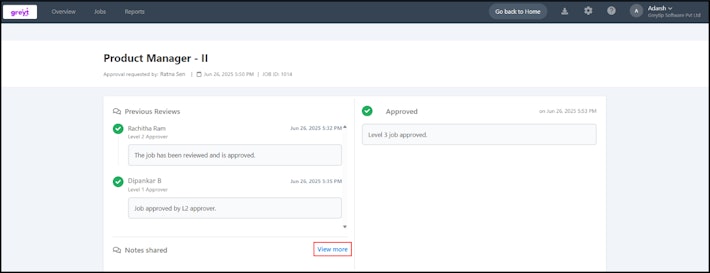
Previous Reviews
Notes Shared
Add Your Review
Job details
In the Add your review textbox, enter your comments and click Approve/Reject as per the requirement.

Note:
The reviewer comments are displayed in reverse chronological order, with the latest comment appearing at the top.
If a previous reviewer has shared a note, you can click View more to see the full comment.
You can only view the Previous Reviews section, but you won’t be able to edit any of the comments.


Related articles: