Adjust TCS/TDS Deductions in greytHR Employee Portal
Updated in December - 2024 | Subscribe to watch greytHR how-to video
During the Proof of Investment (POI) submission period, usually at the end of the financial year or as per the company’s timelines, employees can now submit proofs of TCS and TDS deductions.
What is TCS and TDS?
TCS (Tax Collected at Source): A tax collected by the seller from the buyer at the time of sale, especially for high-value goods or transactions.
TDS (Tax Deducted at Source): A tax deducted at the source of income such as salary, interest, or other payments.
Declaring TCS and TDS on time ensures accurate tax calculations, prevents overpayments, and aligns with year-end income tax filings.
How does TCS/TDS impact income tax and POI?
Income Tax: Declaring TCS/TDS ensures taxes already paid are accounted for, reducing double taxations, refunds, and miscalculations.
POI (Proof of Investment): Including TCS/TDS in POI helps adjust taxable income, optimize savings, and simplify Tax adjustments
The TCS/TDS section added to the Proof of Investment page helps employees declare TCS/TDS directly from their greytHR ESS Portal to simplify and optimize their tax calculations.
Steps to declare TCS/TDS in POI
As an employee, to declare TCS/TDS login to your greytHR ESS portal and go to Salary > Proof Of Investment.
From the dropdown on the right-hand side of the page, select the required year.
Under POI Components, select TCS/TDS Deduction.
From TCS Deduction, click + Add to declare the TCS amount
Attach Proof
Enter Remarks
Download Form 12BAA, fill in the details, and upload again.
Click Save and Review & Submit.
After the employees declare their TCS/TDS deductions, the admin can view them on the Income Tax page and in the Income Tax Statement.
To view the TCS/TDS deductions on the Income Tax page, login to the greytHR Admin portal, and go to Payroll > Payroll Inputs > Income Tax.
Select the employee, click the Others tab, and scroll down to the TCS/TDS Deduction section to view the selected employee’s TCS/TDS Deductions.
To view the TCS/TDS deductions in the Income Tax Statement, login to the greytHR Admin portal, and go to Payroll > Payroll Inputs > Income Tax.
Select the employee, scroll down, and click Download.
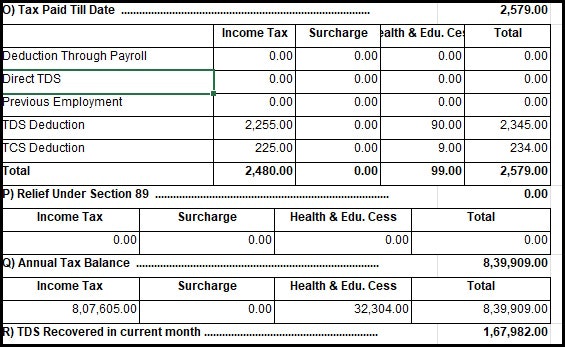
In the selected employee’s Income Tax Statement, the Tax Paid Till Date section displays the TCS/TDS Deductions.


Other related links: