Access greytHR ESS Portal as an Alumni for Key Documents
Updated in September-2024 | Subscribe to watch greytHR how-to video
In our efforts to facilitate a seamless transition after separation, we are delighted to announce that after separation, you will have limited access to your Employee Self-Service (ESS) portal for a specific duration. You can view and download essential information such as payslips, Form 16, IT statements, and letters within the designated period. This ensures a seamless post-exit experience in managing crucial employment-related tasks.
Let us now explore the ESS portal as a former employee.


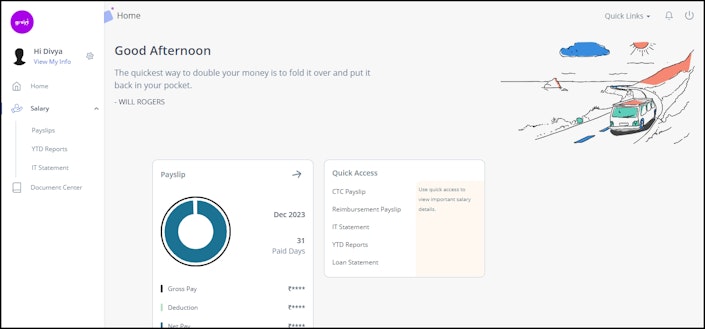
You can perform the following actions on the portal based on the customized access provided by your admin:
Log in to your portal
View your basic information details
Access documents
Log in to your portal
After separation, you will receive a communication from your admin via SMS/Email informing you about the extended ESS portal services. You can log in to your ESS portal with your existing credentials. However, in exceptional cases when you forget your credentials, you can reset your password by the following methods:
Reset via alternate email address: This scenario occurs when you remember your login ID and forget your password.
On your greytHR ESS portal login page, in the Login ID textbox, enter your login ID.
Click Forgot Password. The Forgot password? That’s okay! Let’s change it card appears.
In the Login ID textbox, enter your login ID.
Click Continue. A success message appears stating that an email is sent to your alternate email address to reset your password.
Reset via alternate mobile number: You can reset your password by entering the 6-digit OTP sent to your alternate mobile number.
On your greytHR ESS portal login page, in the Login ID textbox, enter your login ID.
Click Forgot Password. The Forgot password? That’s okay! Let’s change it card appears.
In the Login ID textbox, enter your login ID.
Click Continue. A message appears informing you that an OTP has been sent to your mobile number.
In the OTP textbox, enter the OTP that you have received.
Click Continue. The Reset your password page appears to reset your new password.
Contact your HR admin: Your HR admin will share the login credentials to sign in to the portal.
View your basic information details
The ESS portal allows you to view your basic information details. The Employee Information page in the greytHR ESS portal helps you to view all your personal information available in the greytHR application such as profile picture, name, location, and employee ID.
To navigate to the Employee Information page, click View My Info. The Employee Information page opens.
Access documents
You can download different documents and letters from the Document Center and Salary pages. These pages allow you to view and download your Payslips, IT Statements, Form 16, and YTD Reports. You can also request your admin to allow you access to other features of the portal. Learn how to download your documents and letters here.
Other related links: