Check Your Leave Balances and Transactions on greytHR
Updated in October-2025 | Subscribe to watch greytHR how-to video
Employee leave balances refer to the amount of time off, such as vacation days or sick leave that an employee has accrued but not yet used.
The Leave Balance screen in the greytHR Mobile application allows you, as an employee, to view your leave balances and details. This includes information such as the total number of leave days allocated, the number of days utilized, and the remaining balance for a selected year. You can also apply for leave from the Leave Balance screen.
View detailed information on leave types
To view the detailed information on different leave types, from your greytHR Mobile application, tap Explore > Leave > Leave Balance.


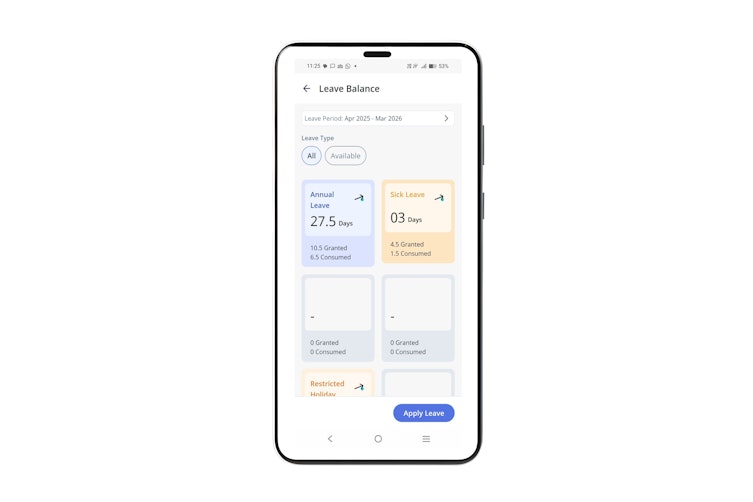
On the Leave Balance screen, tap the → arrow on the required leave type card. For example - Compensatory Off. The Compensatory Off screen appears and displays the following tabs:
Balance: This tab displays data related to the selected leave card such as Opening Balance, Granted, and Availed. You can also view a graphical representation of the leave balances for each month. The graph displays the total consumed leave and the total balance of leave.
Transactions: This tab is your leave passbook. It displays all your transactions for the selected year such as Availed, Posted On, From, To, Day(s), and Expiry.
Tap Apply if you want to apply for the selected leave type.
Note: You can also apply for leave from the Apply Leave screen.
Other related links: