Change Languages Easily in greytHR Mobile App
Updated in June - 2026 | Subscribe to watch greytHR how-to video
The greytHR Mobile app now supports multiple languages to improve usability and adoption. This initiative is the first step toward a global-friendly mobile experience in greytHR. Employees can choose from languages such as English (default), Bahasa, Hindi, Arabic, Kannada, Tamil, Telugu, Gujarati, Marathi, Malayalam, Bengali, and Odia ensuring they can use the app in the language they are most comfortable with.
By combining AI-based translation, external validation, and iterative feedback, the greytHR Mobile app ensures translations are accurate, contextual, and user-friendly.
As an employee, you can use the greytHR Mobile app in your preferred language, making it easier to navigate and complete everyday tasks like applying for leave, checking payslips, or marking attendance.
Enable multi-language in the greytHR Mobile app
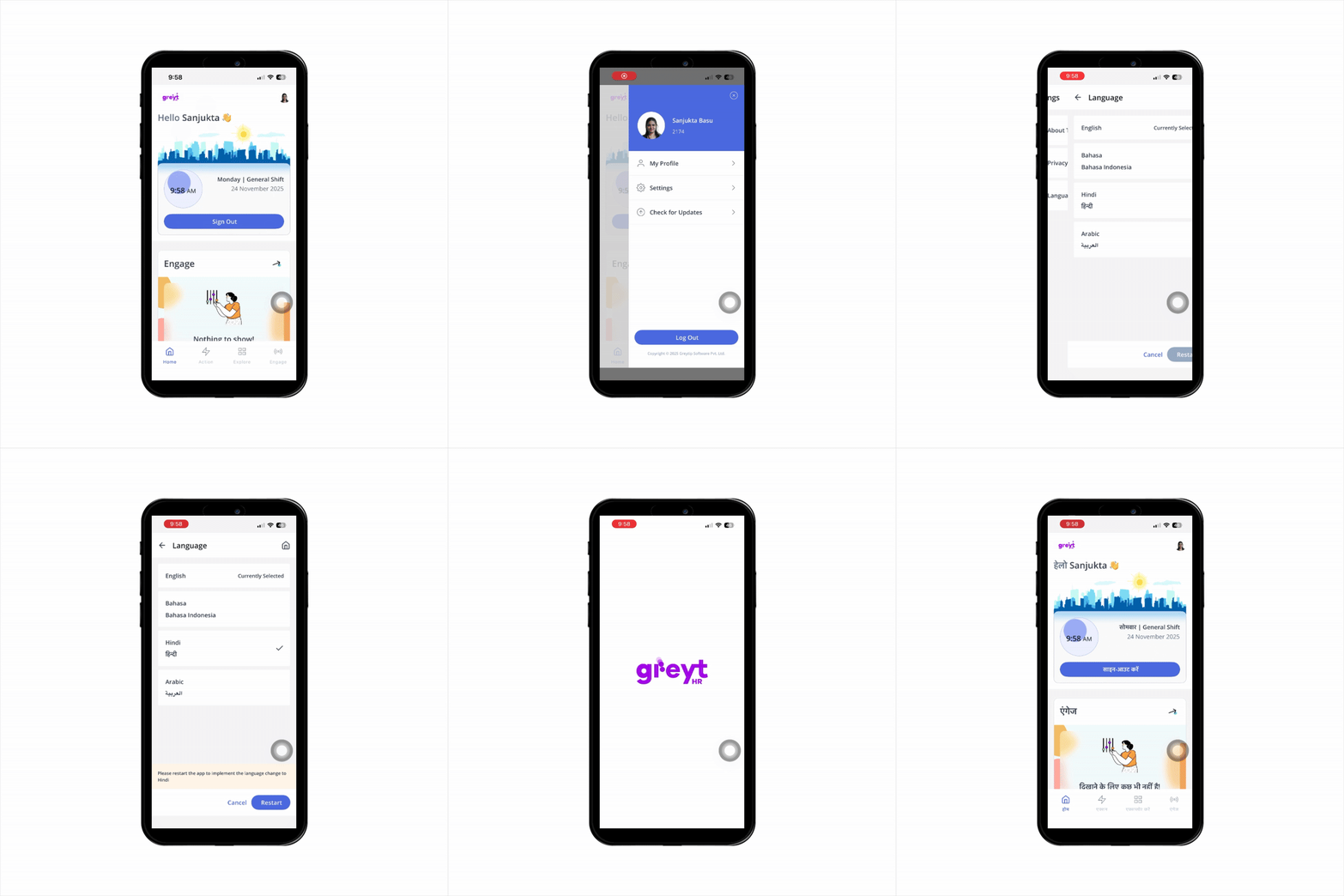
Log in to the greytHR Mobile App.
On the top-right corner of the Home screen, tap your profile picture. A sidebar menu opens.
Tap Settings > Language tab.
Select your preferred language from the available options and click Restart. The app restarts, after which it will switch to the selected language.
Related Article: