May 2026 releases



Here's what we've been working on lately
Haryana LWF slabs revision - May 2026
Updated Haryana Labour Welfare Fund (LWF) contribution limits as per the latest state amendment. Employee contribution now calculated at 0.2% of Gross (with revised upper cap). Employer contribution also revised accordingly.
Impact
Functional: Auto-applied for Haryana-mapped employees in May 2026 payroll onwards
Updated CPF calculation — NRIC instead of Immigration Status & visa date (Singapore)
CPF contribution eligibility and rate determination now uses the employee's NRIC issue date instead of Immigration Status and visa issue date. Aligns with CPF Board identification standards for Singapore payroll.
Impact
Functional: CPF rate lookups now driven by NRIC; previously configured Immigration Status fields may no longer be the deciding factor
Operational: Singapore admins should verify NRIC data is accurate in employee master before running payroll
Payslip templates updated with revised labels per Income Tax Act 2025
Payslip templates — Teddy, Teddy with YTD, and Teddy with Master — updated to reflect revised section references as per IT Act 2025. Ensures deduction and exemption categories carry correct statutory terminology.
IT Savings Report changes — Tax Year 2026 onwards
Three label replacements: "Financial Year" replaced with "Tax Year" in 3 places within the IT Savings Report. Changes apply only for Tax Year 2026 and onwards; no impact on prior-year reports.
Impact
Functional: Terminology-only change; no data or calculation impact
Operational: Admins downloading the IT Savings Report will see the updated label from Tax Year 2026 run
New input — Relationship with Landlord in House Rent (Form 124 / erstwhile Form 12BB)
Employees can now specify their relationship with the landlord (e.g. parent, spouse, none) while submitting IT Declaration or POI for HRA exemption
New field added in the HRA section of both ESS IT Declaration and admin POI submission screens
Captured value flows into the new Form 124 (as mandated under IT Act 2025) replacing the old Form 12BB
Field also added to HRA-related reports for admin review
Impact
Functional: New mandatory field for HRA declarations from Tax Year 2026-27; affects all employees claiming HRA exemption via IT Declaration/POI
Operational: Payroll admins should communicate to employees to complete this field; reports now include the landlord relationship column
Optimise Payroll - self-service action for admins
New self-service "Optimise Payroll" action on the Payroll Process page. Allows admins to safely optimise payroll data structures without raising a support ticket. Particularly beneficial for large clients (40K–50K employees, up to ~200 components) where billions of payroll records accumulate over time.
Impact
Functional: Reduces payroll run time for large accounts; no data change, only structural optimisation
Operational: Admins can trigger this action before a payroll run if performance is slow; reduces dependency on support teams
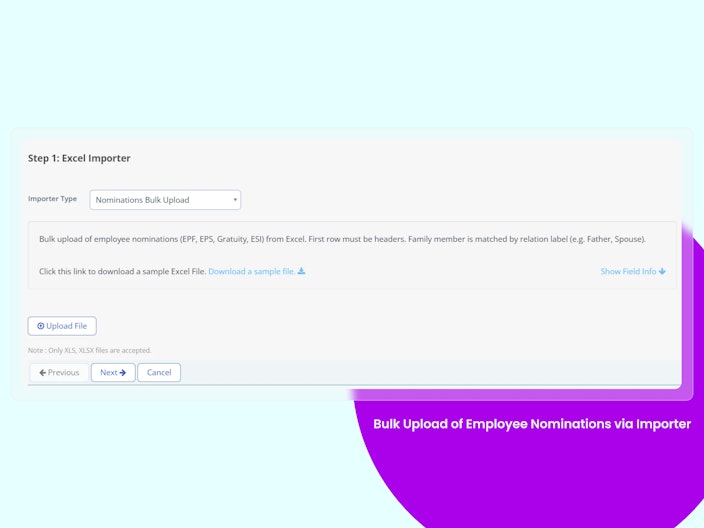
Bulk Upload of Employee Nominations via Importer
Previously, employee nomination details had to be entered and updated manually for each employee, making the process slow and error-prone, especially during onboarding, audits, or bulk corrections. This also increased the risk of incorrect or non-compliant statutory nomination records.
The feature bulk upload of employee nominations via importer, solves the problem by enabling HR/Admin users to upload nomination details in bulk through Excel with built-in validations and update logic.
Key improvements:
Reduces manual effort and processing time
Supports bulk creation and update of EPF, EPS, Gratuity, and ESI nominations
Prevents duplicate, invalid, or non-compliant entries through validations
Improves accuracy and statutory compliance management
Simplifies bulk corrections and employee onboarding activities.


JPEG File Support in Bulk Document Upload
Previously, admins were unable to upload .jpeg files in the Bulk Document Upload section, even though JPEG is a widely used image format. Users had to manually convert files into other supported formats, causing unnecessary effort, upload failures, and delays.
This feature solves the problem by adding support for .jpeg files in Bulk Document Upload, allowing users to upload documents directly without format conversion.
Key improvements:
Supports .jpeg files as valid upload format
Reduces manual file conversion effort
Improves upload success rate and user experience
Aligns the system with standard image format compatibility
Ensures existing upload functionality remains unaffected
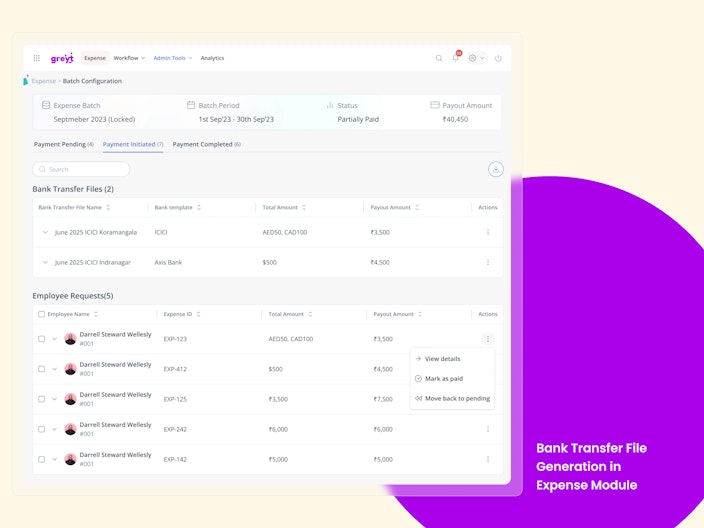
Bank Transfer File Generation in Expense Module
This enables admins to generate bank-specific transfer files directly from approved expense payouts, making it easy to upload the file to the bank portal and process employee reimbursements in bulk.

AI-Based Candidate Profile Scoring
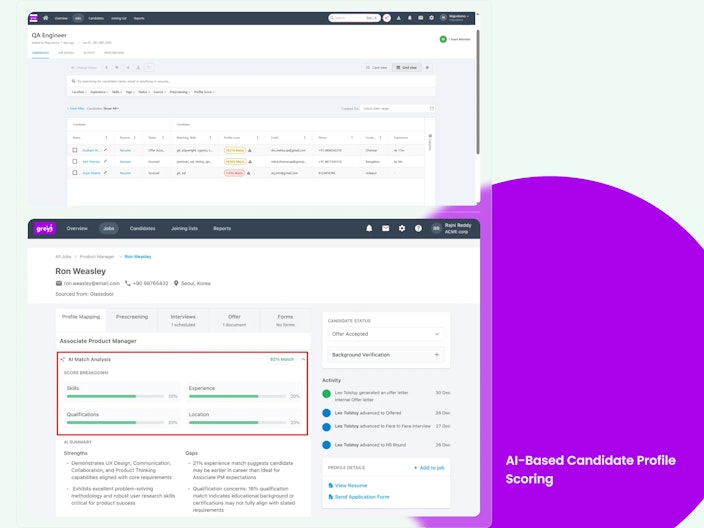
Recruiters can now make smarter, faster hiring decisions with AI-Based Candidate Scoring in greytHR Recruit. This feature automatically evaluates every candidate against a job role across four key dimensions:
Skills Fit
Experience Fit
Qualification Fit
Location Fit
Based on these dimensions, Recruit generates a transparent match score (0–100) for every candidate, making it easy to identify the best-fit talent at a glance.
Administrators can configure default scoring weightages globally, while recruiters can further customize weights at the job level to ensure the scoring aligns with the specific requirements of each role.
Why is it Important?
Faster Shortlisting: Replaces manual resume comparison with instant AI-ranked scores, reducing screening time significantly.
Eliminates Guesswork: Moves beyond vague High/Medium/Low labels to scores.
Fairer Evaluation: Structured, criteria-based scoring reduces unconscious bias and ensures every candidate is assessed consistently.
Key Highlights:
Admins can configure default AI scoring weightages under Recruitment → Settings → Preferences → AI Candidate Scoring.
Scoring weights can be defined globally and overridden for individual jobs during job creation.
Every candidate receives a match score between 0 and 100.
Scores are visible across Candidate List, Candidate Cards, and Candidate Profile pages.
Scores automatically recalculate whenever candidate information or job requirements are updated.
Missing candidate data is handled intelligently to avoid unfair penalization.
Top AI Matches panel will soon surface the top 20 best-fit candidates for each job (Phase 2 – expected in the next 2–3 weeks).

Translation on mobile app - Oriya
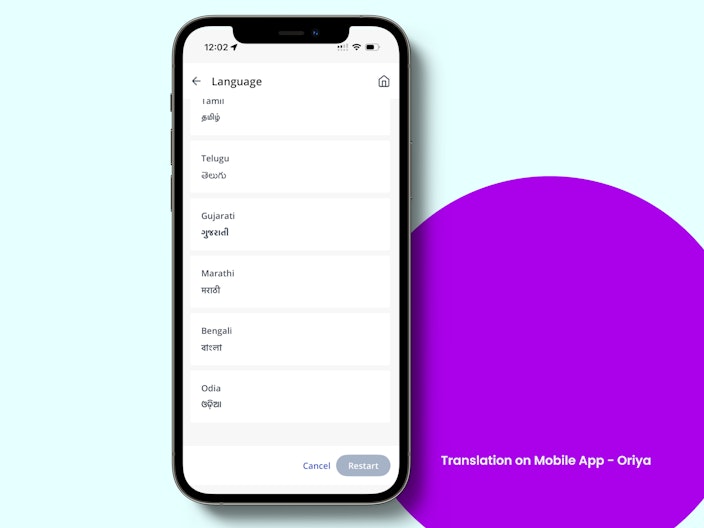
Building on our earlier launch of Marathi, Bengali and Malayalam translation, the greytHR mobile app will support Oriya. Users can seamlessly switch their app language from English to Oriya, allowing the content to be displayed in their preferred language.

Auto geo fence library upgrade
Enhanced the Auto Geo Fence library to improve location accuracy, stability, and background tracking performance. This upgrade also helps reduce false triggers and ensures more reliable geo fence event detection.
React Native Project Upgrade
Upgraded the React Native project to improve overall app performance, stability, security, and maintainability while addressing existing technical debt and compatibility issues. As part of the upgrade, core libraries, third-party dependencies, and native modules are updated to ensure better compatibility, smoother future enhancements, and a more reliable development and build process.
Refresh Option on Tracking Details Screen – GPS Enhancement
Introduced a refresh option on the tracking details screen, allowing users to fetch the latest GPS updates instantly. This helps provide quicker access to updated tracking information.


Tamil Language Support for GPS Labels
Added Tamil language support for GPS related labels to improve accessibility and user experience for Tamil speaking users. Users can now view GPS labels and tracking information in their preferred language.
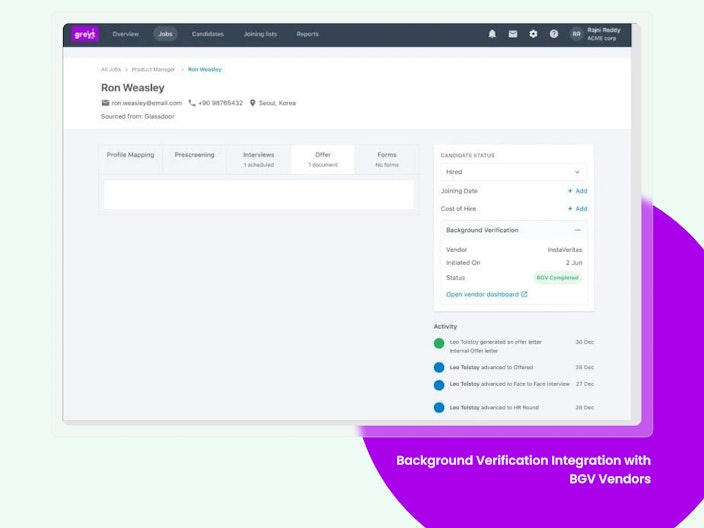
Background Verification Integration with BGV Vendors
Recruiters and admins can now initiate and track Background Verification (BGV) directly within greytHR Recruit through integration with BGV vendor apps available on the Unite Marketplace. This feature eliminates fragmented workflows by enabling users to trigger BGV from the Offer Status section, choose from enabled vendors, and monitor real-time verification status—all without leaving the platform. Depending on the availability of BGV apps, users can initiate verification, select a vendor, or explore and enable new vendors via Unite. The system also supports pre-filled candidate data, optional document sharing, and automatic status updates, ensuring a smooth transition from offer issuance to background verification.
Why is it Important?
Eliminates Manual Handoffs: Removes the need to initiate BGV outside the system after offer rollout.
Accelerates Candidate Onboarding: Speeds up the transition from offer stage to verification.
Improves Visibility: Provides real-time BGV status tracking within Recruit.
Enhances User Experience: Offers a unified workflow with direct integration to vendor ecosystems.
Reduces Redundancy: Minimizes duplicate data entry with pre-filled forms and document auto-sharing.
Key Highlights:
Initiate Background Verification directly from the Status section within Recruit.
Supports BGV vendors integrated through the Unite Marketplace.
Automatically detects enabled BGV vendors and adapts the workflow accordingly.
Directly initiate verification when a single BGV vendor is enabled.
Select from multiple BGV vendors when more than one BGV app is active.
Redirects users to the Unite Marketplace to explore and enable BGV vendors when no vendor is configured.
Pre-fills candidate information such as name, email, phone number, and other available details in the BGV initiation form.
Allows recruiters to review and edit candidate details before submitting the verification request.
Supports optional document sharing through the "Send Documents" option, eliminating manual document uploads to vendor portals.
Seamlessly redirects users to the selected vendor's platform for vendor-specific verification activities.
Displays real-time BGV status updates within Recruit for complete visibility.
Supports reverse synchronization of BGV status from the vendor back into Recruit.
Provides a single view of recruitment and verification progress within the hiring workflow.
Reduces manual effort, eliminates tool switching, and ensures a smooth transition from offer rollout to candidate onboarding.

Other Features
34-Character Bank Account Number Support
Previously, the system did not fully support 34-character alphanumeric bank account numbers across modules like Add Employee, Onboarding, ESS, QB, and Excel Importer, causing validation errors and data truncation issues.
This feature enables support for account numbers up to 34 alphanumeric characters across all relevant modules, ensuring accurate validation, storage, and display without data loss.
Overall Progress Now Visible for Goal Plans
Employees can now instantly see the overall progress (%) of each Goal Plan. This gives a clear, real-time view of how close you are to completion.
Progress is automatically calculated based on goal weightage and milestone updates, ensuring accurate tracking at all times.
Admin Bulk Reviewer Actions for Attendance Features
Admins can now review and take bulk action on pending Attendance Regularization, Permission, and Overtime (OT) requests from a single workflow review page. Selected requests can be approved, rejected, or forwarded in bulk, while still applying individual validations, workflow rules, and audit logging for each request. The feature also supports filters, multi-select, partial success handling, and real-time status updates to help manage high-volume approvals efficiently.
Admin Bulk Reviewer Actions for Leave Features
Admins can now review and take bulk action on pending Leave, Leave Requests, Leave Encashment, Leave Comp-off, Leave Cancellation, and Restricted Holiday from a single workflow review page. Selected requests can be approved, rejected, or forwarded in bulk, while still applying individual validations, workflow rules, and audit logging for each request. The feature also supports filters, multi-select, partial success handling, and real-time status updates to help manage high-volume approvals efficiently.
greytHR Astra Logo Updated
The application has been updated with the new, approved greytHR Astra logo provided by the design and branding team. The refreshed logo is now consistently applied across all relevant areas of the application, ensuring a unified and modern brand presence.
Holiday Master Updated for Indonesia & Singapore
The Holiday Master now dynamically populates country-specific public holidays based on default country configuration (from advanced options)
Indonesia — 17 public holidays for 2026 seeded (Tahun Baru, Isra Mikraj, Imlek, Nyepi, Idul Fitri, Wafat Yesus Kristus, Paskah, Hari Buruh, Kenaikan Yesus Kristus, Idul Adha, Waisak, Hari Lahir Pancasila, Tahun Baru Islam, Proklamasi Kemerdekaan, Maulid Nabi, Kelahiran Yesus Kristus)
Singapore — 11 public holidays for 2026 seeded (New Year's Day, Chinese New Year ×2, Hari Raya Puasa, Good Friday, Labour Day, Hari Raya Haji, Vesak Day, National Day, Deepavali, Christmas Day)
India — Existing logic unchanged
Holiday list auto-switches when country selection changes
Want to explore more about greytHR? Visit our website.