April 2026 Releases



Here's what we've been working on lately
Payroll - Income Tax Act 2025 Compliance
GreytHR Payroll is now compliant with the Income Tax Act 2025 and IT Rules 2026, effective Tax Year 2026–27 (April 2026 onwards)
Nomenclature & Section Updates
All IT module labels, sections, and help texts updated as per new tax law
Applies across IT Declarations, Statements, ESS, and Admin views
Historical data (pre-April 2026) remains unchanged
Forms Update
Form 12BB replaced with Form 124
Enhanced structure:
Additional employee details
Expanded HRA landlord information
Deductions aligned to new chapter structure
HRA Enhancement
Metro city list expanded from 4 → 8 cities
50% exemption applicable to newly added cities
Auto-detection via PIN code mapping
Applicable only under Old Tax Regime
Functional Impact:
All IT workflows now use updated section references and terminology
Employees will declare investments using new Form 124 structure
HRA exemption calculation logic updated for additional metro cities
Reports, tax computations, and statutory outputs aligned with new law
FBP Policy — Percentage-Based NPS Declaration
FBP now supports percentage-based NPS declarations, allowing employees to declare contributions as a % of base salary instead of a fixed amount. Employees can now declare NPS contributions as a percentage of their base salary instead of entering a fixed amount. Admins can configure the applicable base component and the maximum allowed percentage within the FBP policy. The system automatically calculates the corresponding INR value in real time and reflects it across payroll and tax outputs.
Functional Impact:
Introduces dynamic calculation logic (percentage → amount) for NPS under FBP
Ensures accurate and consistent reflection of NPS across payroll and tax modules
Eliminates dependency on manual amount entry
Operational Impact:
Simplifies employee declaration process
Reduces admin intervention and calculation errors
Requires one-time FBP policy configuration by payroll admins
Improves accuracy and compliance in NPS reporting
Datasharehub Enhancements
The file upload limit in Datasharehub has been increased from 5MB to 20MB, enabling users to upload larger files without splitting or compressing them.
Functional Impact:
Users can now upload higher-size files seamlessly, reducing upload failures and improving efficiency in handling bulk or detailed documents.
Operational Impact:
Decreases dependency on external tools for file compression, reduces manual effort, and improves overall user experience and productivity
Webhook for payroll process and Payroll lock events are now available
Webhooks are now available for key payroll lifecycle events, specifically Payroll Process and Payroll Lock, enabling real-time event notifications to external systems.
Functional Impact:
Systems can automatically trigger downstream actions (e.g., integrations, reports, audits) upon payroll processing or locking, eliminating delays and manual intervention.
Operational Impact:
Improves automation and system interoperability, reduces dependency on manual monitoring, and ensures timely updates across integrated platforms
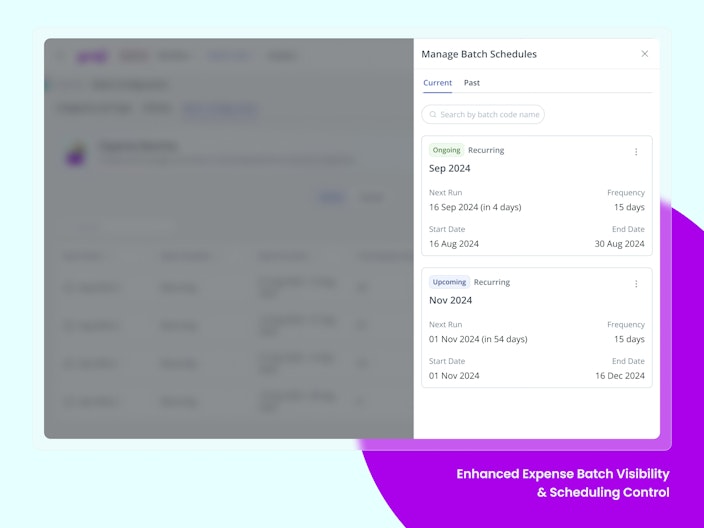
Enhanced Expense Batch Visibility & Scheduling Control
We’ve enhanced Expense Batch Management to give admins better visibility into all batches in one place, including past, current, and future batches. Batch creation is now more streamlined with the option to configure both one-time and recurring schedules based on need. We’ve also introduced a clearer segregation of Active and Closed batches, making it easier to track and manage batch operations.


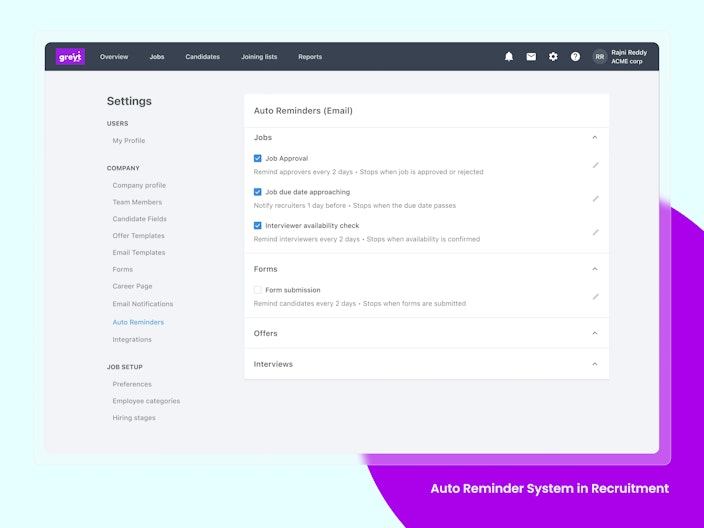
Auto Reminder System in Recruitment
Recruiters can now automate follow-ups across the hiring process using Auto Reminders in greytHR Recruit. This feature allows admins to configure reminders for key recruitment actions such as interview feedback submission, offer approvals, candidate responses, and form completion. Reminders are triggered automatically based on predefined events, with customizable frequency, recipients, and stop conditions, ensuring timely task completion without manual intervention.
Why is it Important?
Reduces Hiring Delays: Keeps the recruitment process moving by prompting users to complete pending actions on time.
Minimizes Manual Follow-ups: Eliminates the need for recruiters to chase interviewers, candidates, or approvers manually.
Improves Process Efficiency: Ensures smoother coordination between recruiters, hiring managers, and candidates.
Key Highlights:
Admins can configure Auto Reminders under Recruitment > Settings > Auto Reminders.
Reminders can be set for different stages such as Interviews, Offers, Forms, and Jobs.
Supports reminders for actions like interview feedback submission, offer approvals, and form completion.
Reminder frequency can be customized based on business needs.
Reminders are automatically sent to relevant users such as recruiters, interviewers, approvers, or candidates.
Auto-stop functionality ensures reminders stop once the required action is completed.
Helps recruiters track and manage pending tasks more effectively across the hiring workflow.

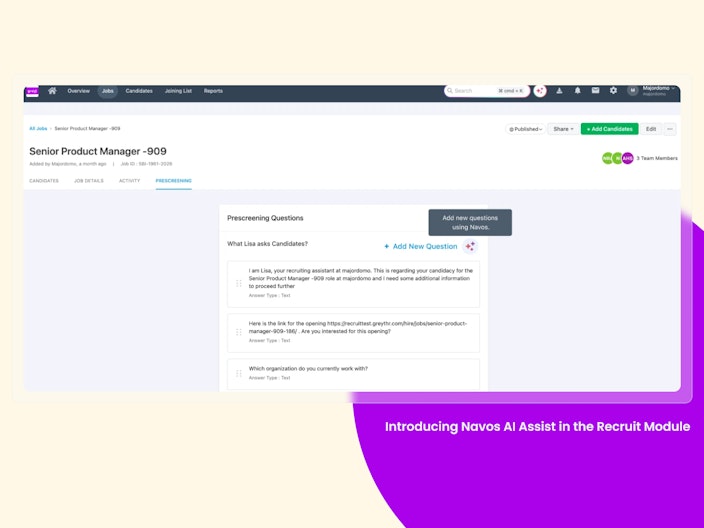
Introducing Navos AI Assist in the Recruit module.
Recruiters can now simplify and accelerate hiring workflows using NAVOS, greytHR’s AI-powered assistant, within the Recruit module. NAVOS enables recruiters to instantly generate job descriptions, scorecard categories, prescreening questions, candidate emails, and reusable email templates—directly within their workflow. By leveraging minimal inputs such as job title, department, or location, NAVOS auto-generates structured, consistent, and high-quality content, which can be regenerated or edited as needed. This helps reduce manual effort while improving speed, standardization, and overall efficiency across the hiring process.
Why is it Important?
Reduces Manual Effort: Eliminates the need to create job descriptions, questions, and emails from scratch.
Accelerates Hiring: Enables faster job creation and quicker candidate outreach at scale.
Enhances Recruiter Productivity: Allows recruiters to focus more on decision-making rather than content creation.
Keeps Platform Competitive: Brings AI-powered capabilities in line with leading ATS platforms.
Key Highlights:
NAVOS is embedded across multiple stages of the recruitment workflow.
Auto-generates job descriptions with customizable tone and regeneration options.
Creates scorecard categories and competencies at a global level.
Generates relevant prescreening questions based on job inputs.
Drafts personalized candidate emails for individual or bulk communication.
Enables creation of reusable email templates for different hiring stages.
Works directly within Job, Scorecard, Prescreening, and Email sections.
Content can be regenerated, edited, or manually overridden before use.
Fully optional—manual workflows continue to be supported.

Other Features
Odisha Professional Tax (PT) Discontinued from April 2026
The Government of Odisha has announced the discontinuation of Professional Tax (PT) effective 1st April 2026 as part of the Budget 2026–27 changes.
From this date, PT will no longer be applicable for employees working in Odisha.
What’s changed?
Employers are not required to process PT deductions or filings, leading to reduced compliance efforts
Employees may see a marginal increase in their take-home pay due to the removal of PT
Note: Any PT obligations up to March 2026 must still be completed as per existing guidelines.
Duplicate Attendance Processing Prevention with Ongoing Request Notification
The system will now detect if attendance processing is already running for the same date range, attendance cycle, or employee scope, and prevent duplicate requests. Users will see a clear message with the ongoing process details and can retry only after the current process is completed or 1 hour has passed since it was initiated. This helps prevent duplicate attendance records and payroll inconsistencies.
Admin Bulk Reviewer Actions for Attendance Features
Admins can now review and take bulk action on pending Attendance Regularization, Permission, and Overtime (OT) requests from a single workflow review page. Selected requests can be approved, rejected, or forwarded in bulk, while still applying individual validations, workflow rules, and audit logging for each request. The feature also supports filters, multi-select, partial success handling, and real-time status updates to help manage high-volume approvals efficiently.
Custom Display Labels for Worked Rest Days/Off Days/Holidays
Previously, when employees worked on Rest Days, Off Days, or Holidays, the system applied a fixed attendance status logic that couldn't be customized. Now, with backend custom labels, admins can instantly identify such instances through dedicated status tags — ROP (Rest Day – On Present), WOP (Weekly Off – On Present), and HOP (Holiday – On Present) — that appear across Attendance Info, Muster, and Summary Reports for quick, at-a-glance visibility.
Auto-Transfer of Pending Workflows to Skip-Level Manager
Earlier, when a manager resigned, their pending approvals would get stuck, leading to delays in critical workflows and manual intervention by admins to reassign tasks.
Auto-Transfer of Pending Workflows feature eliminates that bottleneck by automatically transferring all pending workflows to the skip-level manager (or an alternate approver if needed) once the manager’s LWD is completed. It ensures approvals continue seamlessly without disruption, maintaining business continuity and efficiency.
Auto-Generate Employee Number via API Using Series
Earlier, while creating employees via API, admins or partners had to manually assign employee numbers—leading to errors, duplicates, and operational overhead.
This feature solves that by allowing the system to automatically generate employee numbers based on a selected series (e.g., Permanent, Intern), just like the web app. It removes the need to track numbers manually and ensures a seamless, error-free onboarding experience through APIs.
New 'Unified Comprehensive Reviews Report' in Performance Management
Previously, reports could only be downloaded one review at a time. Now, you can export data for multiple reviews together; for example, all quarterly reviews for an employee in one single report.
Want to explore more about greytHR? Visit our website.