January 2026 Releases



Here's what we've been working on lately
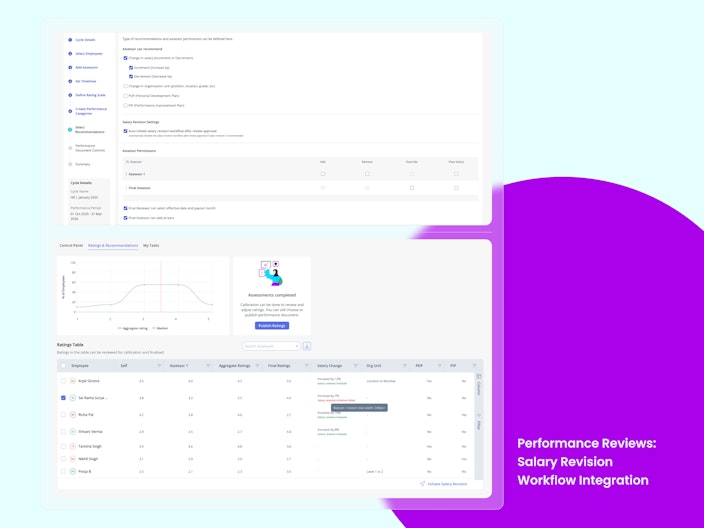
Salary Revision Workflow Integration from Performance Review
Salary recommendations made during Performance Reviews earlier needed manual follow-ups to reach payroll. Approved recommendations now flow directly into the Salary Revision Workflow and move through configured approvals. This ensures faster execution, fewer errors, and a seamless connection between performance decisions and payroll processing.


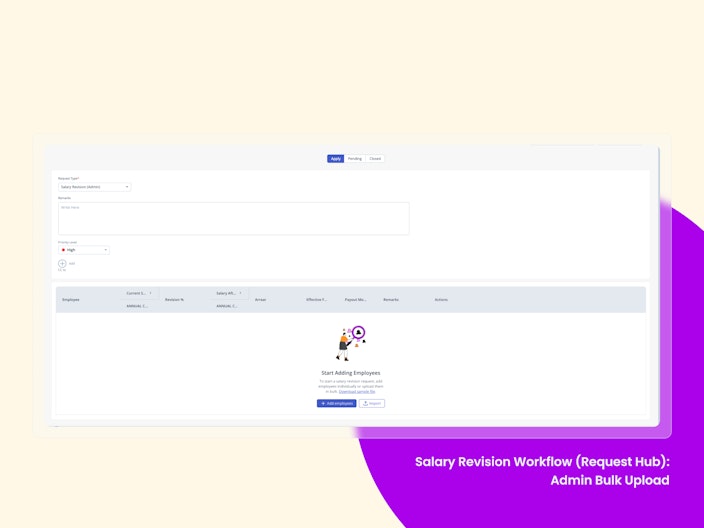
Salary Revision Workflow (Request Hub) — Admin Bulk Upload
Admins can now bulk upload revised salary data for multiple employees and submit requests directly from Request Hub. This significantly eases the admin’s job in situations where organisations need to initiate salary revisions at scale.
Once submitted, all requests flow through the configured approval process in Request Hub and finally land with the payroll admin for approval and payroll processing.

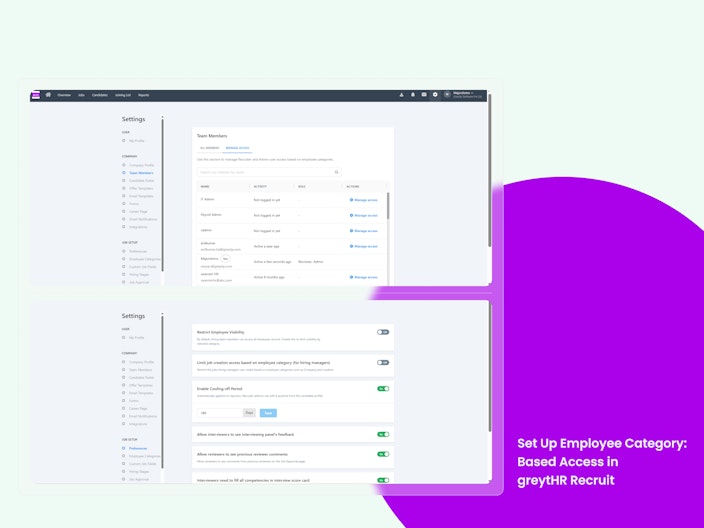
Set Up Employee Category–Based Access in greytHR Recruit
Admins can now configure employee category–based access controls in greytHR Recruit to restrict visibility of employees, jobs, and hiring actions based on categories such as Company, Location, Department, or other defined employee category attributes. This ensures recruiters and hiring managers interact only with data relevant to their assigned business unit while maintaining data privacy and operational clarity.
Why is it Important?
Large organizations operating multiple entities can now prevent cross-entity data exposure within Recruit.
Recruiters and Hiring Managers see only relevant employees and jobs, reducing errors in hiring team assignment and job creation.
Ensures strong data security and governance, while still allowing central teams to retain oversight where required.
Key Highlights:
Granular access control for recruiters and admins – Restrict employee and job visibility using employee category–based filters such as company, location, or department.
Controlled hiring manager experience – Hiring Managers raising job requests can be limited to viewing employees only from their own entity, ensuring accurate access and compliance.
Simplified and secure configuration – Admins can manage visibility and access centrally through Recruit settings, ensuring consistent enforcement across the hiring workflow without disrupting system-level configurations.

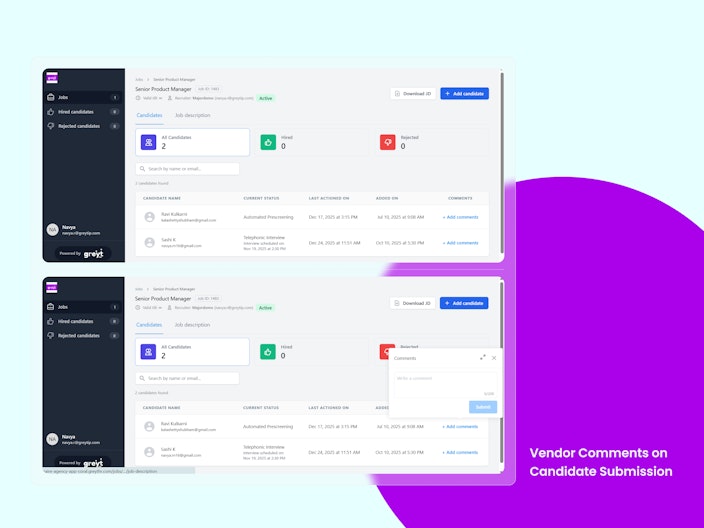
Vendor Comments on Candidate Submission
Vendors can now add comments while submitting candidates in greytHR Recruit. This gives recruiters better upfront context on candidate availability, experience, or special notes without additional follow-ups.
Why is it Important?
Better Context: Recruiters receive key candidate insights at the time of submission.
Faster Decisions: Reduces the need for follow-up emails or calls with vendors.
Transparency: Clear identification of vendor-provided inputs.
Key Highlights:
Vendors can add optional comments during candidate submission.
Comments are visible on the Candidate Overview page.
All vendor comments are clearly tagged as Agency.
Vendor comments are read-only for recruiters.
Every comment is automatically logged in the activity history.

Other Features
Attachments now supported for Salary and Organisational Unit recommendations in Performance Reviews
Assessors can now attach supporting documents when making Salary and Organisational Unit recommendations in performance reviews. This brings these recommendations in line with PDP and PIP, meaning every recommendation type now supports documentation for clearer context, stronger audit trails, and more consistent decision-making.
Key Goal Plan Dates Now Clearly Displayed
Employees and managers can now clearly see all key goal plan dates in one place, reducing confusion, missed deadlines, and last-minute surprises.
Decimal Values in Salary Recommendations in Performance Reviews
Assessors can now recommend salary hikes using decimal values. This enables more accurate and realistic recommendations beyond whole numbers.
View Salary Permission for Assessors in Performance Reviews
A new View Salary permission can now be enabled during review configuration. With this permission, assessors can view the complete salary structure and make salary recommendations either at a component level or as an overall percentage.
Remove Recommendation Permission in Performance Reviews
Higher-level assessors can now completely remove a salary recommendation, not just override it. This provides greater flexibility when a recommendation is not applicable or needs to be withdrawn.
Filter Goal Plans by Status on ESS
Managers can now quickly filter employees by Goal Plan status — such as Pending Approval, Paused, or Cancelled — and take action faster. Pending approvals are clearly marked, with a direct review option to reduce manual searching and save time when managing large teams.
Display all absence types under the “Out of Office” section in Who is In dashboard
The On Leave section on the dashboard will be renamed to Out of Office to represent all employees who are not expected to work on a given day, regardless of the reason.The Out of Office section will contain four tabs/cards within the same section, clearly categorizing employees based on their out-of-office reason.
Allow Restricted Holiday (RH) as Last Working Day (LWD)
Restricted Holidays will now be evaluated based on whether RH leave is availed, instead of being auto-classified as non-working days. A new configuration allows RHs to be treated as valid working days by default, unless the employee explicitly applies RH leave.This enables employees to select an RH as their LWD when they plan to work, without requiring HR overrides.
Shift & Configurable Category Filters for Overtime (OT)
This enhancement introduces Shift-based filtering and configurable Category filters across key OT workflows. Admins can now configure which employee categories are available as filters, while Managers and Admins benefit from focused, reusable views during OT application and review.
Age-Based Eligibility Rule for Menstrual Leave Type
Admins can now configure leave eligibility based on employee age, calculated from DOB and validated in real time at application.
Enable / Disable Shifts — Better Control, Less Clutter
Admins often end up with shifts that are no longer required (seasonal, pilot, or mistakenly created). Earlier, they had to either keep them active (risking wrong assignment) or delete them (and recreate later). You can now enable or disable a shift anytime—without deleting it.
Configurable Signature & Approval Workflow for Letter Generation
HR admins can now choose whether employee letters require signatory authorization or can be generated without approval. This flexibility eliminates unnecessary approval steps, reduces turnaround time, and allows organizations to align letter generation with their internal authorization policies while retaining existing approval workflows where needed.
Task Remarks via Query Builder
Admins can now fetch and report on remarks entered by task assignees directly through the Query Builder. This includes tasks in checklists, workflows, or standalone tasks, capturing full user-entered text without truncation. The feature improves auditability, traceability, and reporting, while enabling analysis and export of task context for better operational transparency.
Increased Character Limit for Policy Number Field
HR Admins can now enter and store insurance policy numbers up to 50 characters (previously 25), supporting longer alphanumeric formats from various providers. This update ensures consistency across onboarding, insurance details, Excel imports, and reports, prevents data truncation, and maintains existing validations and error messages.
Expanded Indonesian Time Zone Support for Accurate Employee Tracking
greytHR now supports three Indonesian time zones—Asia/Jakarta (UTC+07:00), Asia/Nusantara (UTC+08:00), and Asia/Manokwari (UTC+09:00). Admins and employees can select these zones across the platform, ensuring accurate tracking of work hours, tasks, and all time-related data for teams operating in different regions of Indonesia.
Restrict Checklist Owner to Named Users for Accurate Task Assignment
Admins configuring checklists can now assign the Owner field only to eligible named users, preventing misassignment to employees or unauthorized users. This ensures checklists trigger correctly, improves task accountability, enhances automation reliability, and provides audit trails for owner changes.
Expanded Data Source Fields for Letter Template Automation
Admins can now leverage an expanded set of employee, nominee, payroll, contract, and company fields in letter templates. This ensures letters are accurate, standardized, and compliant, while reducing manual effort and errors. Enhanced formatting, validations, and integration with reports and workflows improve operational efficiency and consistency in HR communications.
Updated Annual Tax Computation Logic & PPH21/26 Applicability
We’ve updated Indonesia payroll tax rules to improve accuracy and statutory compliance. Positional cost and annual tax calculations have been refined, with updated rounding logic applied at the final stage. PPH applicability is now determined by Residential Status instead of nationality. These changes ensure consistent and compliant tax calculations across all employee scenarios.
New Reports and Enhancements
Form X – Register of Wages, Fines and Damages (Punjab):
This report is now available for Punjab, enabling users to generate the statutory register covering wages, fines, and damages in compliance with state-specific labour regulations.Form-A – Register of Wages (Punjab):
This report is now supported for Punjab, allowing users to generate a compliant wage register as mandated under applicable Punjab labour laws.Payroll Reconciliation – Consolidated Report Enhancement:
The Payroll Reconciliation – Consolidated Report now includes a new option, “Show differences between the selected months.” When enabled, the report automatically highlights variances between salary components and totals across two selected months, reducing manual effort and improving audit and validation accuracy.
Auto-Populate End Date for Maternity Leave
Maternity Leave and pick a start date, the system will automatically set the end date to 182 days later (you can still edit it if needed).If those 182 days go into the next leave year, the system will either split it into two leave requests or ask you to apply the remaining part later, depending on your company’s policy.
Want to explore more about greytHR? Visit our website.