June 2025 Release



Here's what we've been working on lately
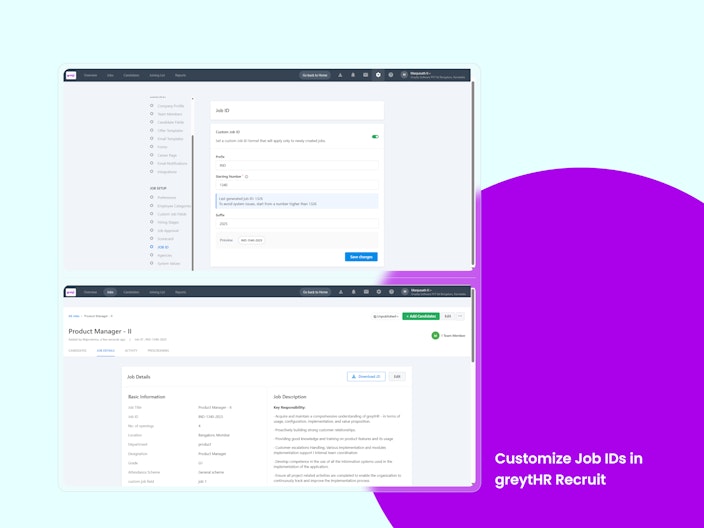
Customize Job IDs in greytHR Recruit
With the Job ID Customization feature, recruiters and HR admins can now tailor job IDs to match their organization’s internal tracking systems. This powerful capability improves clarity, promotes consistency, and streamlines collaboration across recruitment activities — all with minimal effort.
Why is it Important?
Improved Clarity: Helps customers easily trace and filter jobs.
Saves Time: Eliminates manual edits by automatically aligning with internal numbering.
Better Collaboration: Teams can work seamlessly using familiar, consistent Job IDs.
Key Highlights:
Customizable Prefix, Starting Number, and Suffix
Jobs will follow the new custom format for all future posts.


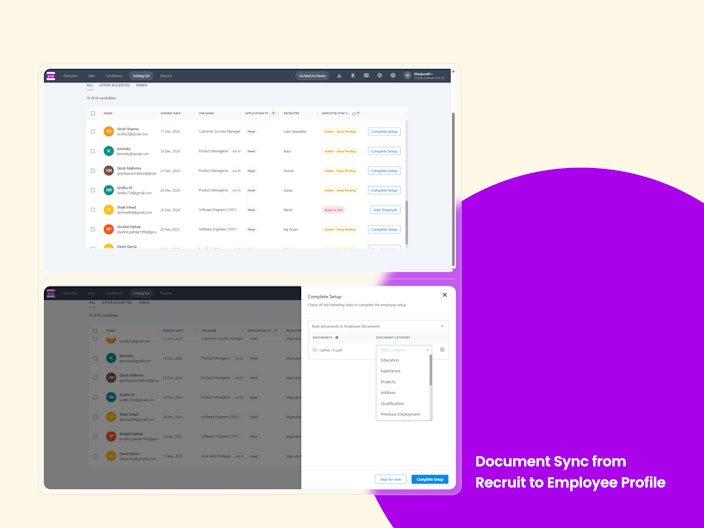
Document Sync from Recruit to Employee Profile
With the Document Sync feature, recruiters and HR admins can now push candidate documents directly from greytHR Recruit to the employee profile in HRMS—right at the time of hiring. This powerful capability removes redundant uploads, reduces manual effort, and ensures a smooth handover during onboarding.
Why is it Important?
No Redundant Uploads: Prevents the need to re-upload the same documents during onboarding.
Fewer Errors: Minimizes manual mistakes by syncing collected documents automatically.
Faster Onboarding: Speeds up the hiring-to-onboarding flow with seamless document transfer.
Smooth Integration: Connects Recruit and HRMS effortlessly for a cleaner employee setup.
Key Highlights:
One-click push of candidate documents to the employee profile.
“Complete Setup” window to view, select/deselect, categorize, and preview documents.
Supports multiple file types: PDF, XLS, XLSX, DOC, DOCX, TXT, PPT, PPTX, GIF, JPG, PNG.

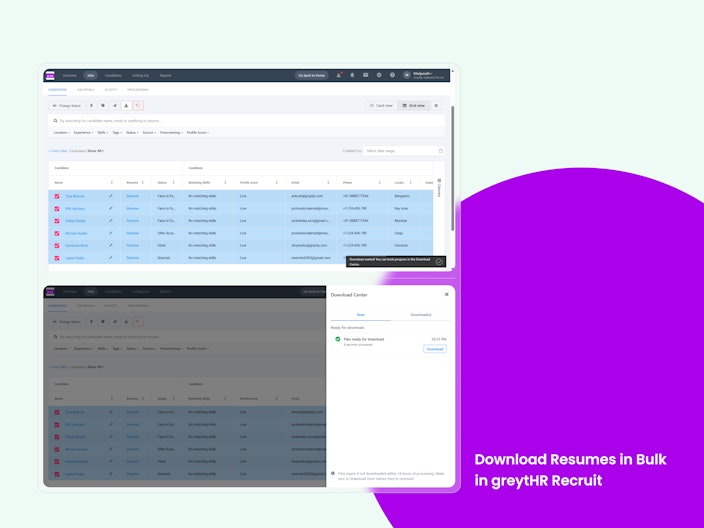
Download Resumes in Bulk
With the Bulk Resume Download feature, recruiters and hiring managers can now download multiple candidate resumes at once. This enhancement significantly reduces manual effort, saves time, and streamlines the resume review and sharing process across recruitment activities.
Why is it Important?
Improved Efficiency: Eliminates the need to download resumes individually, saving valuable time.
Enhanced Collaboration: Simplifies the process of compiling resumes for hiring teams.
Reduced Manual Effort: Minimizes repetitive tasks and improves the recruiter experience.
Key Highlights:
Select multiple candidates from the Candidate Pool, Grid View, or Card View using checkboxes.
Download resumes as a single
.zipfile containing all selected resumes.File format:
.zipwith PDFs or DOCX files named as [uniquecode]_[ResumeName] (e.g., QgdaEbx9Jh_Yash_resume.pdf).Available for Recruiter, Recruiter Admin, and Hiring Manager roles.
Displays a loading indicator while the zip file is being prepared.
Shows a confirmation message after the download is complete.
Displays a warning if any selected candidate does not have an uploaded resume.

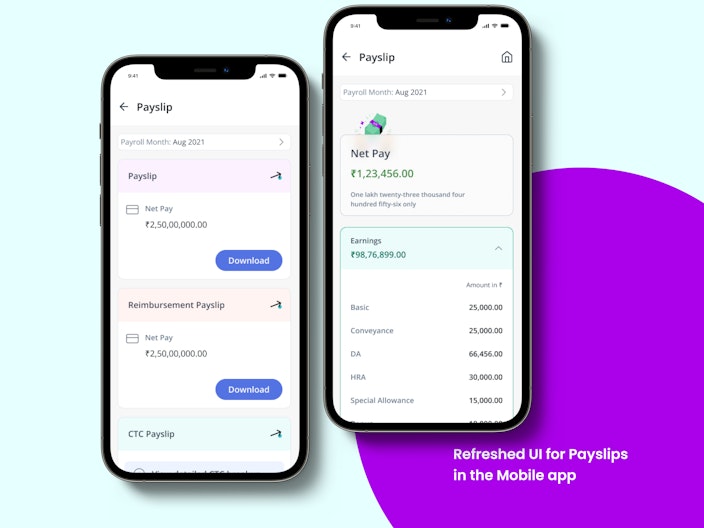
Refreshed UI for Payslips in the Mobile app
Payslips can now be viewed and downloaded in a refreshed UI that has been designed to offer a balanced and unified experience. A cleaner and more consistent layout has been introduced to improve usability.

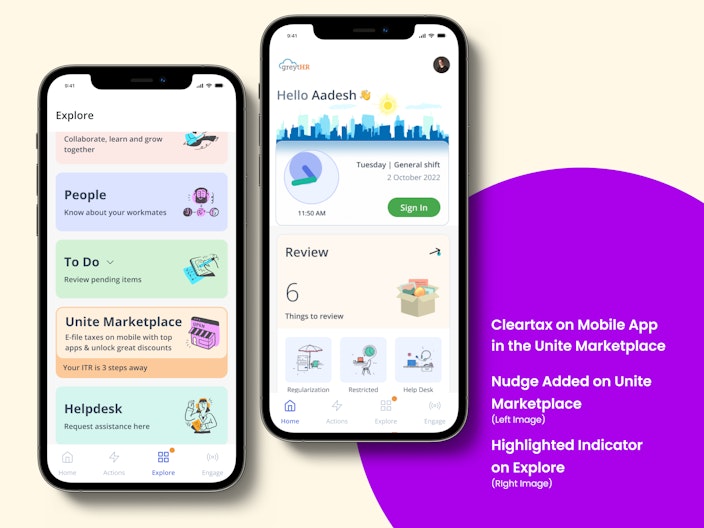
Now see the highlighted capability of Cleartax on the mobile app in the Unite marketplace
For customers who have enabled Cleartax in the Unite Marketplace, a highlighted indicator is now being shown on the mobile app. This enhancement has been added to guide users more easily to the Cleartax section.

Currency codes and symbols are now aligned with the ESS portal view
Currency codes and symbols across the mobile app have been aligned with those displayed on the ESS web portal. This update has been made to ensure clarity and consistency in areas where financial information is shown.
Indonesia Payroll - BPJS Agents
We introduced the BPJS Contribution Agent and the BPJS Contributions Picker Agent to simplify payroll configuration for Indonesian companies. These agents automatically calculate and apply BPJS Kesehatan (Health) and BPJS Ketenagakerjaan (Employment) contributions based on employee eligibility and contribution rules. Admins can now configure contributions more accurately and ensure compliance with statutory requirements. This marks a significant step in scaling greytHR’s capabilities for the Indonesian market.
New Statutory Reports for Indian Customers
We added several new statutory reports to support region-specific compliance needs. These include wage registers, muster rolls, annual returns, and deduction logs - helping payroll administrators meet diverse Indian state and central labour regulations with ease and accuracy.
Form 25: Muster roll and register of compensatory Holiday - Tamil Nadu
Form 28: Muster Roll - Gujarat
Form I: Register of Wages, Overtime, Fine, Deductions
Form V: Wage Slip - Haryana
Form XXIX: Register of Advances and Deductions (CLRA)
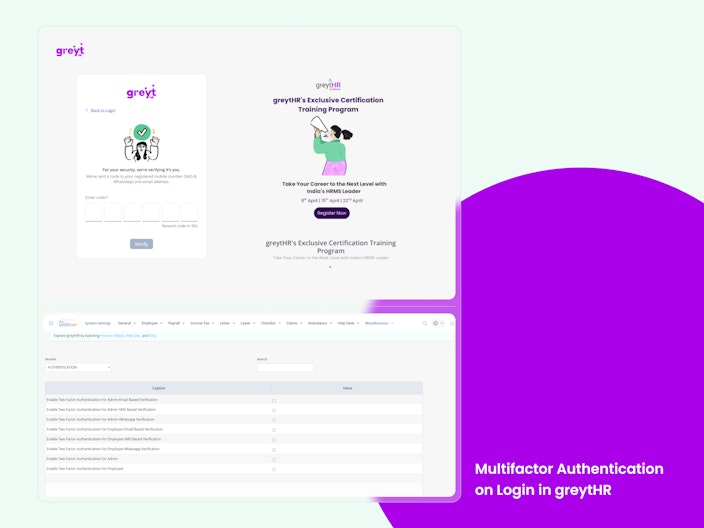
Multifactor Authentication on login in greytHR
We’ve introduced 2FA to boost login security across the platform. Admins can now enable 2FA for fellow admins, choosing delivery via SMS or Email. Enhanced workflows ensure that new, returning, and password-resetting users are guided through secure OTP verification. These settings are configurable from the Advanced Options panel in System Settings.
This helps prevent unauthorized access and data breaches, strengthening customer trust. It also ensures compliance with growing industry standards for secure authentication.

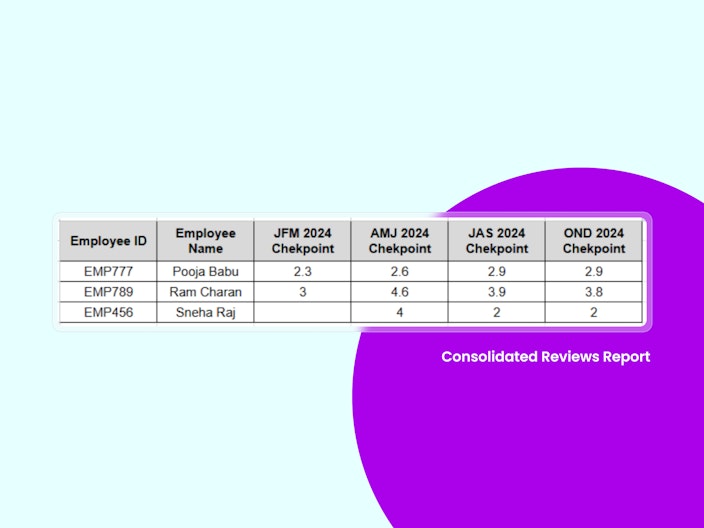
Consolidated Reviews Report
Admins needed a faster way to pull final performance ratings across multiple review cycles for further analysis or operations.
A new Consolidated Reviews Report is now available in the Performance Management section.
Select multiple past and active review cycles (draft and cancelled ones are excluded).
Filter employees just like in the existing reports.
Download all final ratings in a standardized format like this sample report.
Perfect for combining performance data across time in one clean export.

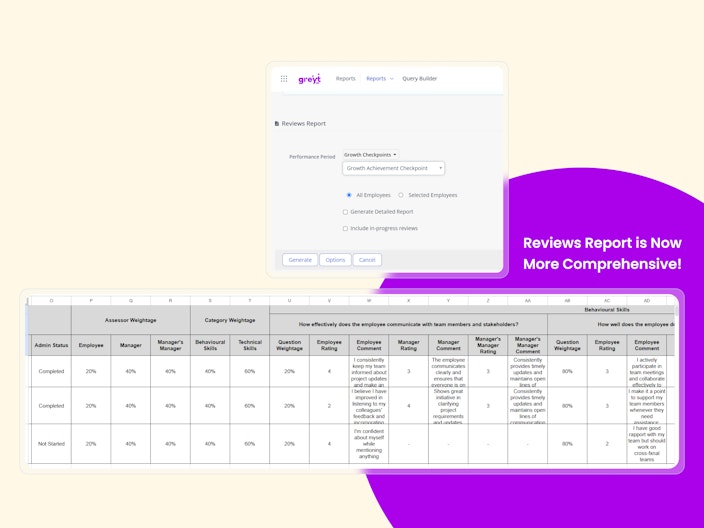
Reviews Report is now more Comprehensive
Admins needed more control over the level of detail and status of reviews included in reports.
The Reviews report now includes two new checkboxes for better customization:
✅ Generate Detailed Report – Get all ratings and comments instead of just summaries.
✅ Include In-Progress Reviews – Include reviews that are still underway, not just published ones.
Choose one or both options depending on your needs.
This upgrade gives HR teams more insight and flexibility—from high-level summaries to in-depth reviews, all in one place.

Other Features
Auto-Approval for Leave Requests Applied on Behalf
Admins can enable auto-approval for leave requests applied by managers or admins on behalf of employees. This optional setting speeds up processing, cuts down workflow steps, and maintains full audit transparency.
Configurable Attendance Status in Shift Summary Report
Adds a new dropdown Attendance Status to Include in Summary Count under the Shift Summary Report settings. Admins can choose to count only ‘Present’ employees or include all statuses (default: All). Options are dynamically fetched based on tenant-specific active attendance statuses. Applies to both on-screen and exported reports; configurable per tenant without impacting others.
Enabled Close Ticket Action for Admin in Helpdesk
This enhancement introduces a Close Ticket action for Admin users in the Helpdesk module, with the existing Accept and Reject options. The feature allows admins to finalize tickets that require no further action, helping maintain a cleaner, more organized ticketing system. It includes safeguards like confirmation prompts, audit logging, user notifications, and restrictions to prevent re-closing already resolved tickets.
Hobby and Caste/Religion Fields added to Employee Onboarding
This feature enables HR admins to include Hobby and Caste as optional text fields during employee onboarding. These fields will appear under the personal information section, stored in the employee profile, and visible in the onboarding review workflow. Post-submission, the data will be accessible in the ESS profile, employee directory and be available in downloadable QB reports, ensuring consistent visibility and data integrity across modules.
Entry Limit for Qualifications and Previous Employment in Employee Self-Onboarding extended
This enhancement increases the record entry limit from 5 to 20 for Qualifications and Previous Employment sections during employee self-onboarding. It allows new employees to comprehensively document their background. All entries will be visible in the onboarding workflow, verified by admins, and reflected accurately in the employee profile, ESS portal, and relevant reports, including Query Builder reports.
Increased Character Limit for Reason for Leaving Field in Employee Onboarding to 150 Characters
This update extends the character limit of the Reason for Leaving field from 10 to 150 characters in the Previous Employment section of the Employee Onboarding form. It allows admins to document more detailed and meaningful reasons for an employee's prior departure. The enhanced field supports accurate data capture and accurately displays across all relevant views, including employee profile, admin panel, and HR reports.
Bulk Import for Review Questions In the Library
HR admins can now bulk upload review questions to the PMS Library with a simple spreadsheet. Here's how it works:
Upload a file with two required fields: Question Group and Question.
The system validates entries—missing fields or duplicate questions trigger helpful error messages.
New questions are added to existing groups, or new groups are created if needed
Poll Permissions Simplified
Until now, users needed voting rights without being able to create polls, but both actions were tied together.
Voting and poll creation permissions are now separate:
Voting now depends on View Poll permission.
Creating polls still requires Create Poll permission.
Users with both permissions can create and vote as usual.
This change gives admins more control over who can vote vs. who can create, avoiding unnecessary access.
Previous Job Reviewers' comment visibility
In multi-level job approval workflows, secondary and subsequent reviewers can now view comments provided by previous reviewers. This enhancement ensures better context, informed decision-making, and improved collaboration throughout the approval process.
The feature was frequently requested by users to reduce misalignment, redundant reviews, and communication gaps.
Coming Soon
Job Approval visibility on the ESS portal
Shift Roster upload for the manager
Overstay
Option to Reject Employee Swipes Across All Capture Methods
Elapsed timer on mobile app
PDF viewer on mobile app
Employee Information: Validation for Duplicate Mobile Numbers
Adding an additional Indonesia Time Zone
Enable Password Reset for Alumni Users with ‘NULL’ Passwords
Calibration that Powers Fair Reviews and Sharper Decisions.
Configurable Permission Notifications via Event Notification
Want to explore more about greytHR? Visit our website.